Crestron AV2 & PRO2 2-Series Integrated Dual Bus Control System
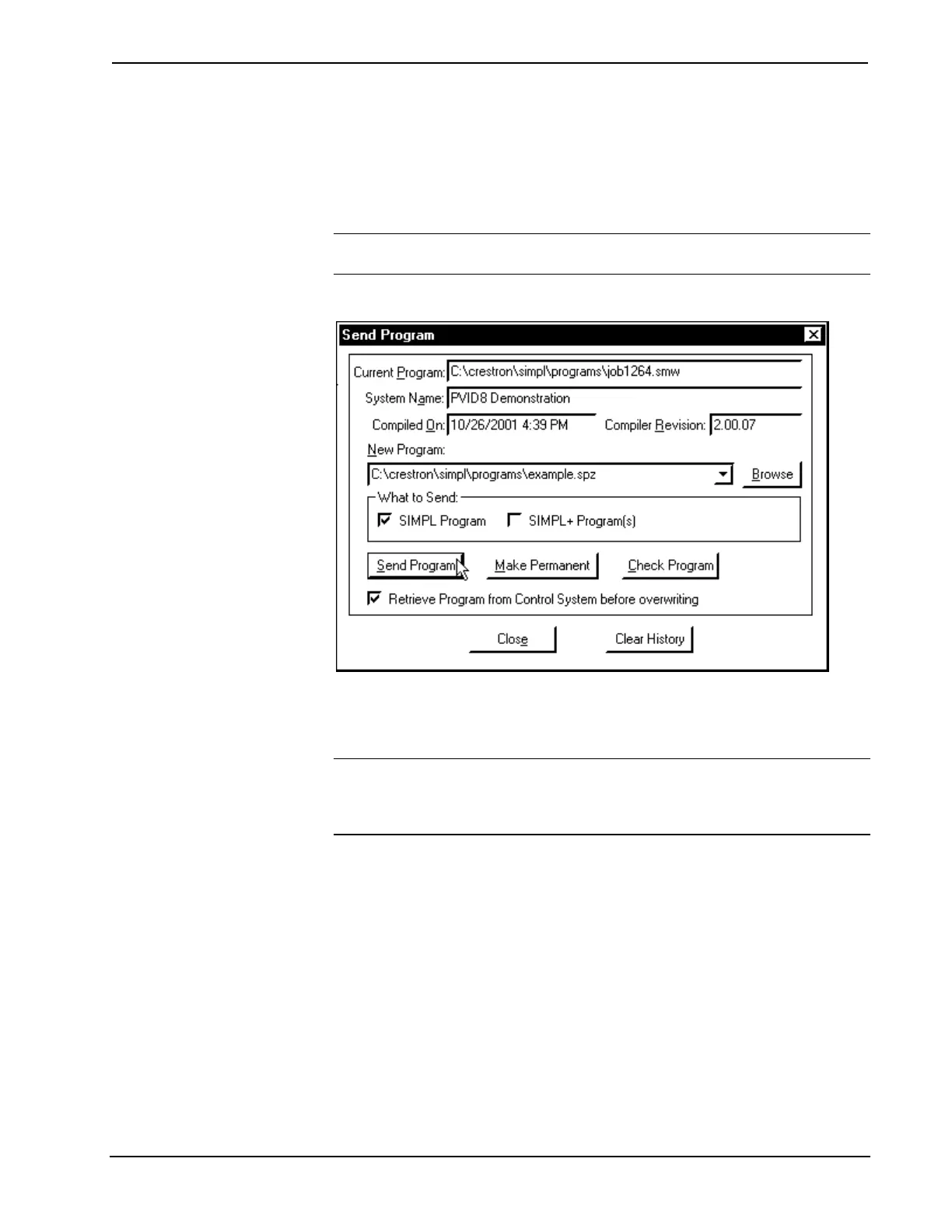
4. As shown after this step, click the Send Program button to initiate
program upload to the control system. A "Transfer in Progress"
window opens, but no response is required. If SIMPL+ files are present
and the SIMPL+ Program(s) option is checked in the What to Send area
of the window, the associated files are transferred after the program is
transferred.
NOTE: Check the Retrieve Program from Control System before overwriting check
box to save the file currently loaded into the control system
“Cresnet Simpl Program” Window
5. If the "Failure" dialog box opens, repeat steps 3 and 4. If this does not
remedy the problem, call Crestron customer service. Refer to "Further
Inquiries" on page 43.
NOTE: Use of the Make Permanent button is not required for a 2-Series integrated
dual bus control system since all transfers are permanently stored. To extract the
existing program, confirm that the Retrieve Program from the Control System before
overwriting check box is checked before sending the new program.
6. After transferring the program file, click on the Check Program button
to ensure that the file loaded properly. The information in the Current
Program field of the "Cresnet Simpl Program" window should update
and display the file currently loaded. If the information does not update,
repeat steps 3 through 5. If this does not remedy the problem, call
Crestron customer service. Refer to "Further Inquiries" on page 43.
Testing the Program after Transfer
Complete the following steps in the order provided to determine if the program
transfer was a success.
1. Select Tools | Viewport to open the Crestron Viewport.
Operations Guide - DOC. 5957 Integrated Dual Bus Control System: PRO2 & AV2 • 35











 To Next Page