Crestron AV2 & PRO2 2-Series Integrated Dual Bus Control System
Configure AV2 and PRO2 (Continued)
DEVICE SYMBOL DROP ADDITIONAL
LIBRARY REQUIRED WHERE SETUP
Plug-in
Control
Cards [Cards
(2-Series Z
Bus)
C2ENET-1 or
C2ENET-2
(card varies
per custom
system)
Empty C2Z-
EN1 Card
Slot (slot 8)
Adding a C2ENET card enables the slot
to accept Ethernet devices. Refer to the
documentation supplied with the specific
C2ENET card for additional setup
information.
OPEN
Depends
upon system
requirements.
C2Net-
Device
(Slot 9)
Depends upon the type of peripheral
dropped into the slot. Refer to the
documentation supplied with the specific
peripheral for additional setup
information.
Not
applicable
(N/A)
Built-in front
panel
(Slot 10)
N/A None required; this slot represents non-
programmable hardware and there is no
reference in Programming Manager.
Converting an Existing System Program
To convert an existing system program that is configured with a control system other
than the AV2 or PRO2, one must verify that SIMPL Windows (v2.0 or later) is
running and the Crestron database (v15.6.2 or later) is available. Complete the
following steps to execute the conversion.
1. Use the correct version of SIMPL Windows and open the existing
program.
2. In Configuration Manager, drag the desired 2-Series integrated dual
bus control system from the Control Systems folder in the Device
Library onto the existing control system in System Views.
NOTE: If the existing program makes use of a SIMPL+ module, continue with
steps 3 and 4. Otherwise, proceed to step 5.
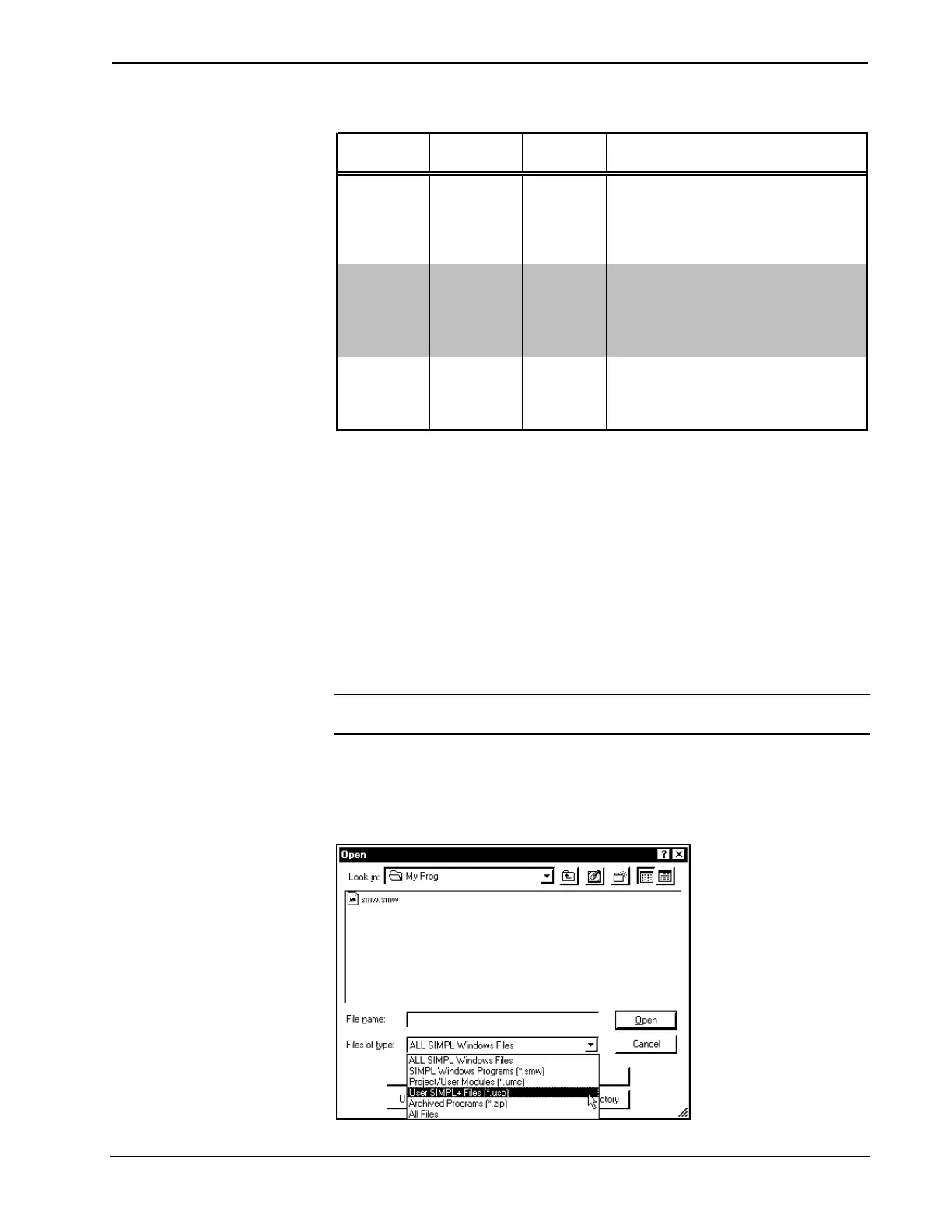
3. Open any SIMPL+ program by selecting File | Open. From the
"Open" window select User SIMPL+ Files (*.usp) as the file type to
help navigate to the proper file, as shown after this step.
Selecting the Appropriate File Type from the “Open” Window
Operations Guide - DOC. 5957 Integrated Dual Bus Control System: PRO2 & AV2 • 33











 To Next Page