2-Series Integrated Dual Bus Control System Crestron AV2 & PRO2
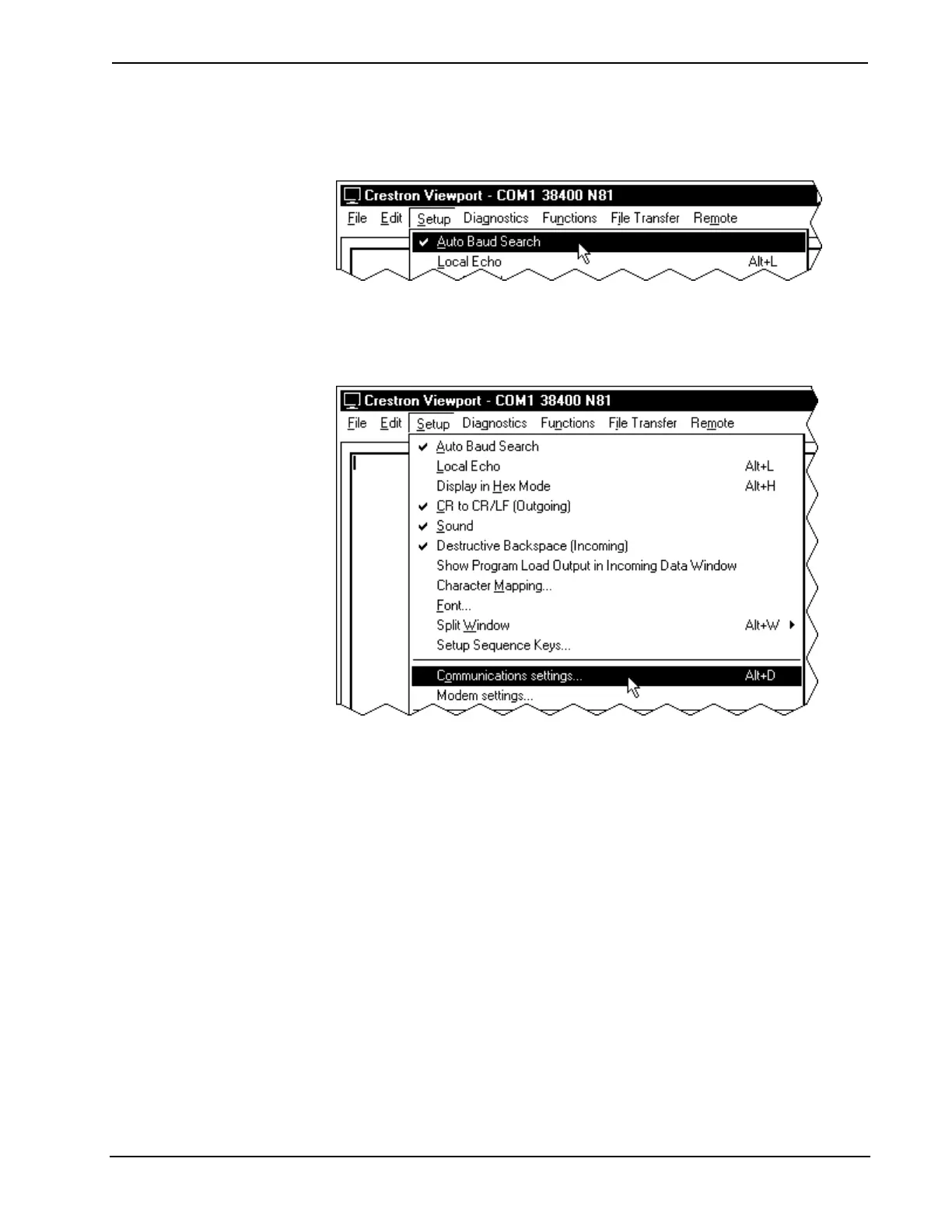
5. From the Setup menu, verify that Auto Baud Search is checked; refer
to illustration after this step.
Verifying Auto Baud Search
6. While the Viewport is displayed, select Setup | Communications
settings (alternatively, depress Alt+D) to open the “Port Settings”
window. Refer to the illustration after this step.
Accessing the “Port Settings” Window
7. Select the appropriate connection type (RS-232 for a PC connection
through the COMPUTER port of the 2-Series integrated dual bus
control system or TCP/IP through the Ethernet via optional Z-BUS).
Verify that the proper COM port is selected and set the parity to None,
the data bits to Eight, and the stop bits to One. Refer to the window
shown after this step for the remaining settings. Click on the OK button
to save the communication settings and close the window.
26 • Integrated Dual Bus Control System: PRO2 & AV2 Operations Guide - DOC. 5957











 To Next Page