Crestron AV2 & PRO2 2-Series Integrated Dual Bus Control System
1. Establish communications with the 2-Series integrated dual bus control
system by following the steps listed in "Obtaining Communications" on
page 25.
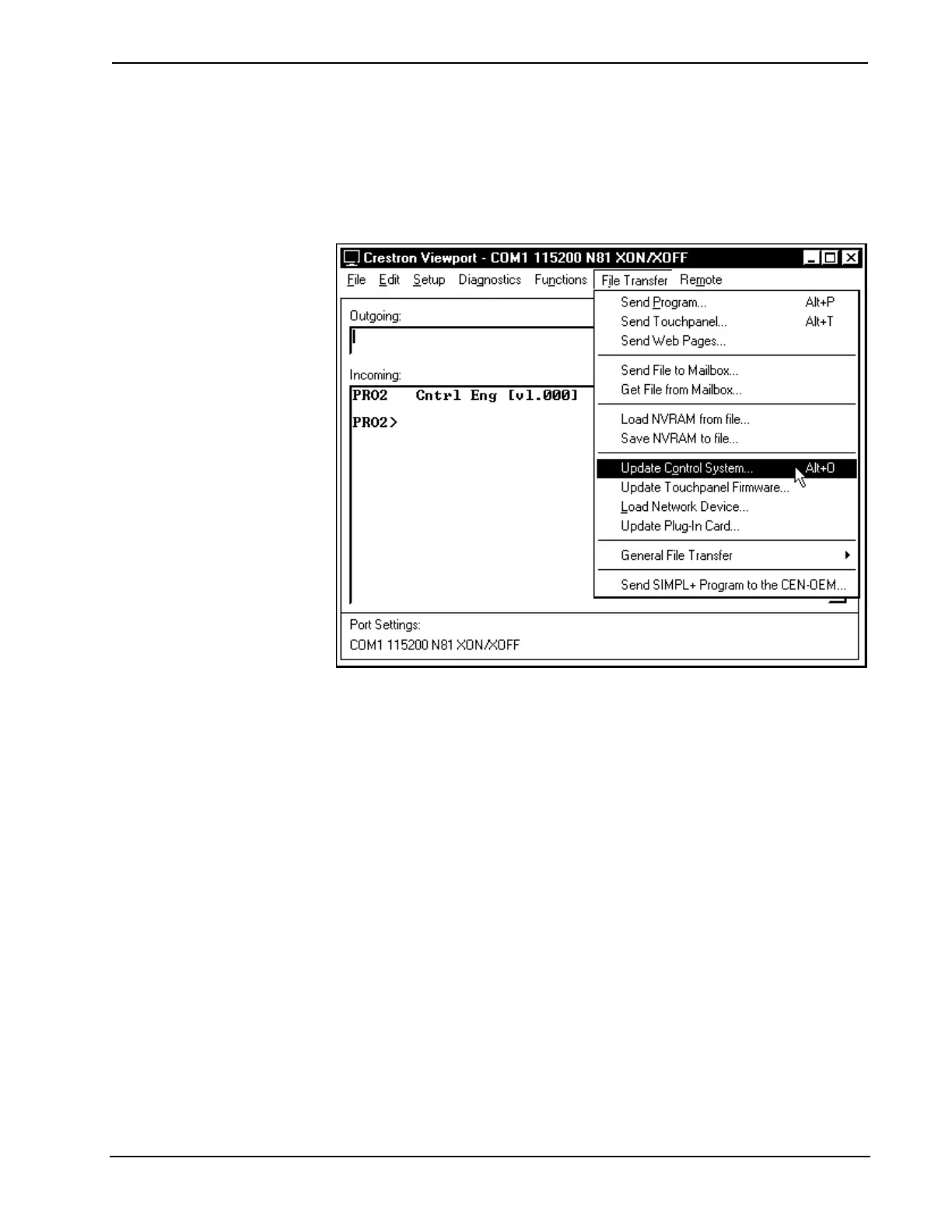
2. From the Crestron Viewport, select File Transfer | Update Control
System as shown below.
Accessing the "Update Control System" Window
3. The "Open" window offers the option to enter or browse to the path
name of a new update package. Only choose update packages with a
CUZ extension.
4. After, locating the CUZ package, click OK in the "Open" window to
initiate firmware download. Observe the "Transfer In progress"
window on the PC.
5. When the transfer is 100% complete, the "Waiting for Control System
to Reboot" message appears.
6. Upload the SIMPL program and SIMPL+ modules after the transfer is
complete.
Operations Guide - DOC. 5957 Integrated Dual Bus Control System: PRO2 & AV2 • 37











 To Next Page