2-Series Integrated Dual Bus Control System Crestron AV2 & PRO2
The listing follows the same order as the system tree in Configuration Manager. The
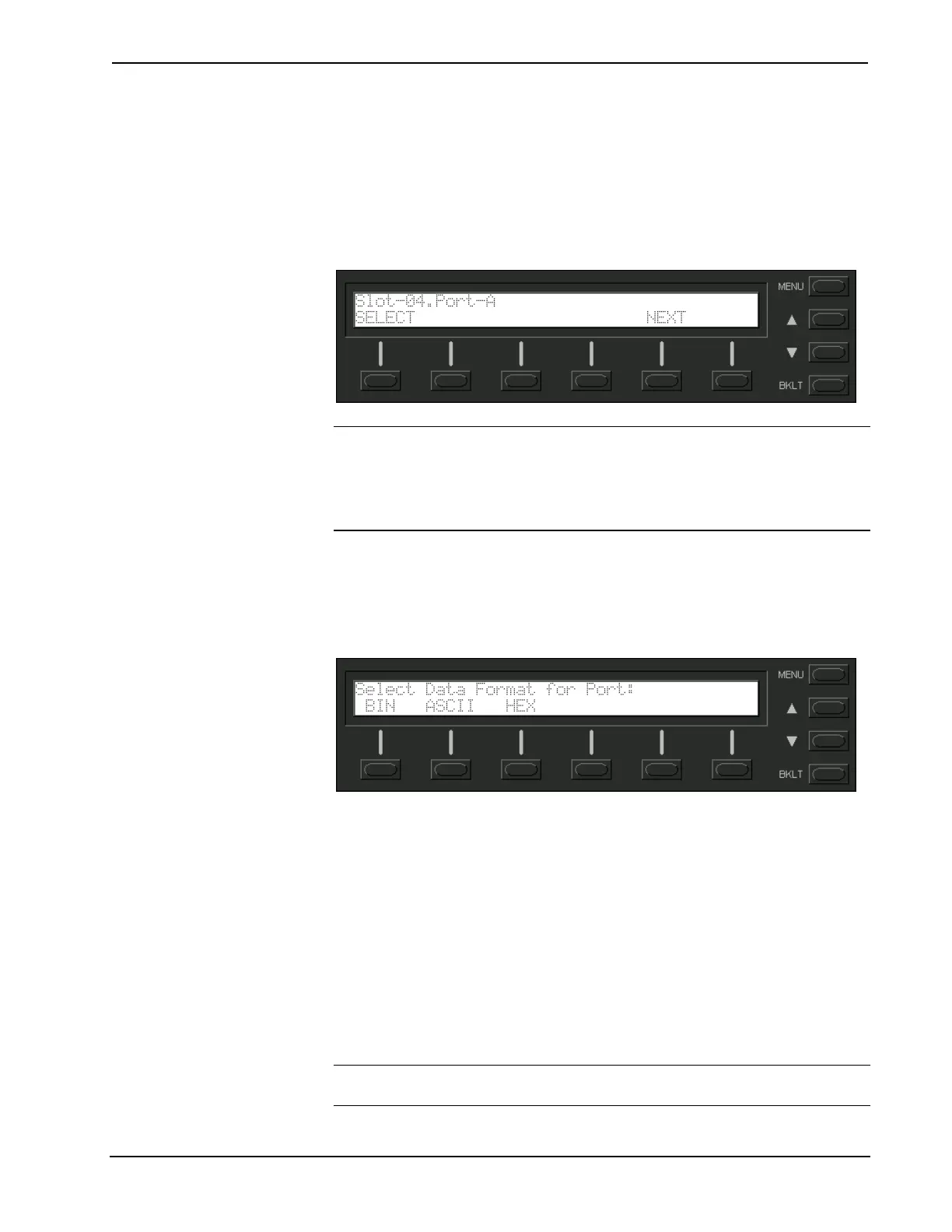
top line of the LCD display provides the COM-type device or card and its port. In the
sample shown below, the first active port in the system is the built-in card, port A.
The bottom line of the LCD display provides commands. The user can SELECT the
COM port shown on the top line or use NEXT or PREV (appears after scrolling
down from the top of the list) to scroll through the entire list of all devices and cards
that can be monitored.
Sample of COM-Type Device or Card Listing
NOTE: The PREV command only appears after advancing past the first COM-type
device or card in the list.
NOTE: The up and down menu selection buttons to the right of the LCD display
may be used in lieu of the NEXT and PREV menu function buttons.
The data transmitted and received when communicating with another device can be
monitored in three formats. Depressing the SELECT menu function button displays
the Format Type screen, shown below. Select the BIN, ASCII, or HEX menu
function button to determine the appropriate format.
Select Format Type Screen
Once the BIN, ASCII, or HEX menu function button is selected, the display
provides the T/R Screen. The Data Menu in the CNX Series control system
contained a RESET and REFRESH menu function button. These buttons are not
necessary for the PRO2, because the data is always 'live'. A buffer constantly records
and recycles the data. The buffer is empty when the COM port is first selected and
remains empty until data is transmitted or received.
When the port is active, data information races across the T/R Screen; a sample is
shown after this paragraph. The transmission and reception traffic is displayed in
alternating sequence to facilitate diagnostics. Depressing any of the six-menu
function buttons 'freezes' the data information. The up and down menu selection
buttons to the right of the LCD display may be used to advance or reverse the frozen
data. Compare the data to expected manufacturer's protocol for the communicating
device.
NOTE: Data in the 'freeze' state is denoted by a lower case letter (f) in front on the
T and R in the T/R/Screen.
42 • Integrated Dual Bus Control System: PRO2 & AV2 Operations Guide - DOC. 5957











 To Next Page