67 • AirMedia® Series 3 Receivers Product Manual — Doc. 9020C
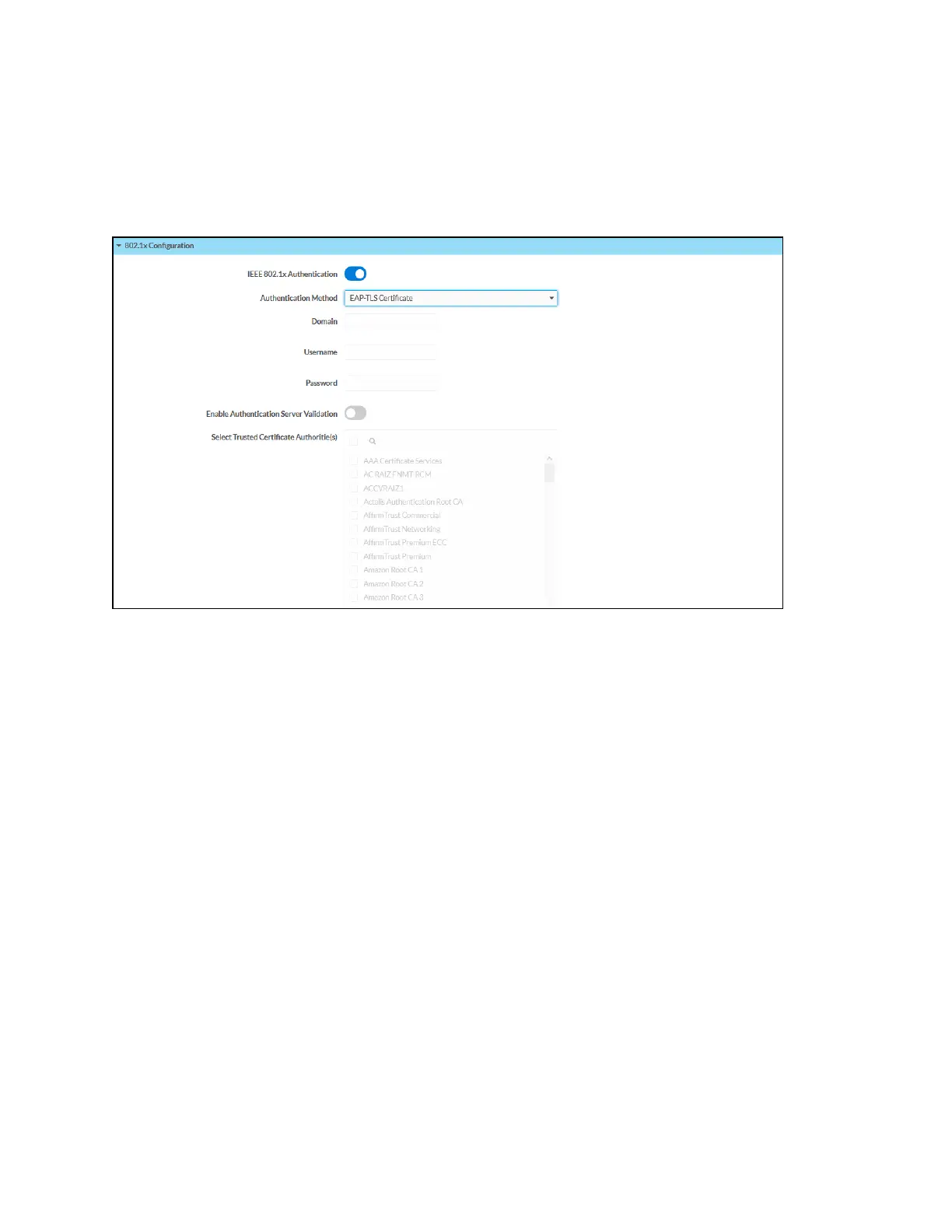
802.1x Configuration
Select 802.1x Configuration to display selections for configuring IEEE 802.1x network
authentication for receiver security.
802.1x Configuration Tab Selections
l
IEEE 802.1x Authentication: Turn on the toggle to use 802.1x authentication for the
receiver.
l
Authentication Method: Select an 802.1x authentication method (EAP-TLS Certificate or
EAP MSCHAP V2- password) from the dropdown menu.
l
Domain: If EAP MSCHAP V2- password is selected for Authentication Method, enter a
domain name for authentication.
l
Username: If EAP MSCHAP V2- password is selected for Authentication Method, enter a
username for authentication.
l
Password: If EAP MSCHAP V2- password is selected for Authentication Method, enter a
password for authentication.
l
Enable Authentication Server Validation: Turn on the toggle to use server validation for
elevated security.
l
Select Trusted Certificate Authorities: Select trusted CAs (Certificate Authorities) from
the provided CAs to be used for server validation:
o
Select the corresponding check box for each CA that you wish to make a trusted CA.
o
Enter a search term into the text field to search for and display CAs that match the
search term.
o
Select the check box in the search field to select all CAs as trusted CAs.















 To Next Page