EasyManua.ls Logo

Crestron DM-RMC-4K-SCALER-C - User Manual

Crestron DM-RMC-4K-SCALER-C
20 pages
Print Icon
To Next Page IconTo Next Page
Loading...
DM-RMC-4K-SCALER-C/-DSP
4K DigitalMedia 8G+
®
Receivers and
Room Controllers with Scaler
Supplemental Guide
Crestron Electronics, Inc.

Other manuals for Crestron DM-RMC-4K-SCALER-C

Questions and Answers

  • M
    millerjamesAug 16, 2025
    Why is there no video but I hear audio on my Crestron Receiver?
    • F
      fjohnsonAug 16, 2025
      If the video from your Crestron Receiver is not being displayed, but you can still hear the audio, it might be due to HDCP incompatibility. Make sure that the HDCP settings of all DigitalMedia devices in the signal path, including the display, support the HDCP level of the source.
  • J
    Jennifer OliverAug 19, 2025
    How to fix a non-operational SIMPL Windows program on a Crestron DM-RMC-4K-SCALER-C Receiver?
    • M
      Mathew CochranSep 12, 2025
      If the SIMPL Windows program isn't working with your Crestron Receiver, and you're not using a DigitalMedia switcher, check the IP table. Use the Crestron Toolbox application to ensure the IP table is correctly set in System Info. Also, if you are using a DigitalMedia switcher, make sure that the DM-RMC-4K-SCALER-C connects to the correct DM output port of the switcher.
  • L
    lauren52Aug 22, 2025
    What to do if the video is intermittent on my Crestron DM-RMC-4K-SCALER-C?
    • L
      lindseydonnaAug 22, 2025
      If the video signal from your Crestron Receiver is cutting in and out, it might be because of loose HDMI cable connections. Check both ends of each HDMI cable to be sure they are properly connected.
  • C
    Cory SmithAug 25, 2025
    How to resolve 'Unsupported Resolution' message on Crestron DM-RMC-4K-SCALER-C Receiver?
    • X
      xscottAug 26, 2025
      If your Crestron Receiver displays an “Unsupported Resolution” message, the scaler isn't set to a resolution that your display can handle. To fix this, change the scaler resolution to one that your display supports.
  • J
    Jessica LaneAug 28, 2025
    Why does my Crestron Receiver (DM-RMC-4K-SCALER-C) not stay powered on?
    • A
      April HughesAug 28, 2025
      If your Crestron Receiver (DM-RMC-4K-SCALER-C) won't stay on, and you're not using the included power pack, the DM IN port needs to be connected to a PoDM+ PSE port. Make sure the DM IN port is connected to a PoDM+ PSE port.
  • J
    James LoweAug 31, 2025
    Why is there no analog audio output from my Crestron Receiver (DM-RMC-4K-SCALER-C)?
    • F
      Faith SmithAug 31, 2025
      If you're not getting analog audio from the AUDIO OUT port on your Crestron Receiver (DM-RMC-4K-SCALER-C), check these things: 1. Make sure the EDID is set to 2-channel audio (this doesn't apply to the DSP model). 2. In DMTool, confirm that the 'Enable Analog Audio Output' box is checked. 3. In SIMPL Windows, ensure the analog audio output is correctly programmed. 4. Check that the volume is properly set in both DMTool and the SIMPL program for the DM-RMC-4K-SCALER-C.
  • E
    Elizabeth HarrisSep 2, 2025
    What to do if my Crestron Receiver (DM-RMC-4K-SCALER-C) won't link to the DM IN device?
    • B
      Bobby SmithSep 3, 2025
      If your Crestron Receiver (DM-RMC-4K-SCALER-C) can't link to the device connected to its DM IN port, and the DM link status LED is off, the cable connections might be faulty. Check that each end of the cable is properly connected, and if needed, inspect the cable terminations.
  • A
    Ashley SmithSep 6, 2025
    Why is the LAN connection unresponsive on my Crestron Receiver?
    • C
      Cynthia HarrisSep 6, 2025
      If your Crestron Receiver's LAN connection isn't working, and the DM-RMC-4K-SCALER-C and another DigitalMedia endpoint are connected to a DigitalMedia switcher, and the LAN port of the other endpoint is also connected to an Ethernet switch, disconnect the LAN port from the Ethernet switch. When a DigitalMedia endpoint is connected to a DigitalMedia switcher, its LAN port shouldn't also be connected to an Ethernet switch.
  • C
    Carlos RodriguezSep 9, 2025
    Why does the video flicker when touching my Crestron Receiver (DM-RMC-4K-SCALER-C)?
    • B
      Brian ArcherSep 9, 2025
      If the video flickers or drops when you touch the DM-RMC-4K-SCALER-C or touch metal near it, your Crestron Receiver may not be properly grounded. Make sure that the DM-RMC-4K-SCALER-C is properly grounded.
  • D
    Donna LongSep 12, 2025
    How to fix poor HDMI audio quality on Crestron Receiver (DM-RMC-4K-SCALER-C- DSP only)?
    • M
      Michelle GilbertSep 12, 2025
      If the HDMI output audio from your Crestron Receiver (DM-RMC-4K-SCALER-C - DSP only) is poor or missing, the audio sampling frequency at the source might not be supported by the display. Set the input’s audio EDID to sampling frequencies that the display can support.

Summary

Introduction to DM-RMC-4 K-SCALER-C;-DSP

Physical Description of DM-RMC-4 K-SCALER-C

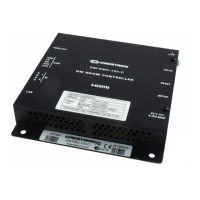
Top View of DM-RMC-4 K-SCALER-C

Illustrates the top of the DM-RMC-4K-SCALER-C, detailing its connectors, controls, and indicators.

Left Side View of DM-RMC-4 K-SCALER-C

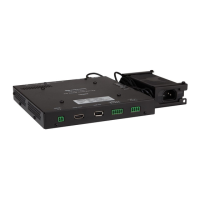
Details the connectors, controls, and indicators on the left side of the DM-RMC-4K-SCALER-C.

Right Side View of DM-RMC-4 K-SCALER-C

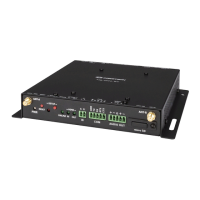
Details the connectors, controls, and indicators on the right side of the DM-RMC-4K-SCALER-C.

Configuration Options for DM-RMC-4 K-SCALER-C

Video Wall Processing Configuration

Explains combining multiple units for video walls up to 64 displays.

DMTool Configuration for Video Walls

Provides steps to configure video wall settings using Crestron DMTool software.

SIMPL Windows Configuration for Video Walls

Details how to configure video wall settings using Crestron SIMPL Windows.

Adjustable Underscan and Overscan Settings

Describes how to adjust image size (underscan/overscan) for proper display fit.

User-Selectable Output Resolution Configuration

Explains how to select output resolution for the scaler using DMTool or SIMPL Windows.

Standby Timeout Configuration

Details how to configure the automatic shutdown feature when no video is detected.

Display Mode Configuration

Explains how to set image display modes like aspect ratio or pixel mapping.

EDID Management and Configuration

Covers managing Extended Display Identification Data for upstream device communication.

Connecting Third-Party HDBaseT Transmitters

Provides steps to connect third-party HDBaseT devices for serial communication.

HDCP 2.2 Compliance

Troubleshooting Guide for DM-RMC-4 K-SCALER-C

Appendix: Pin Assignments

AUDIO OUT Pin Assignments and Wiring

Illustrates pin assignments and wiring for the balanced and unbalanced audio outputs.

LAN Connector Pin Assignments

Details the pin assignments for the RJ-45 LAN connector.

DM IN Connector Wiring

Provides wire color and pin number information for the DM IN connector.

Crestron DM-RMC-4K-SCALER-C Specifications

General IconGeneral
Baud rate115200 Bd
Product colorBlack
LED indicatorsYes
Heat dissipation63 BTU/h
Housing materialMetal
Scaled resolutions1920 x 1080, 2560 x 1600, 3840 x 2160, 4096 x 2160
Operating temperature (T-T)0 - 40 °C
Operating relative humidity (H-H)10 - 90 %
AC adapter frequency50/60 Hz
AC adapter input voltage100-240 V
Power consumption (typical)18 W
RJ-45 ports quantity2
Number of HDMI outputs1
Maximum pixel clock300 MHz
Channel separation (1 kHz)90 dB
Signal-to-Noise Ratio (SNR)95 dB
Weight and Dimensions IconWeight and Dimensions
Depth28 mm
Width137 mm
Height318 mm
Weight625 g

Related product manuals