8 • DSP-1282 &DSP-1283: Secure SIP Endpoint with Avaya Aura 7.1 Configuration Guide — 8340B
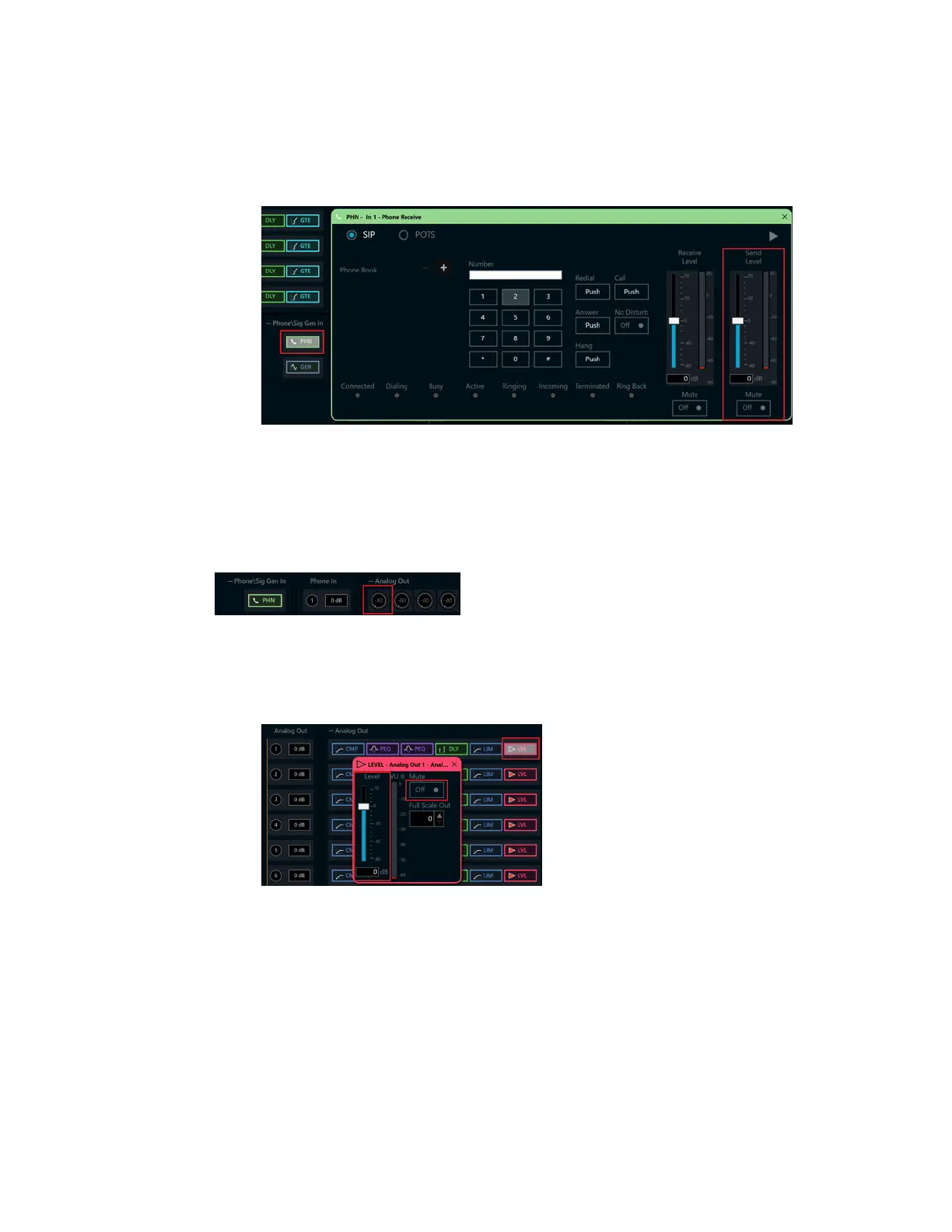
4. Under Phone\SigGenIn,clickPHN.In thenewwindowsetthefollowing:
a. MovetheSendLevelslider to0db.
b. Click MutetoOff.
Crestron AviaTool: AudioInputConfiguration(4/4)
OutputConfiguration
Toconfiguretheanalogoutput:
1. UnderPhoneIn1 (firstrow),clickAnalogOut(left-mostcolumn)andenter 0asthe
decibelvalue.
Crestron AviaTool: AudioOutputConfiguration(1/3)
2. Under AnalogOut1,doubleclickLVL.Inthenewwindowsetthefollowing:
a. MovetheLevelslider to0db.
b. Click MutetoOff.
Crestron AviaTool: AudioOutputConfiguration(2/3)



 To Next Page
 Loading...