30 • DSP-1282 &DSP-1283: Secure SIP Endpoint with Avaya Aura 7.1 Configuration Guide — 8340B
Entity Links
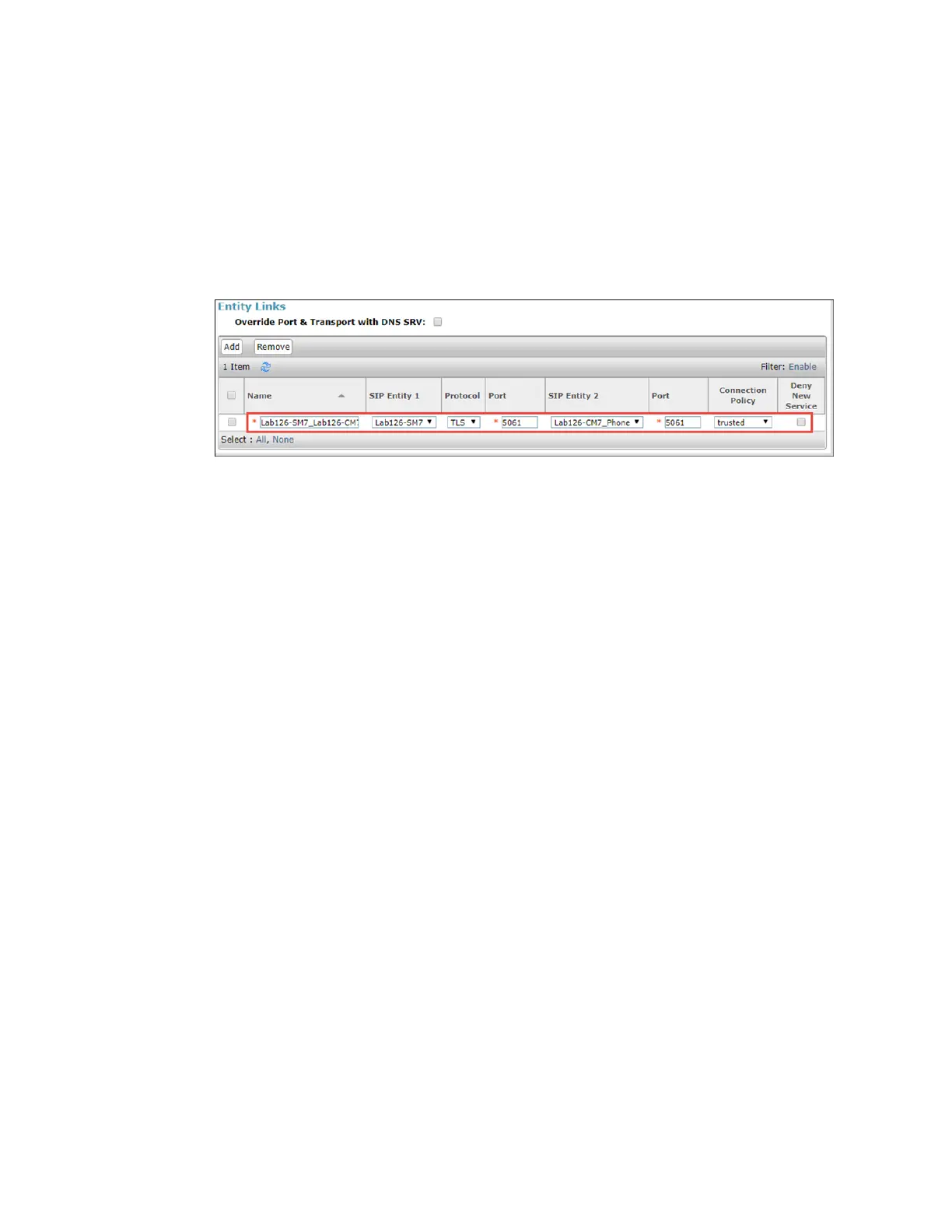
ASIPtrunkbetweenAvayaSessionManager andatelephonysystem isanentitylink.This
examplecreates anentitylink.
ToaddAvayaCMas anentitylink:
1. ClickRouting>EntityLinks.
2. ClickNew.
AvayaAuraSM:AvayaCMEntityLinkConfiguration
3. Inthenewrowthatis displayed,dothefollowing:
a. Enter adescriptivenamefor theName.
b. SelecttheSessionManagerfor SIPEntity1.
c. SelectTLS(for theProtocolfor thisexample).
d. Enter 5061 for thePort(for thisexample).
e. SelecttheCommunicationManagerfor SIPEntity2.
f. Enter 5061 for thePort(for this example).
g. Selecttrustedfor theConnectionPolicy.
4. ClickCommittosave.


 To Next Page
 Loading...