Connect
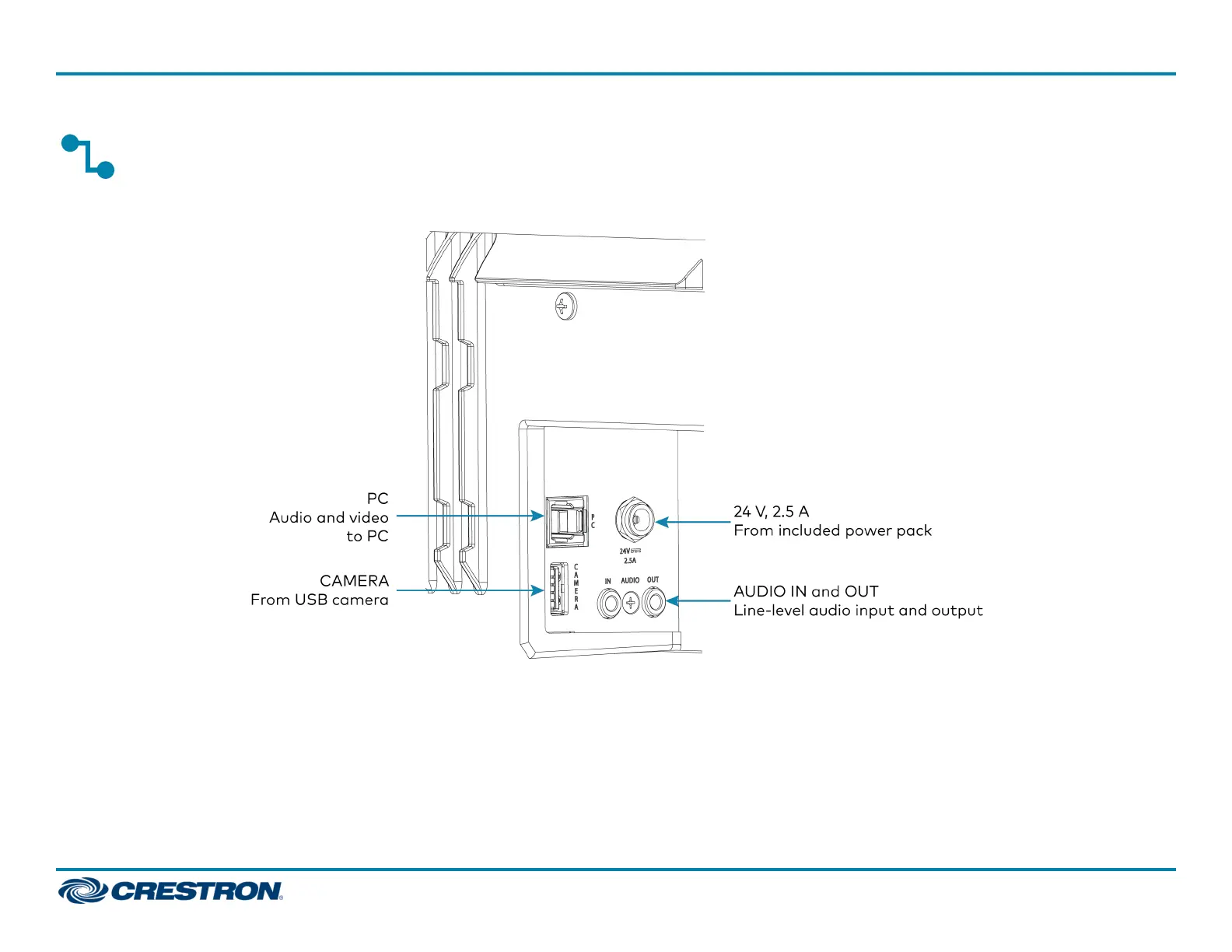
Make the necessary connections as called out in the following diagram. Connect power last.
l PC: Connect the included USB cable to the PC port and to a USB port on the computer. For optimal results, use a USB 3.0 connection.
l CAMERA: Connect a USB camera (sold separately) to the CAMERA port.
l 24 V, 2.5 A: Connect the power pack to the 24 V, 2.5 A power input and to an AC power outlet.
l AUDIO IN and AUDIO OUT: The soundbar provides unbalanced, stereo, analog input and output jacks (3.5 mm TRS mini-phone). The AUDIOINport
accommodates an optional line-level audio source which feeds to the internal amplifier and speakers without a volume control or other signal
processing. The AUDIOOUT port provides a line-level signal for an optional assistive listening system and carries the same audio signal as the
soundbar speakers.
6
UC-SB1
QuickStart
UC Video Conference Smart Soundbar













 To Next Page