
 Need help?
Do you have a question about the Crestron UC-SB1 and is the answer not in the manual?
Instructions for placing the soundbar on a flat surface using included rubber feet.
Front panel status bar illumination indicates operational information and volume level.
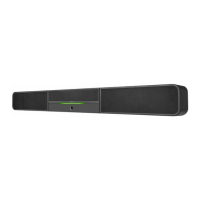
The Crestron UC-SB1 is a sophisticated UC Video Conference Smart Soundbar designed to streamline audio and video conferencing in various professional settings. This front-of-room device integrates essential conferencing components, eliminating the need for separate microphones and speakers, thereby simplifying installation and reducing clutter in conference spaces. Its versatile design allows for placement on a credenza beneath room display(s) or mounting on a wall, offering flexibility in room layout and aesthetics.
The primary function of the UC-SB1 is to provide high-quality audio and video conferencing capabilities. It serves as a central hub for audio input and output, featuring integrated microphones and speakers that capture and project sound effectively across a conference room. The soundbar is designed to deliver clear, intelligible speech and rich audio playback, ensuring that all participants can hear and be heard with clarity.
For audio input, the UC-SB1 incorporates advanced microphone technology to pick up voices from various positions within the room. This eliminates the need for multiple tabletop microphones, contributing to a cleaner and more organized conference table. The integrated speakers are engineered to provide robust sound projection, ensuring that remote participants' voices are clearly audible to everyone in the room.
The soundbar also facilitates video conferencing by acting as an interface for a USB camera (sold separately). When connected to an end-user's PC via USB, the UC-SB1 passes bidirectional audio (microphone and speaker) and camera data across a single USB connection. This "Bring Your Own Device" (BYOD) scenario allows users to leverage their preferred conferencing software on their personal computers while utilizing the high-quality audio and video capabilities of the soundbar.
Beyond its core conferencing functions, the UC-SB1 offers additional audio connectivity. It includes an AUDIO IN port, which is an unbalanced, stereo, analog input (3.5 mm TRS mini-phone). This port allows for the connection of an optional line-level audio source, which feeds directly to the internal amplifier and speakers. This input bypasses volume control and other signal processing, making it suitable for sources that require direct playback through the soundbar's speakers. Additionally, an AUDIO OUT port provides a line-level signal for an optional assistive listening system. This output carries the same audio signal as the soundbar speakers, ensuring that individuals requiring assistive listening devices can receive the conference audio directly.
The front panel of the soundbar features a status bar that provides visual feedback on its operational status. This bar illuminates to indicate the volume level, with increased illumination signifying higher volume. When the volume is set to "0," the status bar remains unlit. This visual indicator offers an intuitive way for users to monitor and adjust audio levels during a conference.
The UC-SB1 is designed for ease of use and flexible deployment. Its compact and integrated design simplifies the setup process, as it combines multiple conferencing components into a single unit.
For installation, the soundbar can be placed on a flat surface such as a credenza. In this configuration, rubber feet are attached to the bottom of the soundbar to ensure stability and prevent scratching of the surface. Alternatively, the soundbar can be wall-mounted, which is ideal for spaces where table space is limited or a cleaner aesthetic is desired. The soundbar includes anchors suitable for mounting on sheetrock walls up to 1/2 inch (13 mm) thickness. For masonry or other materials, installer-supplied mounting hardware may be required.
When wall-mounting, a template is provided to guide the drilling of pilot holes for the mounting hardware. This template ensures accurate placement and proper alignment of the soundbar. A minimum clearance of 3/4 inch (19 mm) above the top of the soundbar is recommended when mounting beneath a display device to allow for sufficient space between the soundbar and the display. A cutout in the wall, guided by the template, provides adequate access for all necessary cabling, ensuring a neat and professional installation.
Once mounted, the soundbar pivots up to the wall bracket and locks into place, securing it firmly to the wall. This design ensures that the soundbar is stable and properly positioned for optimal performance.
The status bar on the front panel provides immediate visual cues regarding the soundbar's operational state. A green status bar indicates the volume level, with its illumination increasing or decreasing in response to volume adjustments. This allows users to quickly gauge the current audio output level.
For microphone and speaker control, the soundbar offers clear visual feedback. Muting the microphone or speaker causes the two outer segments of the status bar to turn red, providing an unmistakable indication that audio input or output is temporarily disabled. If only the microphone is muted, the center of the status bar turns red, offering a distinct visual cue for microphone status. These visual indicators enhance usability by providing immediate feedback on critical audio settings.
The UC-SB1's ability to function in a BYOD scenario is a key usage feature. By connecting to an end-user's PC via a single USB cable, it allows users to bring their own laptops or devices and integrate them seamlessly into the conference system. This flexibility supports various conferencing platforms and software, catering to diverse user preferences and organizational needs.
The UC-SB1 is designed for straightforward installation and minimal ongoing maintenance. The included components and clear instructions facilitate a smooth setup process, reducing the likelihood of installation errors that could lead to maintenance issues.
The soundbar's robust construction and integrated design contribute to its durability. By consolidating multiple components into a single unit, there are fewer individual parts to manage or troubleshoot. The wall-mounting mechanism, once secured, provides a stable and long-lasting installation.
For cabling, the design allows for cables to be routed through a cutout in the wall, which helps protect them from damage and keeps them out of sight. This organized cabling approach not only contributes to a clean aesthetic but also reduces the risk of accidental disconnections or wear and tear on the cables. The included power pack's cord is typically routed from the wall opening through the cable cutout to the soundbar, further ensuring a tidy and secure power connection.
The visual status bar on the front panel can also serve as a basic diagnostic tool. By observing the color and illumination of the status bar, users can quickly ascertain if the device is powered on, if the volume is adjusted, or if the microphone/speaker is muted. This immediate feedback can help in quickly identifying and resolving common operational issues without requiring complex troubleshooting steps.
While the manual does not detail specific user-level maintenance tasks such as cleaning or software updates, the general design philosophy suggests a low-maintenance device. The absence of user-serviceable parts typically means that any internal issues would require professional service, but the external design is robust enough to withstand typical conference room environments. Regular dusting of the exterior surfaces would likely be the extent of user-performed maintenance to keep the device looking presentable. The focus on integrated functionality and simplified connectivity aims to minimize the need for frequent adjustments or repairs, ensuring reliable performance over time.
 General
| Product type | Speaker |
|---|---|
| Certification | CE, IC, UL 62368‑1, CSA C22.2 62368‑1, EN 62368‑1, IEC 62368‑1, FCC Part 15 Class B, ICES‑003 Issue 5 Class B, EN55022:2010 Class B, AS/NZS CISPR22:2010 Class B, AS/NZS CISPR 22:2010 Class B, EN55024:2010, EN61000‑3‑2:2014, EN61000‑3‑3:2013, RoHS compliant |
| Product color | Black, Grey |
| Placement supported | Desk |
| Operating temperature (T-T) | 5 - 40 °C |
| Operating relative humidity (H-H) | 10 - 90 % |
| AC input voltage | 100‑240V V |
| AC input frequency | 50 - 60 Hz |
| Heat dissipation | 66 BTU/h |
| USB port | Yes |
| Bluetooth | No |
| HDMI ports quantity | - |
| Connectivity technology | Wired |
| Woofer diameter (subwoofer) | 3 \ |
| Woofer diameter | 76 mm |
| Tweeter diameter | 25 mm |
| Number of tweeter drivers | 2 |
| Soundbar speaker RMS power | - W |
| Woofer diameter (imperial) | 2 \ |
| Signal-to-Noise Ratio (SNR) | 91 dB |
| Tweeter diameter (imperial) | 1 \ |
| RMS rated power | 20 W |
| Audio output channels | - channels |
 Weight and Dimensions
| Depth | 100 mm |
|---|---|
| Width | 1108 mm |
| Height | 118 mm |
| Weight | 6800 g |












 To Next Page

