Operation Manual
Xs Series Power Amplifiers
page 8
2.6 Wire Your System
2.6.1 Stereo Mode
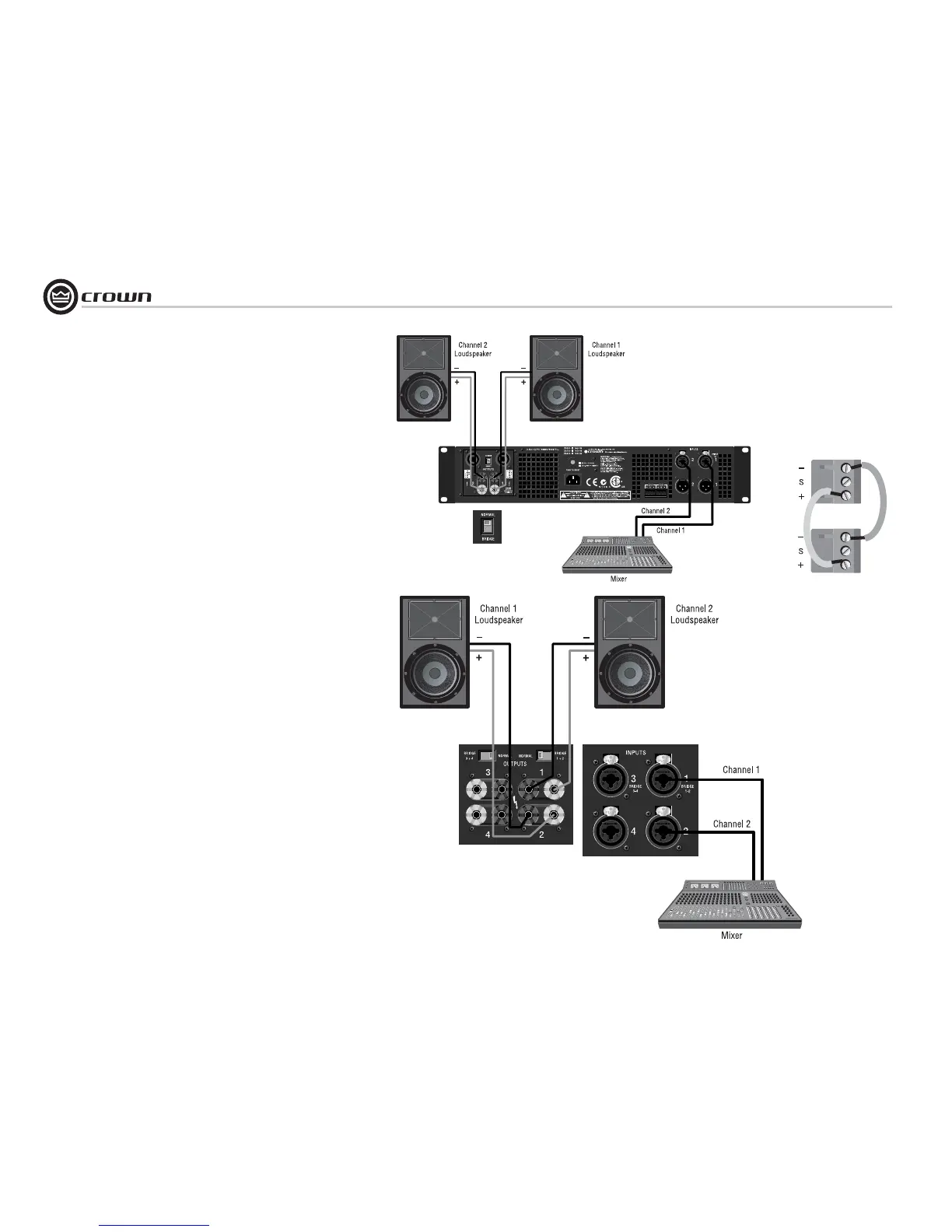
Typical input and output wiring is shown in
Figures 2.8 and 2.10.
INPUTS: Connect input wiring for both channels.
OUTPUTS: Connect speakers to the 5-way binding posts or to
the two Speakon
®
connectors (2-channel models only). See the
details below.
Connection to 5-way binding posts:
1. Connect speaker 1 positive (+) lead to the amp’s Channel-1
positive (red) binding post.
2. Connect speaker 1 negative (–) lead to the amp’s Channel-1
negative (black) binding post.
3. Connect speaker 2 positive (+) lead to the amp’s Channel-2
positive (red) binding post.
4. Connect speaker 2 negative (–) lead to the amp’s Channel-2
negative (black) binding post.
Connection to Speakon
®
connectors
(2-channel models only):
1. Connect speaker 1 positive (+) lead to the amp’s Channel-1
Speakon
®
terminal 1+.
2. Connect speaker 1 negative (–) lead to the amp’s Channel-1
Speakon
®
terminal 1–.
3. Connect speaker 2 positive (+) lead to the amp’s Channel-2
Speakon
®
terminal 1+.
4. Connect speaker 2 negative (–) lead to the amp’s Channel-2
Speakon
®
terminal 1–.
2.6.2 How to Parallel the Inputs
There are three ways to feed the same signal to each amplifier
channel:
1. Buy a “Y” cable. Plug the female end into your signal cable, and
plug the split male ends into both amplifier inputs.
2. Feed your signal to the Channel-1 input (either Phoenix or
combo). Connect a jumper wire (Figure 2.9) between the Phoenix
Channel-1 (+) screw terminal and the Channel-2 (+) screw termi-
nal. Connect another jumper wire between the Channel-1 (–)
screw terminal and the Channel-2 (–) screw terminal.
3. Feed your signal to the Channel-1 Phoenix terminals. Using a
mic cable or phone-to-phone cable, connect Channel-1 combo
jack to Channel-2 combo jack.
2 Setup
Figure 2.10
Stereo Wiring,
Xs4300
CHANNEL 2
CHANNEL 1
Figure 2.8
Stereo Wiring,
2-Channel Models
Figure 2.9
Phoenix Connector Wiring for
Parallel Inputs



 To Next Page