page 9
Xs Series Power Amplifiers
Operation Manual
2.6.3 Bridge-Mono Mode
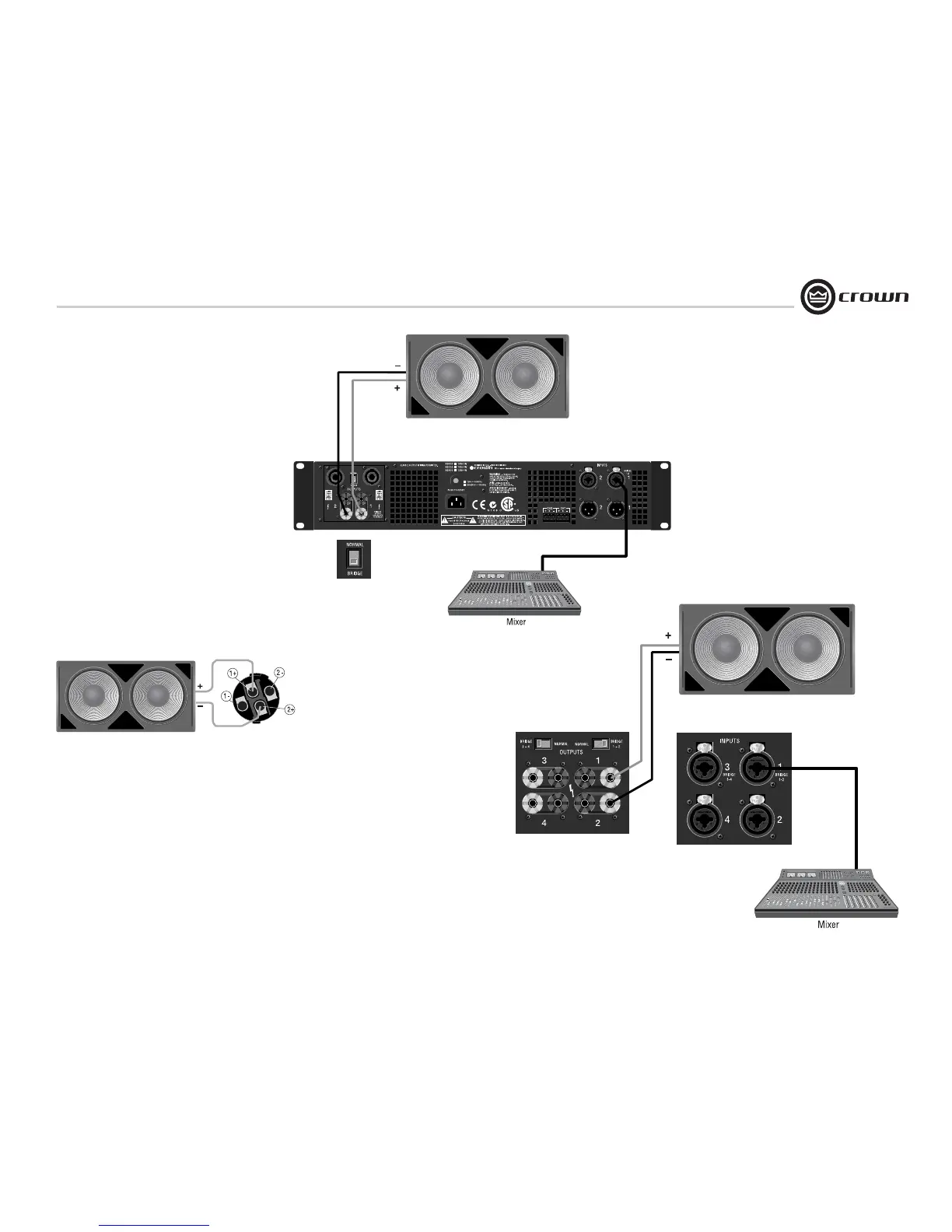
Typical input and output wiring is shown in
Figures 2.11 and 2.12.
NOTE: Crown provides a reference of wiring pin
assignments for commonly used connector
types in the Crown Amplifier Application Guide
available at www.crownaudio.
OUTPUTS: Connect the speaker across the red
binding posts of each channel. Do not use the
black binding posts when the amp is being oper-
ated in Bridge-Mono mode.
Or, connect the speaker across terminals 1+ and
2+ of the Channel 1 Speakon connector (as in
Figure 2.13). This feature is not available in early
models.‘
IMPORTANT: Set the Bridge/Normal
switch to “Bridge.”
2 Setup
Figure 2.11 Bridge-Mono Wiring,
2-Channel Models
Figure 2.12 Bridge-Mono Wiring,
Xs4300
Loudspeaker
Channel 1
Speakon
Figure 2.13 Wiring a Loudspeaker in Bridge-Mono
to the Channel 1 Speakon Connector



 To Next Page