5. BEFORE SETTING UP YOUR PEDOMETER
Before you setup your pedometer you need the following information:
1) Clock Time
2) Your Stride Length (centimeters or inches): _______________
3) Your Weight (kilograms or pounds): _____________________
4) Your Daily Target Number of Steps: _____________________
Note: If you wish the pedometer to display the distance walked in miles you will
need to record your stride length in inches and weight in pounds. If you wish the
pedometer to display the distance walked in kilometers you will need to record your
stride length in centimeters and weight in kilograms.
(If you do not have time to measure your stride length and weight you can use the
default values provided by the pedometer)
6. MEASURING YOUR STRIDE LENGTH
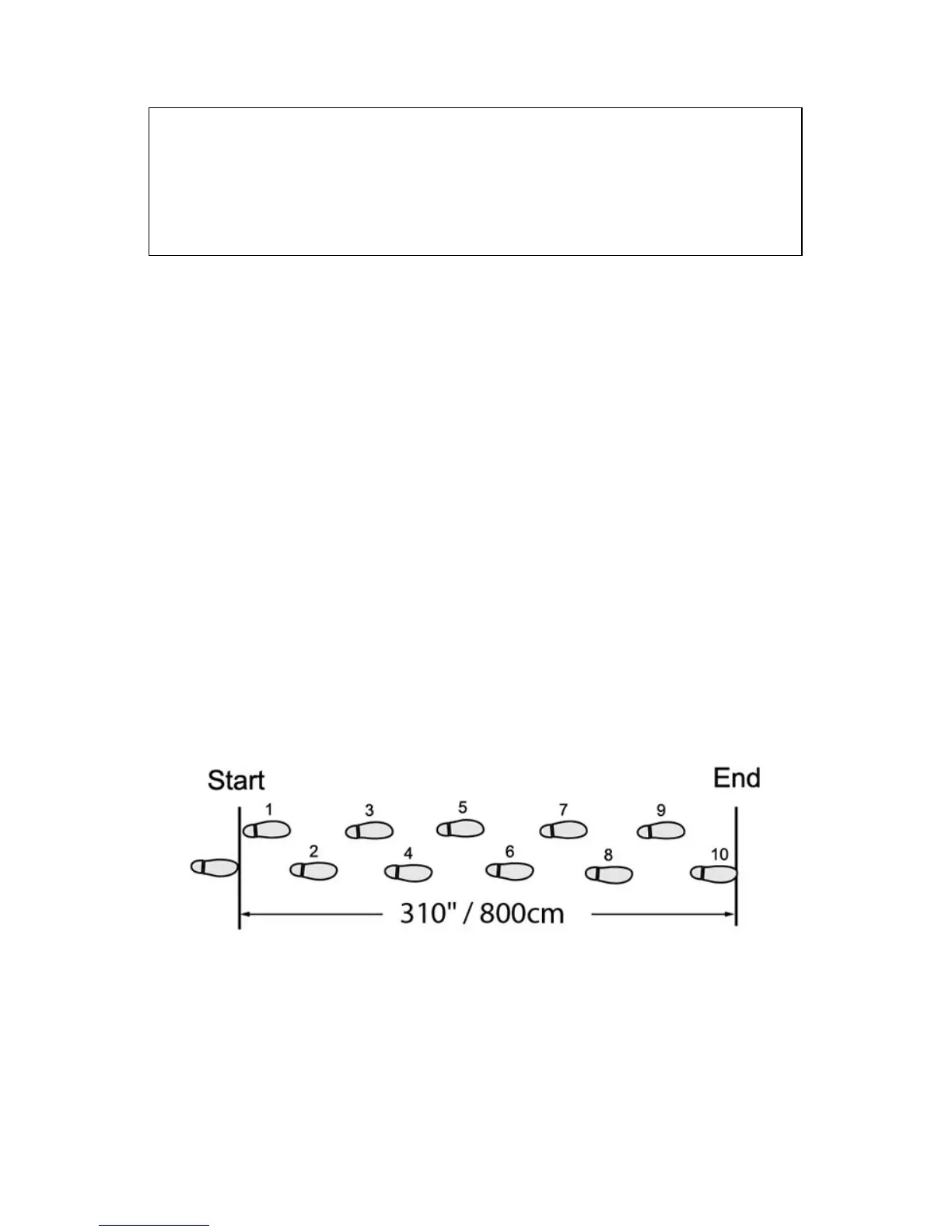
a) As above illustration, walk 10 steps with your normal stride
b) Measure the distance from start to end
c) Calculate your stride by dividing the total distance by 10
Example:
Total Distance = 310”. Therefore, stride = 310” / 10 paces = 31”
Total Distance = 800cm. Therefore, stride = 800cm / 10 paces = 80cm
- Pull battery insulator tab to activate the pedometer.
- If LCD display is not functioning normal and showing abnormal characters,
please perform a “SYSTEM RESET.” See section (18).



 To Next Page