21
TROUBLESHOOTING
Yourcomputerissturdyandsubjecttofewproblemsinthefield.However,youmayencounter
simplesetuporoperatingproblemsthatyoucansolveonthespot,orproblemswithperipheral
devices,that youcansolvebyreplacing thedevice.Theinformation inthissectionhelpsyou
isolateandresolvesomeofthesestraightforwardproblemsandidentifyfailuresthatrequireservice.
Identifying the Problem
If you encounter a problem, go through the following procedure before pursuing complex
troubleshooting:
1. TurnoffyourChromebook.
2. MakesuretheACadapterispluggedintoyourChromebookandtoanactiveACpowersource.
3. Makesurethatanycardinstalledinthememorycardslotisseatedproperly.Youcanalso
removethecardfromtheslot,thuseliminatingitasapossiblecauseoffailure.
4. Makesurethatanydevicesconnectedtotheexternalconnectorsarepluggedinproperly.You
canalsodisconnectsuchdevices,thuseliminatingthemaspossiblecausesoffailure.
5. TurnonyourChromebook.Makesureithasbeenoffatleast10secondsbeforeyouturniton.
6. Iftheproblemhasnotbeenresolved,contactyoursupportrepresentative.
Beforeyouplacethecall,youshouldhavethefollowinginformationreadysothatthecustomer
supportrepresentativecanprovideyouwiththefastestpossiblesolution:
• Productname
• Productconfigurationnumber
• Productserialnumber
• Purchasedate
• Conditionsunderwhichtheproblemoccurred
• Anyerrormessagesthathaveoccurred
• Hardwareconfiguration
• Typeofdeviceconnected,ifany
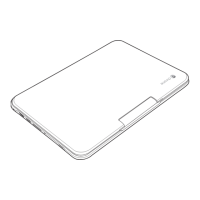
See the Configuration Label on the bottom of your Chromebook for configuration and serial
numbers.


 To Next Page