56
•The remote control board can be set for a maximum of four
remote controls at the same time. When it is necessary to set
more, erase the settings on the remote control (instructions
are on the previous page) and start the setting again.
•Older versions of the remote controller (see picture on the right)
can only be used for “remote control internal setting”, they will
not work with “remote control external setting”.
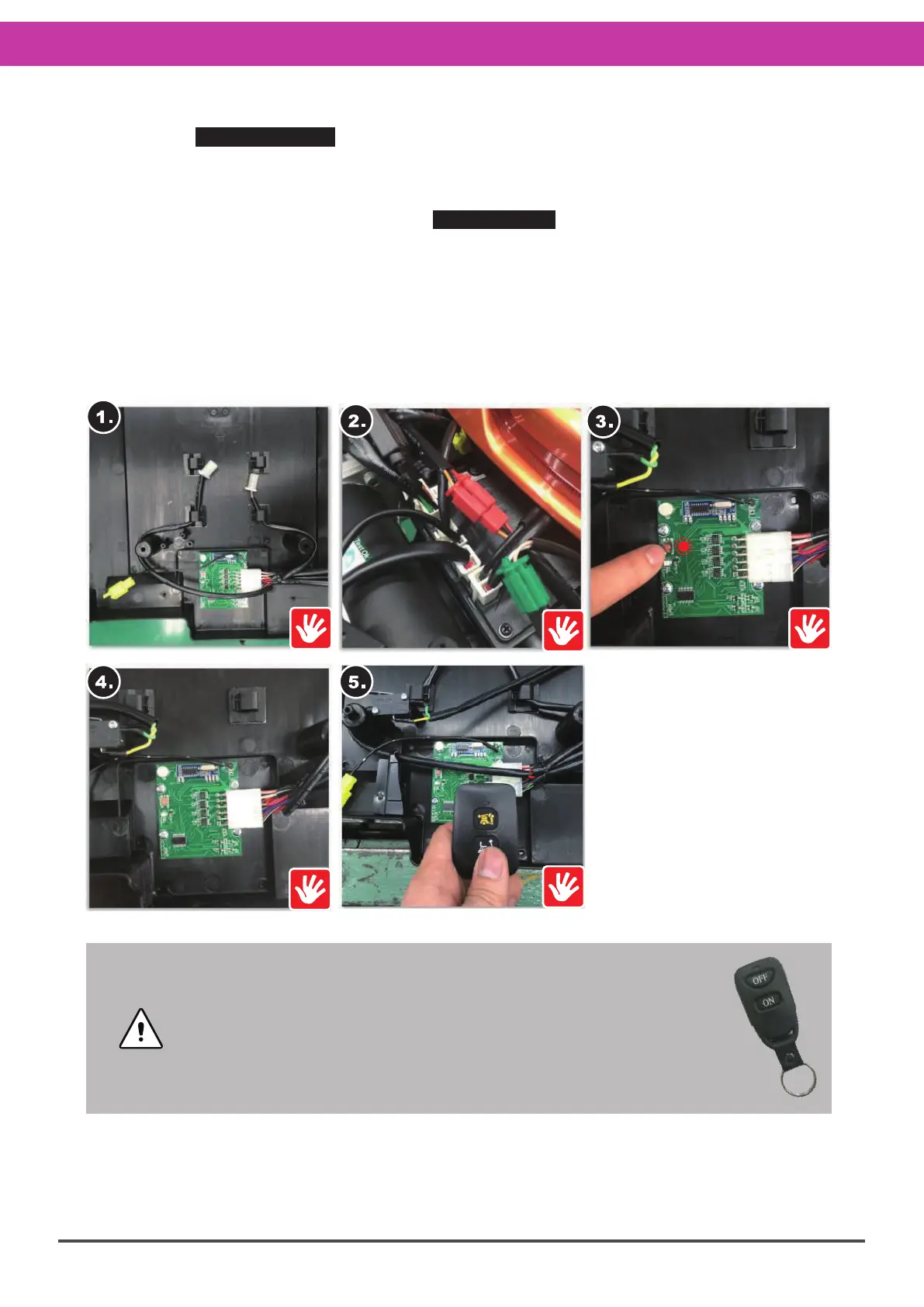
Refer to the SERVICE-12-2 Remote Control Board Repair steps, then :
1.Remove the waterproof cover and set it aside.
2.Check all the connectors on the rear lower cover with the DR controller (only connectors
without locking).
※Refer to the connector instructions in SERVICE-12 Rear Lower Cover for details.
3.Turn on the power to the remote control board, and press the setting button (long-press
for 3 seconds).
4.The remote control board blue light will come on and the remote control is ready for
pairing.
5.Press the “unfolding button”. When the indicator stops flashing, setting is complete.
※When reinstalling, carry out these steps in the exact reverse sequence.
※If function has not been restored, refer to “Remote Control Board Replacement” on the
next page.
Remote Controller Internal Frequency Pairing Setting :



 To Next Page