46
SERVICE - 10
Front Top Cover Repair
Front Top Cover-Side Cover Repair
SERVICE - 10 - 1
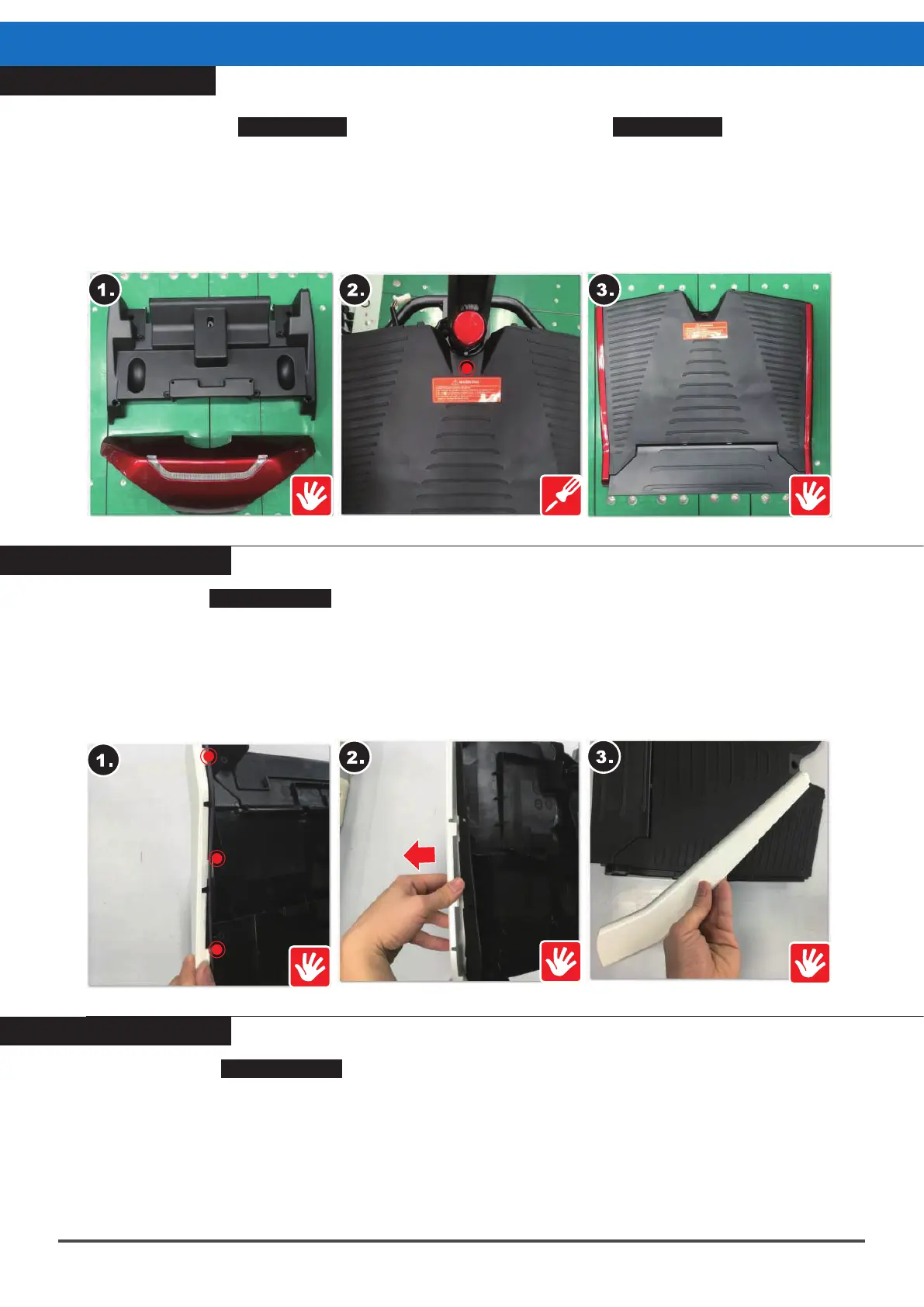
Please follow the SERVICE-3 Front Lamp Cover Repair and SERVICE-9 Front Lower
Cover Repair steps first, then :
1.Remove the front lamp cover and front lower cover.
2.Remove the central screw (16mm, 1pc) at the center of the front end of the top cover.
3.Take off the cover.
※When reassembling, please follow the exact reverse sequence of these steps.
Please follow SERVICE-10 Front Top Cover Repair to remove the cover, then :
1.Find the three locking pins at the sides of the front lower cover - left and right side cover.
2.Push the pins outwards.
3.Take the side cover off both sides.
※When reassembling, please follow the exact reverse sequence of these steps.
Footplate Cover Replacement
SERVICE - 10 - 2
Please refer to SERVICE-10 Front Top Cover Repair to remove the cover, then :
1.Press the front top cover downwards by hand.
2.Allow the cover to disengage from the center locking pin.
3.Gently bend the cover downwards to disengage from the right side locking pin.
4.Remove the locking pin spring on the left side.
5.Take the footplate cover off.
※When reassembling, please follow the exact reverse sequence of these steps.



 To Next Page