51
Power Socket Repair
SERVICE - 11 - 3
Please follow the SERVICE-11 Rear Top Cover Repair steps,
then :
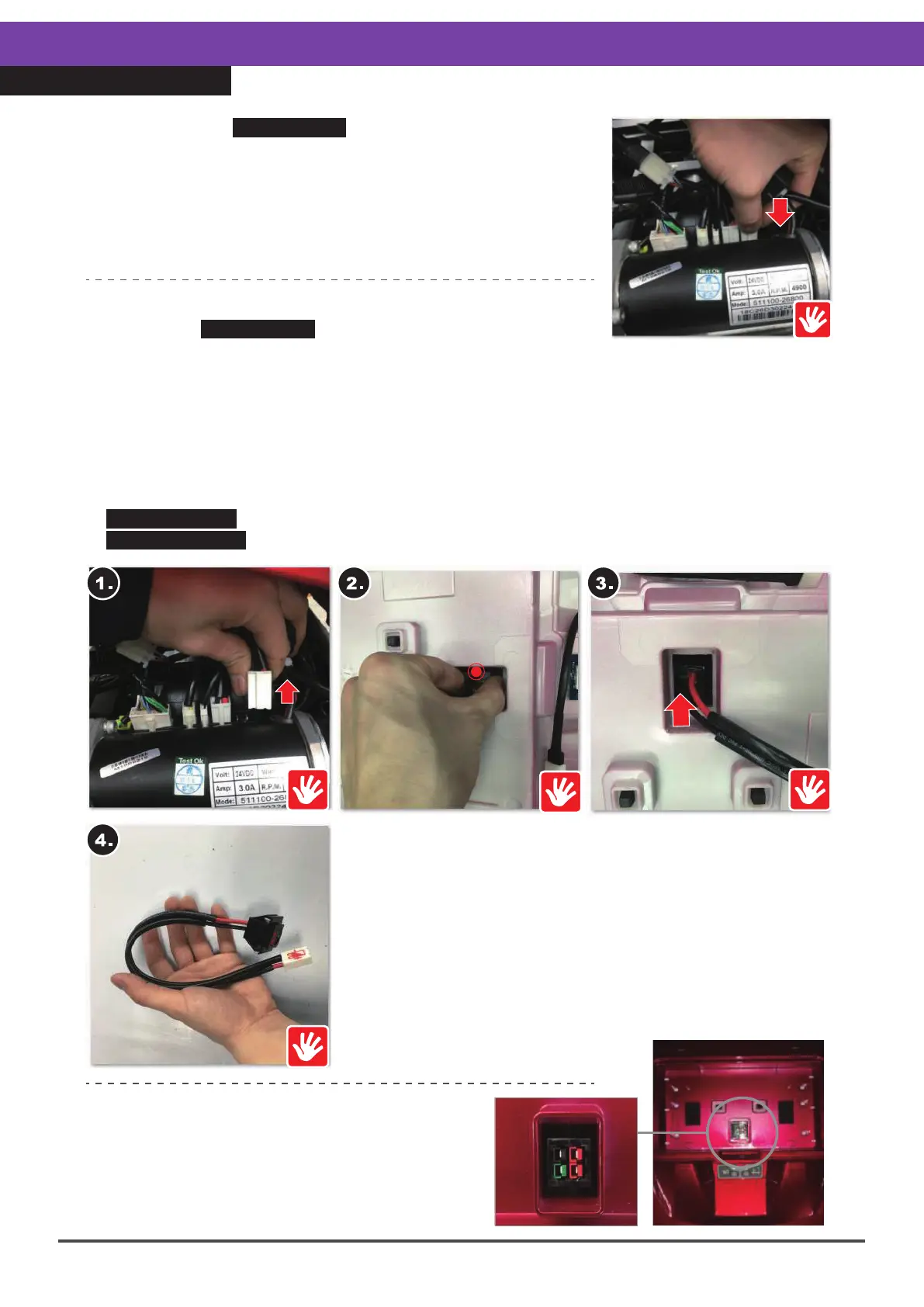
※Find the rear top cover - power socket connector (picture
on the right).
※Check the connector for security and reconnect (picture
on the right).
※If this is not effective, please refer to the following “Replacement
Instructions”.
Re-installation Instructions :
※When re-installing the charger socket, make
sure it is the right position, see the picture on
the right. If the connector position is incorrect,
it will not be possible to reinstall the battery
pack.
Replacement Instructions :
Complete the SERVICE-11 Rear Top Cover Repair to remove
the cover, then :
1.Unplug the rear top cover - power socket connector.
2.Squeeze the two sides of the power socket inside the battery pack and.
3.Push the socket out from the inside.
4.Take the power socket out.
※When reassembling, please follow the exact reverse sequence of these steps.
※During replacement or re-installation, please be aware of the connector position, refer
to the figure on the lower right and the instructions below.
※If function is not restored, refer to.
SERVICE-1-1 Top Control Board Repair, or
SERVICE-11-1 DR Controller Repair to replace a faulty board with a new one.



 To Next Page