EasyManua.ls Logo

Cub SENSOR AID - Diagnosing a Sensor - Diagnose Sensor; Vehicle Maker Selection; Vehicle Model Selection; Vehicle Year Selection

Cub SENSOR AID
21 pages
Print Icon
To Next Page IconTo Next Page
To Previous Page IconTo Previous Page
Loading...
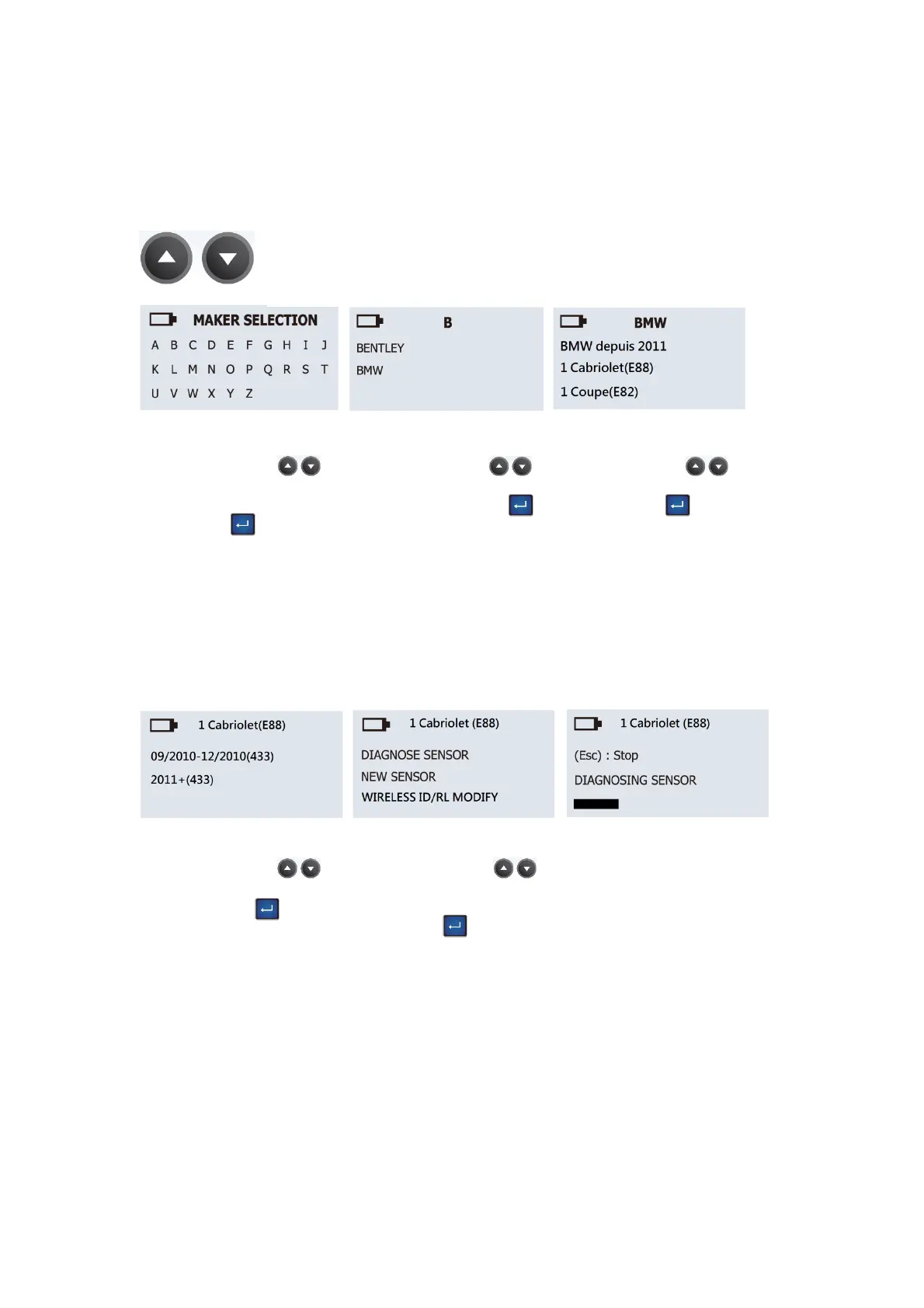
Maker selection:
Use the arrow key
to browse alphabets of
carmakers, press the
“Enter” key to select.
Maker selection:
Use the arrow key
to browse automakers,
press the “Enter” key
to select.
Model selection:
Use the arrow key
to browse models, press
the “Enter” key to
select.
Year selection:
Use the arrow key
to select year and press
the “Enter” key to
select.
Function selection:
Use the arrow key
to select DIAGNOSE
SENSOR and press the
“Enter” key to
diagnose.
English
2.
Diagnosing a
sensor-
Diagnose Sensor
03
Use arrow key to scroll up and down between maker.
Diagnosing Sensor:
Sensor AID will now
activate the sensor.
Sensor respond time may
vary depending on
sensor type and brand.
Sensor AID will beep
after receiving sensor
information.