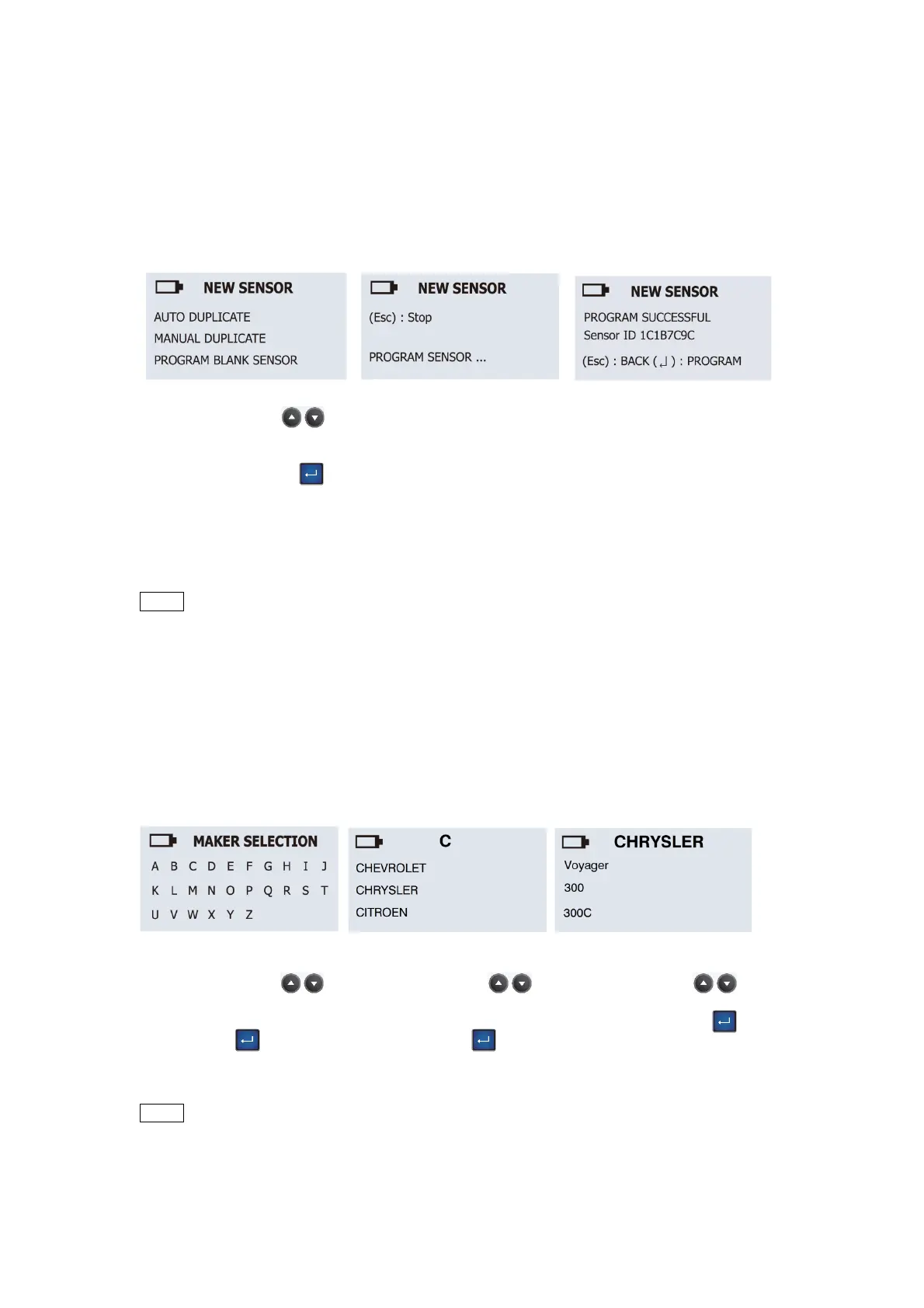
Program Blank Sensor:
Sensor AID will now
program the sensor for
you, following by Erasing
Flash, Program sensor
and Verifying.
Program complete:
When the program
process is complete, you
will hear 2 short beeps
when the sensor is
programmed.
Function selection:
Use the arrow key
to select PROGRAM
BLANK SENSOR and
press the “Enter”
to select.
Note:
Make sure the correct
sensor is inserted in the
Maker selection:
Use the arrow key
to browse through
alphabets, and press the
“Enter” key to select.
Maker selection:
Use the arrow key
to browse through
automakers, and press
the “Enter” key to
select.
Model selection:
Use the arrow key
to browse models, and
press the “Enter” key
to select.
English
3.3 Program Blank Sensor-
Programming a blank
sensor
This function is designed for you to program a blank sensor to O.E. format for vehicle with
auto-relearn function.
NOTE Duplicate and Program function will only work with CUB’s Sensor-AID and
Uni-sensor.
4.
Wireless ID/RL Modify –
Copy and Modify a
sensor
This function
is
designed
for you to bypass OBDII and wireless copy or modify an O.E
sensor.
NOTE Duplicate and Program function will only work with CUB’s Sensor-AID and
Uni-sensor.
07


 To Next Page