EasyManua.ls Logo

Cub SENSOR AID - Year Selection for Duplication; Function Selection for Duplication; 3.1 Auto Duplicate - Auto Duplicate an O.E sensor; Search Sensor ID Process

Cub SENSOR AID
21 pages
Print Icon
To Next Page IconTo Next Page
To Previous Page IconTo Previous Page
Loading...
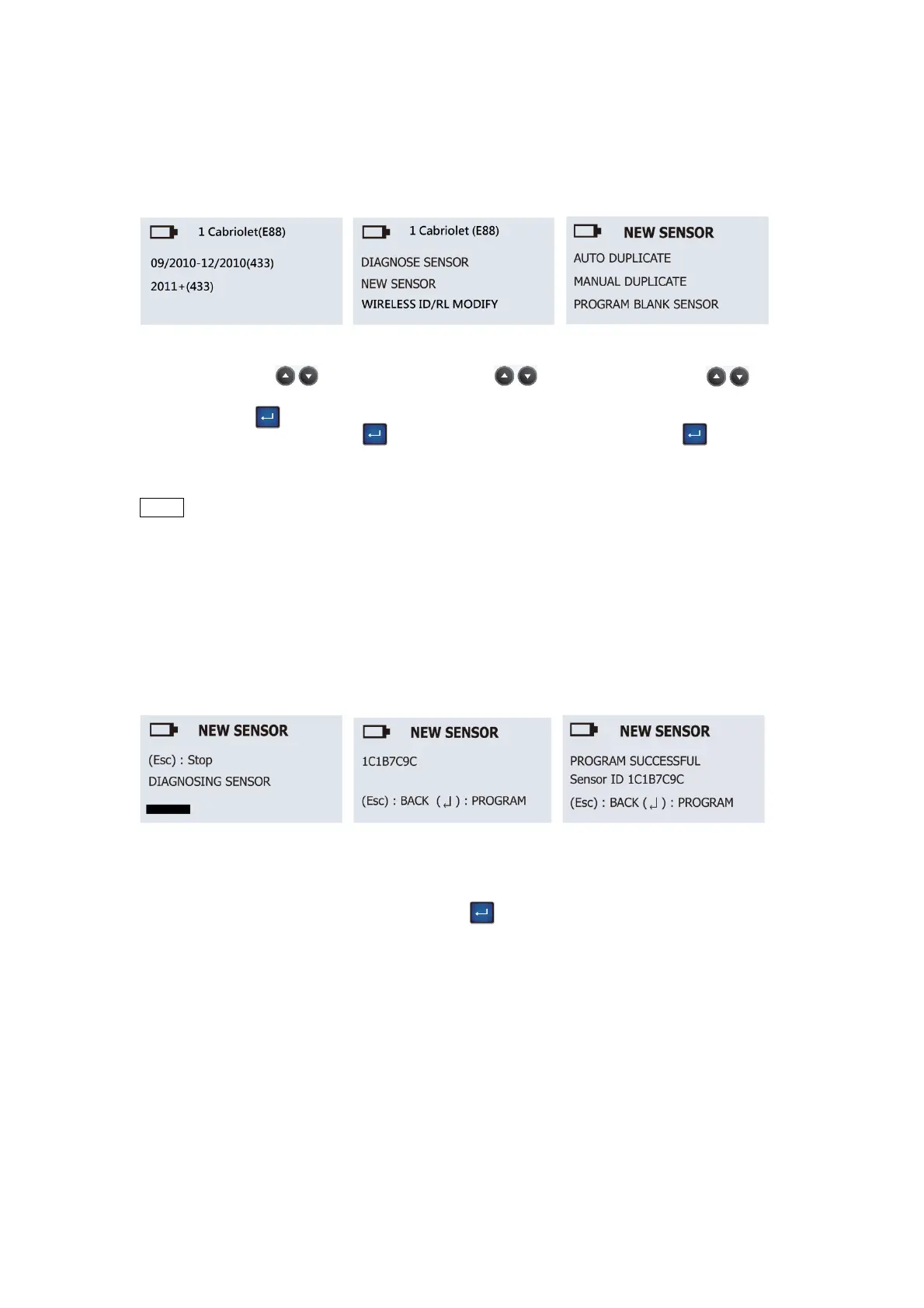
Function selection:
Use the arrow key
to select AUTO
DUPLICATE and press
the “Enter” key to
select.
Year selection:
Use the arrow key
to select year and press
the “Enter” key to
select.
Function selection:
Use the arrow key
to select NEW SENSOR
and press the “Enter”
key
to next.
Search ID Process:
Sensor AID will now
search the sensor ID.
Sensor respond time may
vary depending on
sensor type and brand.
Sensor AID will beep
after receiving sensor
information.
Duplicate Sensor:
Sensor AID will display
the O.E sensor ID, press
the “Enter” key to
program Uni-sensor.
Note:
Once you get the sensor
ID, press Enter key
directly to program the
new sensor. If you press
ESC key, the sensor ID
will be erased, you need
to diagnose again.
English
This function
is
designed
for you to bypass OBDII and automatically duplicate
an O.E
sensor.
NOTE Duplicate and Program function will only work with CUB’s Sensor-AID and
Uni-sensor.
3.1 Auto Duplicate-
Auto Duplicate an
O.E
sensor
This function
is
designed
for you to bypass OBDII and automatically duplicate
an O.E
s
ensor.
05
Duplicate Complete:
Sensor AID will now
duplicate the sensor for
you, following by Erasing
Flash, Program sensor
and Verifying. You will
hear 2 short beeps when
the sensor is duplicated.
Note:
Duplicate and Program
function will only work
with CUB’s Sensor-AID
and Uni-sensor.