EasyManua.ls Logo

Cub SENSOR AID - New Sensor - Duplicate an O.E sensor; Maker Selection for Duplication; Model Selection for Duplication

Cub SENSOR AID
21 pages
Print Icon
To Next Page IconTo Next Page
To Previous Page IconTo Previous Page
Loading...
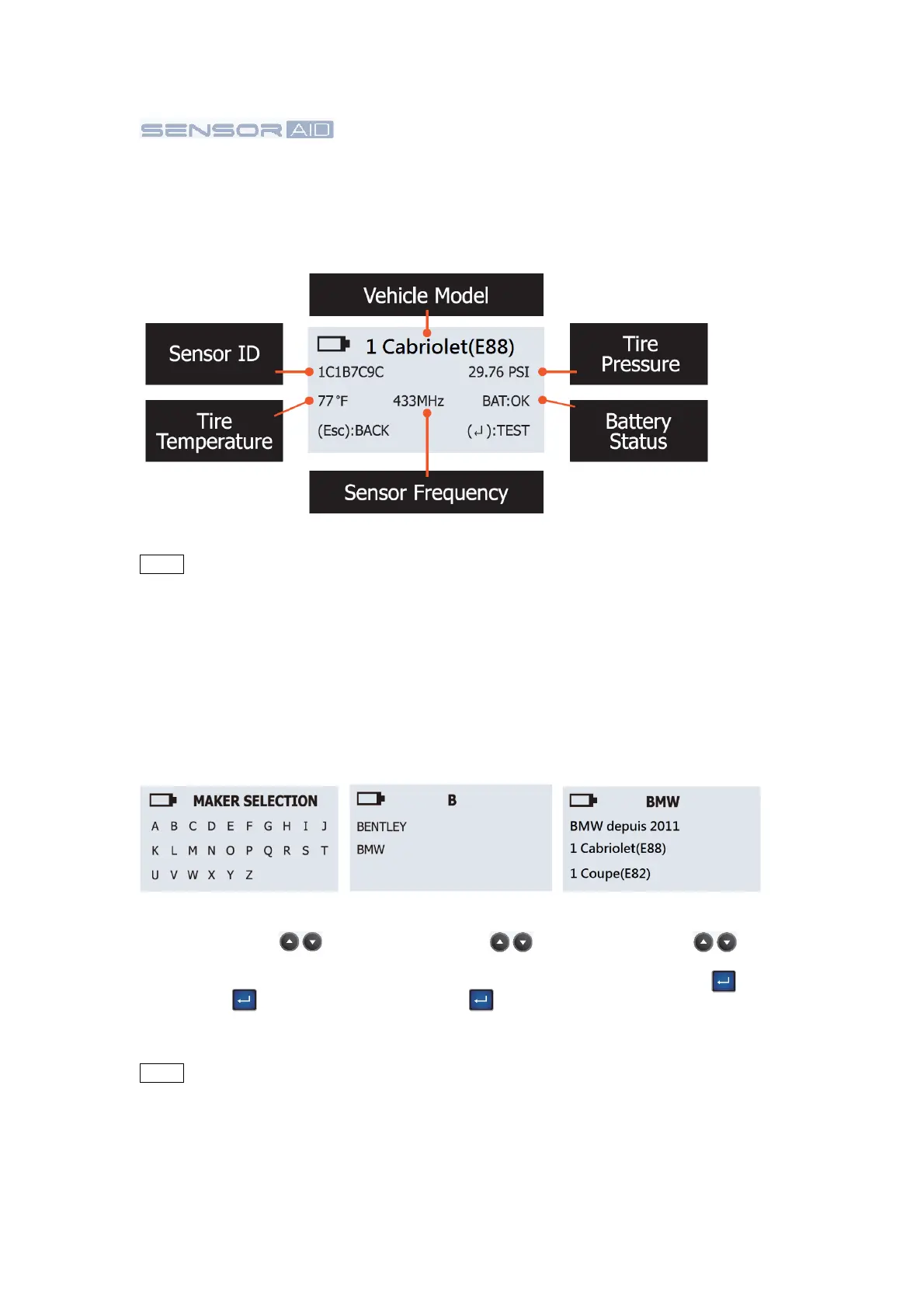
Maker selection:
Use the arrow key
to browse through
alphabets, and press the
“Enter” key to select.
Maker selection:
Use the arrow key
to browse through
automakers, and press
the “Enter” key to
select.
Model selection:
Use the arrow key
to browse models, and
press the “Enter” key
to select.
Diagnosing a
Sensor-
Results Description
The
picture
below is an
example
of sensor data
communication result
NOTE The Sensor AID will identify the sensor
information
that
is
transmitted. Not
all
sensors transmit every
piece of information
shown.
3.
New Sensor-
Duplicate an
O.E
sensor
This function
is
designed
for you to bypass OBDII and automatically duplicate
an O.E
sensor.
NOTE Duplicate and Program function will only work with CUB’s Sensor-AID and
Uni-sensor.
04