41
2
Press the < SET > button to
conrm.
5. TTL: Fully Automatic Wireless
Flash Shooting
Autoash Shooting with One Slave Unit
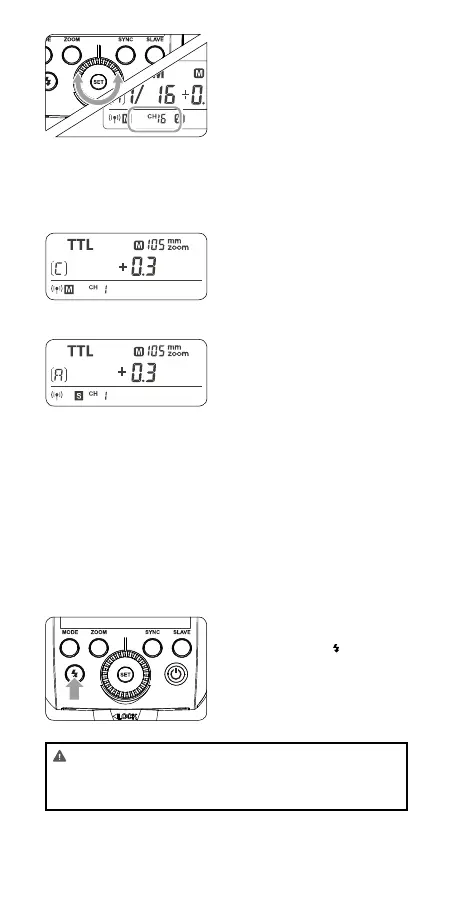
1
Master Unit Setting
• Attach a CUlight FR 36C
camera ash on the cam-
era and set it as the mas-
ter unit. (Page 39)
• A/B/C can be set as TTL
mode independently.
2
Slave Unit Setting
• Set the CUlight FR 36C
that to be controlled as
the wireless slave unit.
(Page 40)
• The slave unit can be set
as A/B/C.
3
Check the communica-
tion channel
• If the master unit and slave
unit(s) are set to a different
channel, set them to the
same channel. (Page 40)
4
Position the camera and
ashes
• Position the camera and
ashes as the picture
shows. (Page 43)
5
Check the ash operation
• Press the master unit’s
Test Button< >.
• Then, the slave unit will
re. If not, adjust the slave
unit’s angle toward the
master unit and distance
from the master unit.
• The slave unit might be out of order or re an unwanted
ash due to the nearby wi routers or other 2.4G equip-
ments. If in this case, please adjust the ash’s channel or
turn off the 2.4G equipments.



 To Next Page