42
6. M: Wireless Flash Shooting
with Manual Flash
This describes wireless (multiple shooting) using manual ash.
You can shoot with a different ash output setting for each slave
unit (ring group). Set all parameters on the master unit.
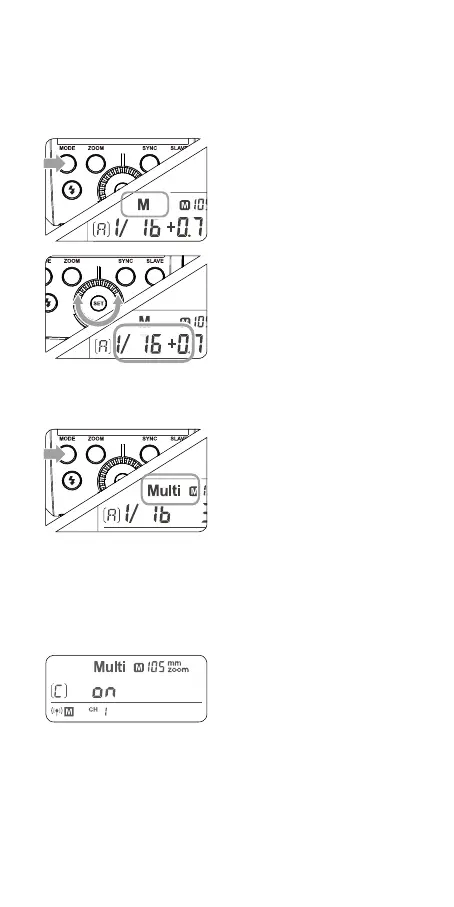
1
Setting the ash mode
to < M >
• Press the < MODE > But-
ton to set the ash to M
mode.
2
Setting ash output
• Turn the Select Dial to set
the ash output of the
groups.
3
Taking the picture
• Each group res at the set
ash ratio.
7. Multi: Wireless Flash Shooting
with Manual Flash
1
Setting < Multi > strobo-
scopic ash.
• Long press the < MODE >
button for 2 seconds so
that <Multi > is displayed.
Long press the < MODE >
button for 2 seconds again
to exit.
2
Setting ash output/ash
frequency/ash times.
• Setting the ash out-
put/ash frequency/ash
times in the A group. Set-
ting the multi ash mode.
(see Page 38)
• B and C group can only
control the ON/OFF of the
slave unit by pressing the
< MODE > Button.
Using a ash (master/slave) with a radio transmission wireless
shooting function make it easy to shoot with advanced wireless
multiple ash lighting, in the same way as TTL autoash shooting.
The basic relative position and operation range are as shown in
the picture. You can then perform wireless TTL autoash shoot-
ing just by setting the master unit to < TTL >.



 To Next Page