38
i-TTL Flash Mode
This ash has three ash modes: i-TTL, Manual (M), and RPT
(Stroboscopic). In i-TTL mode, the camera and the ash will
work together to calculate the correct exposure for the subject
and the background. In this mode, multiple TTL functions are
available: FEC, HSS, second curtain sync, modeling ash, etc.
*Press < MODE > Mode Selection Button and three ash modes
will display on the LCD panel one by one with each pressing.
i-TTL Mode
Press < MODE > Mode Selection Button to enter i-TTL mode.
The LCD panel will display.
• Press the camera release button halfway to focus. The
aperture and effective ash range will be displayed in the
viewnder.
• When the shutter button is fully pressed, the ash will re a
pre- ash that the camera will use to calculate exposure and
ash output the instant before the photo is taken.
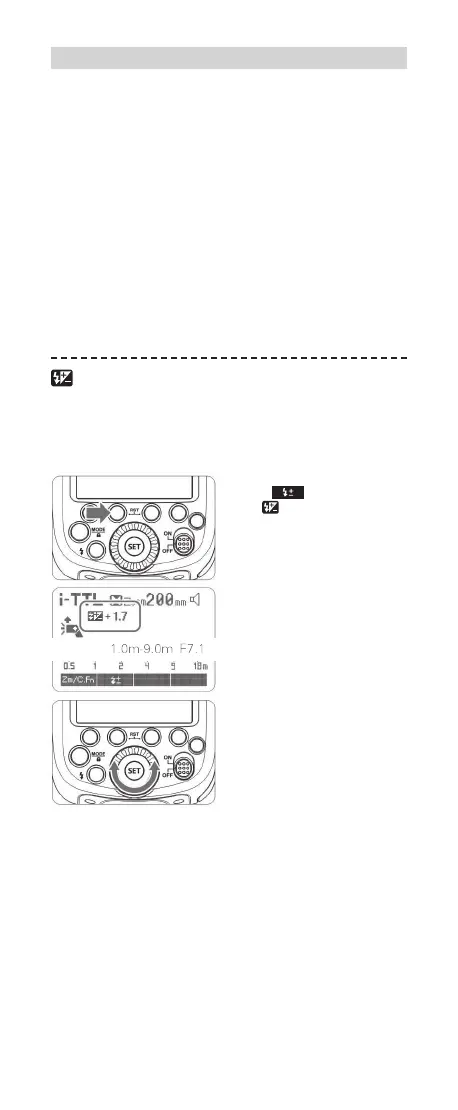
FEC: Flash Exposure Compensation
With FEC function, this ash can adjust from -3 to +3 in 1/3rd
stops. It is useful in situations where minor adjusting of the TTL
system is needed based on the environment.
Setting FEC:
1
Press Function Button
2 < >. The icon
<
> and ash exposure
compensation amount will
be highlighted on the LCD
panel.
2
Set the ash exposure
compensation amount.
• Turn the Select Dial to set
the amount.
• “0.3”means 1/3 step,
“0.7”means 2/3 step.
• To cancel the ash expo-
sure compensation, set the
amount to “+0”.
3
Press <SET> button again
to conrm the settings.
R
R
FR60X_Nikon 171010.indd 38 10.10.2017 17:14:01



 To Next Page