43
1. Wireless Settings
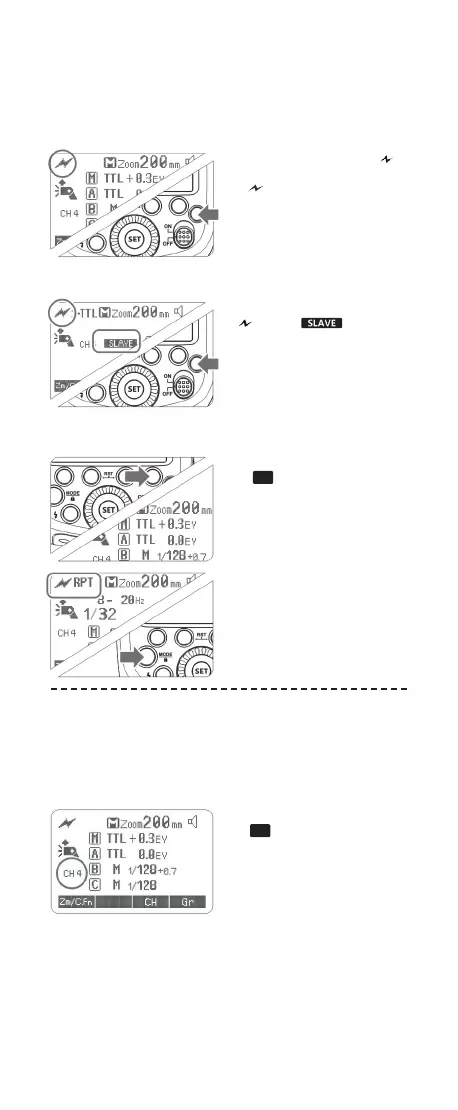
You can switch between normal ash and wireless ash. For
normal ash shooting, be sure to set the wireless setting to OFF.
Master Unit Setting
Press <R> button so that < >
is displayed on the LCD panel.
If < RPT > is displayed, it
means RPT mode is ON.
The backlight turns green now.
Slave Unit Setting
Press <R> button again so that
<
> and < > are
displayed on the LCD panel.
The backlight turns orange now.
2. Setting Master Unit‘s Flash Mode
1
Press Function Button 4
<
CH
> and turn the Select
Dial to choose a channel ID
from 1 to 4.
2
Press the <SET> button to
conrm.
3. Setting the Communication Channel
If there are other wireless ash systems nearby, you can change
the channel IDs to prevent signal interference. The channel IDs
of the master unit and the slave unit(s) must be set to the same.
1
Press Function Button 3
<
CH
> and turn the Select
Dial to choose a channel ID
from 1 to 4.
2
Press the <SET> button to
conrm.
R
R
FR60X_Nikon 171010.indd 43 10.10.2017 17:14:02



 To Next Page