49
Creating a Catchlight
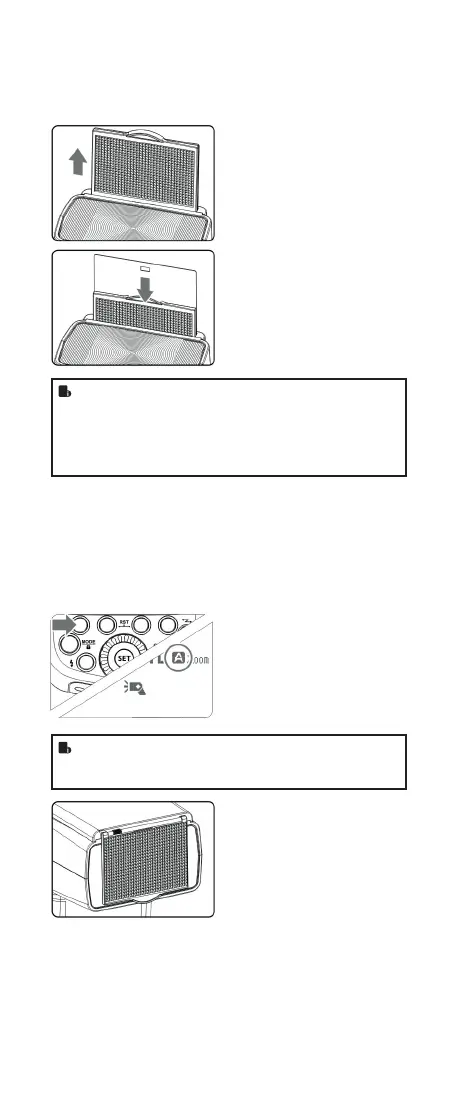
With the catchlight panel, you can create a catchlight in the
subject’s eyes to add life to the facial expression.
1
Point the ash head upward
by 90°.
2
Pull out the wide panel. The
catchlight panel will come out
at the same time.
3
Push the wide panel back in.
• DPush in only the wide
panel.
• Follow the same proce-
dures as for bounce ash.
• Point the ash head straight ahead and then upward by
90°. The catchlight will not appear if you swing the ash
head left or right.
• For best catchlight effect, stay 1.5m/4.9ft away from the
subject.
ZOOM: Setting the Flash Coverage and
Using the Wide Panel
The ash coverage can be set automatically or manually. It can
be set to match the lens focal length from 20 mm to 200mm.
Also, with the built-in wide panel, the ash coverage can be
expanded for 14mm wide-angle lenses.
In Manual Zoom mode, press
the <ZOOM/C.FN> button.
• Turn the Select Dial to change
the ash coverage.
• If < A > is displayed, the
ash coverage will be set
automatically.
• If you set the ash coverage manually, make sure it
covers the lens focal length so that the picture will not
have a dark periphery.
Using the Wide Panel
Pull out the wide panel and place
it over the ash head as shown.
The ash coverage will then be
extended to 14 mm.
• The catchlight panel will come
out at the same time. Push the
catchlight panel back in.
• The < ZOOM/C.FN > button
will not work.
FR60X_Nikon 171010.indd 49 10.10.2017 17:14:07



 To Next Page