39
High-Speed Sync
High Speed Sync (FP ash) enables the ash to synchronize with
all camera shutter speeds. This is convenient when you want to
use aperture priority for ll-ash portraits.
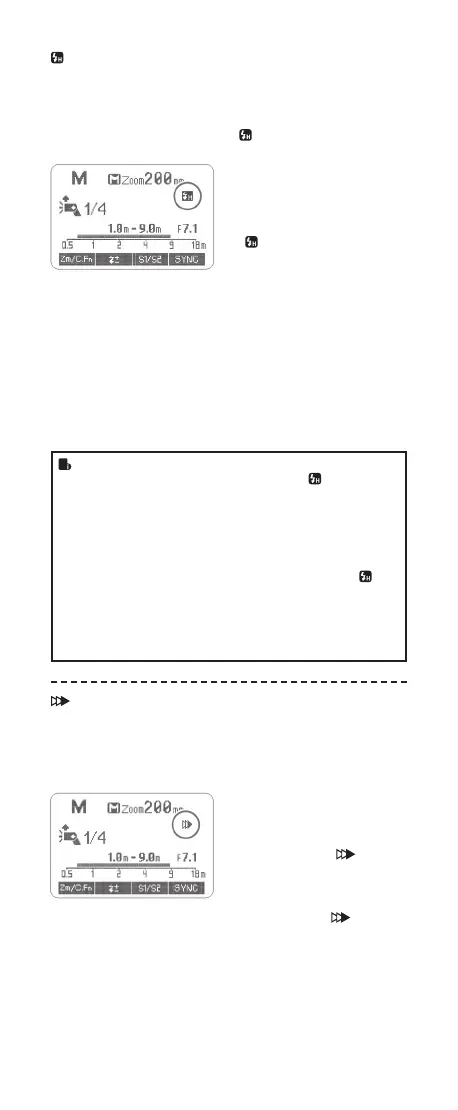
Select the high-speed sync icon <
>.
• Set the ash sync speed to
1/320s (Auto FP) or 1/250s
(Auto FP) in the Nikon camera
menu. Press the shutter
button halfway. The icon
<
> displayed on the ash
screen means the high speed
sync function is enabled on
the ash.
• Turning the camera command
dial can set the shutter speed
to 1/250s or faster.
• To check if the FP ash
function works properly, look
through the shutter speed in
the viewnder. If it shows a
speed of 1/250s or faster, the
FP ash function is on work.
• If you set a shutter speed as 1/320s (Auto FP) or 1/250s
(Auto FP) in the Nikon camera setting, < > will be
displayed in the ash screen regardless of practical
shutter speed.
• With high-speed sync, the faster the shutter speed, the
shorter the effective ash range.
• To return to normal ash, set the ash sync speed to
other options other than Auto FP. Then the icon <
> will
disappear when pressing the shutter halfway.
• Multi ash mode cannot be set in high-speed sync mode.
• Over-temperature protection may be activated after 15
consecutive high-speed sync ashes.
Second-Curtain Sync
With a slow shutter speed, you can create a light train following
the subject. The ash res right before the shutter closes.
• Set the camera to Rear mode
and press the shutter button
halfway, then the ash display
panel will show the second
curtain sync icon <
>.
• When the camera is not set
to Rear mode, pressing the
shutter button halfway will not
light up the icon <
> on the
ash display panel.
FR60X_Nikon 171010.indd 39 10.10.2017 17:14:01



 To Next Page