45
1. Wireless Settings
You can switch between normal ash and wireless ash. For
normal ash shooting, be sure to set the wireless setting to OFF.
Master Unit Setting
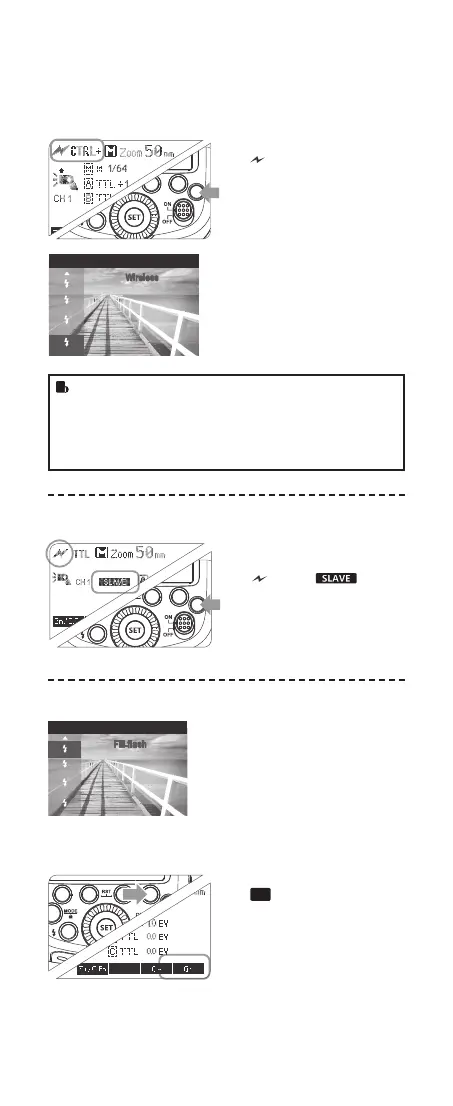
1
Press <R> button so that
< > and <CTRL+> are
displayed on the LCD panel.
2
The backlight turns green
now.
Slave Unit Setting
1
Press <R> button so that
< > and < > are
displayed on the LCD panel.
2
DThe backlight turns orange
now
1
Press Function Button 4
<
Gr
> to choose the group
from M/A/B/C. Then, press
Function Button 3 < MODE >
so that the master unit can
work in OFF / TTL ash
mode. Choose one of them
as the ash mode of master
unit.
Flash Mode
SLOW
REAR
Wireless
R
• Note: In the master unit mode <sCTRL+>, you should
set the camera to wireless lighting mode (WL) when at-
taching the camera ash. If the camera is not set to WL
state, a note „SET YOUR CAMERA“ will be displayed on
the camera ash. As for how to set camera to wireless
lighting mode (WL), please refer tot he camera’s manual.
R
Exit Optical Wireless Lighting Mode
Flash
Mode
SLOW
REAR
Fill-flash
1
Set the camera to NON wireless
lighting mode
2
Press <R> Wireless Selection
Button to switch to other modes.
2. Setting Master Unit‘s Flash Mode
616x0_CUlight_FR60X_BDA_Sony englisch.indd 45 24.10.2016 13:59:19



 To Next Page