49
Using Fully Automatic Wireless Flash
The FEC and other settings that set on the master unit will also
be appeared on the slave unit automatically. The slave unit does
not need any operation. Use the following settings to make
wireless ashes according to the same methods with normal
ash shooting.
• Flash Exposure Compensation (
Page 40)
About Master Unit
Use two or more master units. By preparing several cameras
that with master units ash attached, cameras can be changed
in shooting while keeping the same lighting source (slave unit).
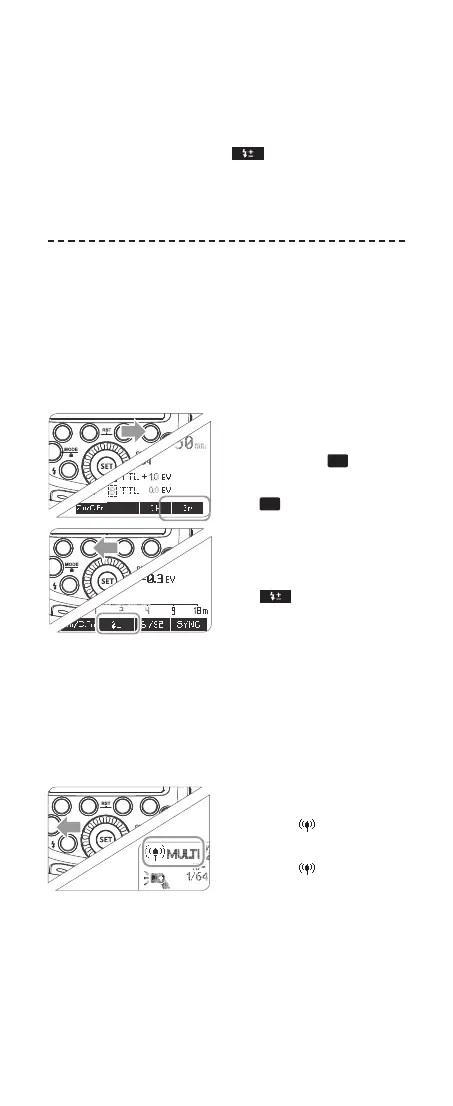
5. M: Wireless Flash Shooting with Man-
ual Flash
This describes wireless (multiple shooting) using manual ash.
You can shoot with a different ash output setting for each slave
unit (ring group). Set all parameters on the master unit.
1
Setting the ash mode
to <M>.
• Drücken Sie die Funk-
tionstaste 4 <
Gr
>, um
Gruppen auszuwählen.
• Press Function Button 4
<
Gr
> to choose groups.
Then, press Function But-
ton 3 <MODE> to set the
ash to M mode.
2
Setting ash output.
• Press Function Button 2
< >. Turn the Select
Dial to set the ash output
of the groups. Press the
<SET> button to conrm.
3
Taking the picture.
• Each group res at the set
ash ratio
6. Multi: Manual Wireless Flash Shooting
1
Setting stroboscopic ash
<MULTI>
• Press <MODE> button
so that < MULTI> is
displayed.
• Press <MODE> button
so that < MULTI> is
displayed.
Using a ash (master/slave) with a radio transmission wireless
shooting function make it easy to shoot with advanced wireless
multiple ash lighting, in the same way as TTL autoash shoot-
ing. The basic relative position and operation range are as shown
in the picture. You can then perform wireless TTL autoash
shooting just by setting the master unit to <TTL>.
616x0_CUlight_FR60X_BDA_Sony englisch.indd 49 24.10.2016 13:59:24



 To Next Page