LOOP® IC Controller Programming
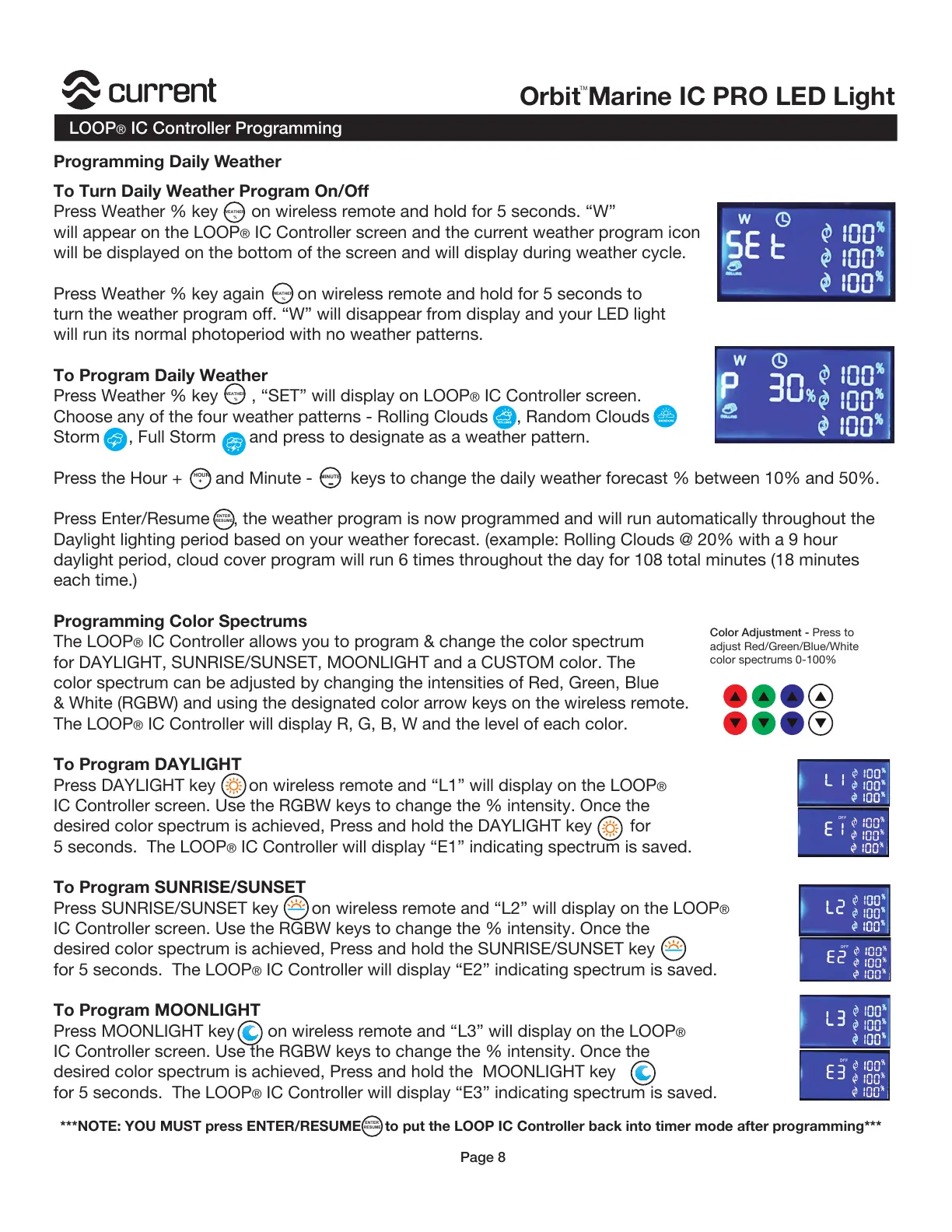
To Turn Daily Weather Program On/Off
Press Weather % key on wireless remote and hold for 5 seconds. “W”
will appear on the LOOP
® IC Controller screen and the current weather program icon
will be displayed on the bottom of the screen and will display during weather cycle.
Press Weather % key again on wireless remote and hold for 5 seconds to
turn the weather program off. “W” will disappear from display and your LED light
will run its normal photoperiod with no weather patterns.
To Program Daily Weather
Press Weather % key , “SET” will display on LOOP
® IC Controller screen.
Choose any of the four weather patterns - Rolling Clouds , Random Clouds
Storm , Full Storm and press to designate as a weather pattern.
Press the Hour + and Minute - keys to change the daily weather forecast % between 10% and 50%.
Press Enter/Resume , the weather program is now programmed and will run automatically throughout the
Daylight lighting period based on your weather forecast. (example: Rolling Clouds @ 20% with a 9 hour
daylight period, cloud cover program will run 6 times throughout the day for 108 total minutes (18 minutes
each time.)
Programming Color Spectrums
The LOOP
® IC Controller allows you to program & change the color spectrum
for DAYLIGHT, SUNRISE/SUNSET, MOONLIGHT and a CUSTOM color. The
color spectrum can be adjusted by changing the intensities of Red, Green, Blue
& White (RGBW) and using the designated color arrow keys on the wireless remote.
The LOOP
® IC Controller will display R, G, B, W and the level of each color.
To Program DAYLIGHT
Press DAYLIGHT key on wireless remote and “L1” will display on the LOOP
®
IC Controller screen. Use the RGBW keys to change the % intensity. Once the
desired color spectrum is achieved, Press and hold the DAYLIGHT key for
5 seconds. The LOOP
® IC Controller will display “E1” indicating spectrum is saved.
To Program SUNRISE/SUNSET
Press SUNRISE/SUNSET key on wireless remote and “L2” will display on the LOOP
®
IC Controller screen. Use the RGBW keys to change the % intensity. Once the
desired color spectrum is achieved, Press and hold the SUNRISE/SUNSET key
for 5 seconds. The LOOP® IC Controller will display “E2” indicating spectrum is saved.
To Program MOONLIGHT
Press MOONLIGHT key on wireless remote and “L3” will display on the LOOP
®
IC Controller screen. Use the RGBW keys to change the % intensity. Once the
desired color spectrum is achieved, Press and hold the MOONLIGHT key
for 5 seconds. The LOOP
® IC Controller will display “E3” indicating spectrum is saved.
MINUTE
HOUR
+
%
WEATHER
-
ENTER
RESUME
Color Adjustment - Press to
adjust Red/Green/Blue/White
color spectrums 0-100%
%
WEATHER
%
WEATHER
***NOTE: YOU MUST press ENTER/RESUME to put the LOOP IC Controller back into timer mode after programming***
Page 8
ENTER
RESUME
Programming Daily Weather


 To Next Page
 Loading...