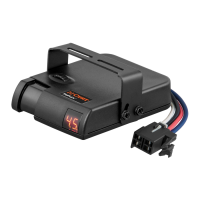
The CURT Echo® Under-Dash Trailer Brake Controller is a sophisticated device designed to manage trailer braking systems, enhancing safety and control while towing. This installation manual provides comprehensive instructions for setting up, configuring, and maintaining the device, ensuring optimal performance.
Function Description
The Echo® is an electronic trailer brake controller that operates on 12-volt negative ground systems. Its primary function is to apply trailer brakes proportionally to the tow vehicle's braking action, or manually when desired. The device connects to the tow vehicle's electrical system and the trailer's brake system, allowing for seamless integration and control. It utilizes Bluetooth technology to connect with a mobile application, 'OneControl® Auto', which serves as the primary interface for setup, adjustments, and monitoring. This under-dash module is designed to be securely mounted within the tow vehicle, with its orientation not affecting performance.
The brake controller manages the output of power to the trailer brakes, allowing for adjustments to both the maximum output and sensitivity. The maximum output determines the highest level of power available to the trailer brakes during braking, while sensitivity adjusts the aggressiveness of the trailer's braking response. These settings are crucial for achieving smooth, firm stops under various load and road conditions.
A key feature of the Echo® is its manual brake activation. By pressing and holding an orange button within the mobile app, the user can manually apply the trailer brakes. This is particularly useful in situations where a slow reduction in speed is desired, independent of the tow vehicle's brakes. The app provides a visual indicator, an orange outer ring, to show the current brake output level during manual activation.
The device also incorporates safety features such as brake light activation. Depending on the switch setting, the tow vehicle and trailer brake lights can be activated when manual control is actuated, increasing visibility. Additionally, it can manage trailer brake response when the vehicle's hazard lights are active, preventing pulsing brake output.
Usage Features
The Echo® brake controller is operated primarily through the 'OneControl® Auto' mobile application, available for Apple and Android devices. After initial installation and wiring, the device pairs with the smartphone via Bluetooth. The pairing process requires enabling Bluetooth on the mobile device and entering a unique six-digit PIN found on the controller unit or quick reference card. It's important to note that pairing should occur within the app, not through the smartphone's Bluetooth settings menu.
Once paired, the app guides the user through an initial setup process, including registration and agreement to end-user terms. The core of the app's functionality revolves around 'Controller Profiles'. Users can create and save multiple profiles for different vehicles, trailers, and load conditions. Each profile allows for customization of vehicle and trailer descriptions. These profiles can be easily switched by swiping left or right on the home screen, and the active profile is displayed prominently.
Within an active profile, users can access and adjust the key settings: Max Output and Sensitivity Level. These adjustments are made by tapping the respective buttons in the app and using '+' or '−' buttons to increase or decrease values. It is recommended to perform these adjustments during a test drive in a safe environment, such as a parking lot, to achieve optimal braking performance. The app also features a toggle for 'Vehicle Hazard Lights' to prevent pulsing brake output when the tow vehicle's hazard lights are active.
The device's status is communicated through a single LED indicator on top of the unit. Different colors and flashing patterns signify various states, such as device not paired (flashing blue), device paired (solid blue), calibrating (flashing yellow), wiring error (flashing red), hardware fault (solid red), or no power (no light on). This LED provides quick visual feedback on the controller's operational status.
For manual control, the unit features two small switches located at the front. One switch controls the brake light activation feature, allowing users to turn it 'ON' or 'OFF'. The other switch controls the level of output available to the trailer brakes when using manual control, either limiting it to the output control setting ('ON' position) or allowing 100% output ('OFF' position). These switches can be adjusted using a small pointed tool.
Maintenance Features
Proper installation and wiring are crucial for the long-term reliability and performance of the Echo® brake controller. The manual emphasizes disconnecting the tow vehicle's negative battery terminal before installation and mounting the 30-amp, auto-reset circuit breaker as close to the battery as possible. Wires should be routed through existing grommets or protected with silicone sealant to prevent damage from sharp edges.
The main module must be mounted firmly in place to prevent improper operation or brake failure. While the orientation of the module does not matter, it should be installed in a location that allows for easy access for troubleshooting, even if out of sight. The provided adhesive pad and zip-ties are used for secure mounting.
Regular checks of the wiring connections are important. The manual provides a detailed wiring diagram and instructions for connecting the device to the tow vehicle's battery, stoplight switch, and trailer connector. It warns against reversing black and white wire connections, as this can damage the unit.
The mobile application itself serves as a maintenance tool by providing real-time status updates and error notifications. The LED status indicator on the device also helps in quickly diagnosing issues such as wiring errors, hardware faults, or connectivity problems. The troubleshooting guide in the manual offers solutions for common issues based on the LED status and app signals, such as 'low voltage' or 'overload'.
In case of connectivity issues, the manual advises checking Bluetooth settings, granting location permissions to the app, and ensuring the correct PIN is entered. If the device cannot connect due to an incorrect or missing PIN, contacting CURT product support with the serial number is recommended.
The manual also stresses the importance of re-adjusting output and sensitivity settings whenever there are significant changes in weather, road conditions, trailer weight, or towing setup. This proactive adjustment ensures consistent and safe braking performance. Testing all trailer lights while the trailer is plugged into the Echo® is also a recommended pre-driving check.
Finally, the product registration process on curtmfg.com/registration allows users to provide feedback, which helps in improving future products and ensures access to warranty support. Sharing experiences and leaving reviews on curtmfg.com/51190 also contributes to the community and product development.



 To Next Page
 General