EasyManua.ls Logo

CWT 5016 - Install; Size; Led Indicator Description; Terminal Description

CWT 5016
14 pages
Print Icon
To Next Page IconTo Next Page
To Previous Page IconTo Previous Page
Loading...
5
SHEN ZHEN YIKEHUDONG
TECHNOLOGY TRADE LT
D
TEL
+86
-
755
-
3
INSTALL
3.1
size
3.2
LED indicator
description
Indicator
Status
Indication description
SRV (
Orange
)
Light on
during
handling
It will be light on when the system sends short messages and
light off when the ha
ndling is over
ACT(
Yellow
)
Flicker
It will flicker periodically when the system is under operation, and
the interval time is 6 sec
NET (
Red
)
Flicker
GSM
module signal indicator, which will flicker slowly after the
system is registered in GSM network
BAT
(
Green
)
Light on
during
charge
It is on
during
interior
battery
is
charging
Instal
l SIM card
Press the small yellow dot,
the SIM card drawer will
spring out automatically. Take
out the drawer, put the SIM
card in it on the slot direction
and plug back the drawer.
Buzzer Reset button
press
the button to clear buzzer
alarm sound
MIC
3.5mm audio in
connect MIC to monitor voice
SPK
3.5mm audio out
connect
loudspeaker
to speak
CWT501
6
Use
r
s manual
6
www.mobq2000.com
3.3
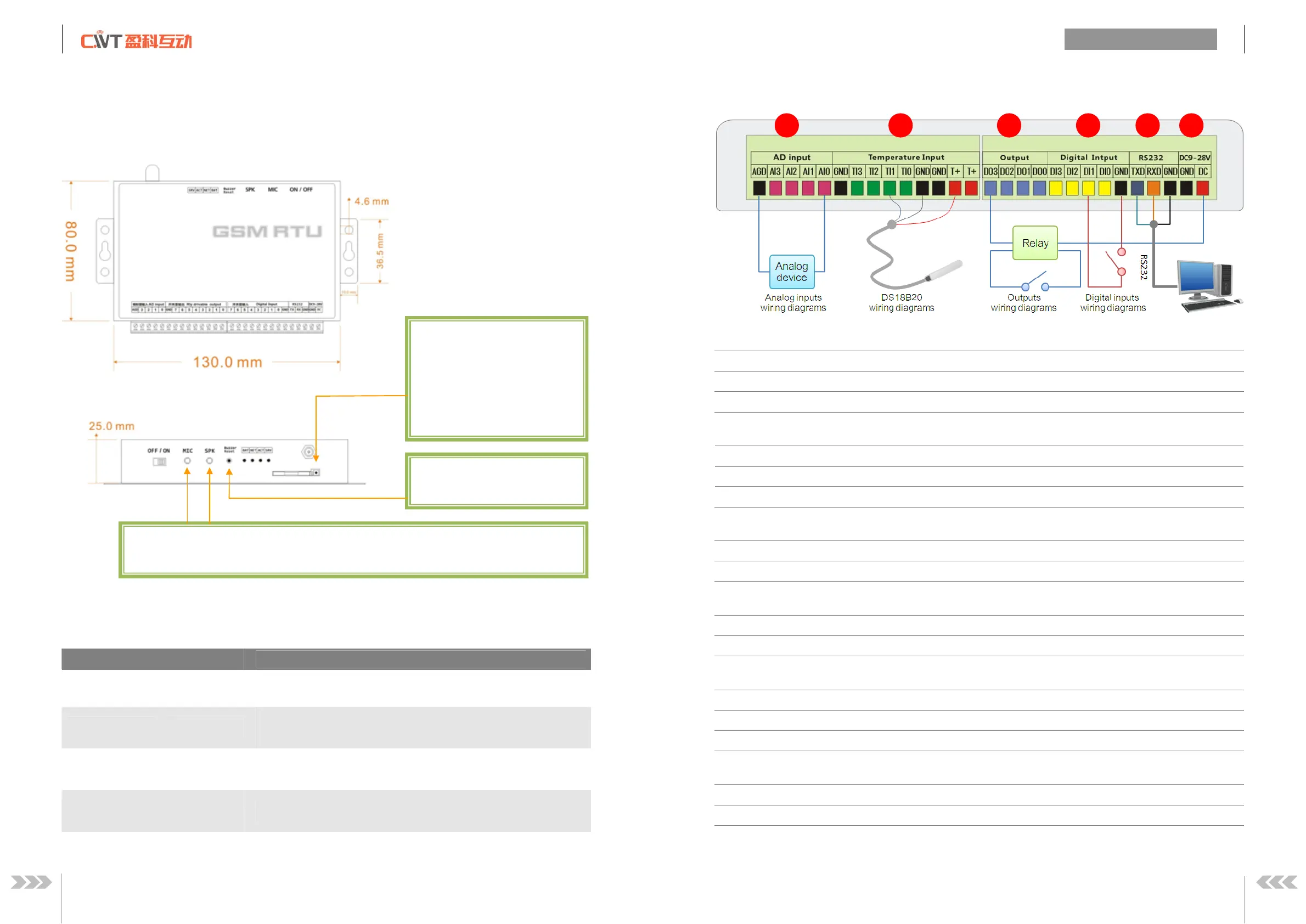
Terminal
Description
.
DC
9
-
2
8
V
(
power in
)
DC
positive terminal of the DC power supply (+)
GND
Negative terminal of the DC power supply (
-
)
Warning
must be careful that
the polarity is not reversed
, otherwise
, the output will be
damage
.
RS232
RXD
Receive Data
Connect RS232 cable orange wire
TXD
Transmit Data
Connect RS232 cable blue wire
GND
Ground
Connect RS232 cable black wire
.
4
digital inputs (NO or NC)
DI0
DI
3
Conn
ect
NO
or
NC
GND
Connect
COM
.
4
drivable relay output
s
DO0
DO
3
negative pole of relay coil
DC
Positive pole of relay coil
.
4 temperature inputs
T+
DS18
B
20
V
DD
GND
DS18
B20
GND
TI0~TI3
DS18
B20
DQ
.
4
analog inputs
AIN
0
AIN3
C
onnect analog device output
A
GD
GND
1
2
3
4
6
5