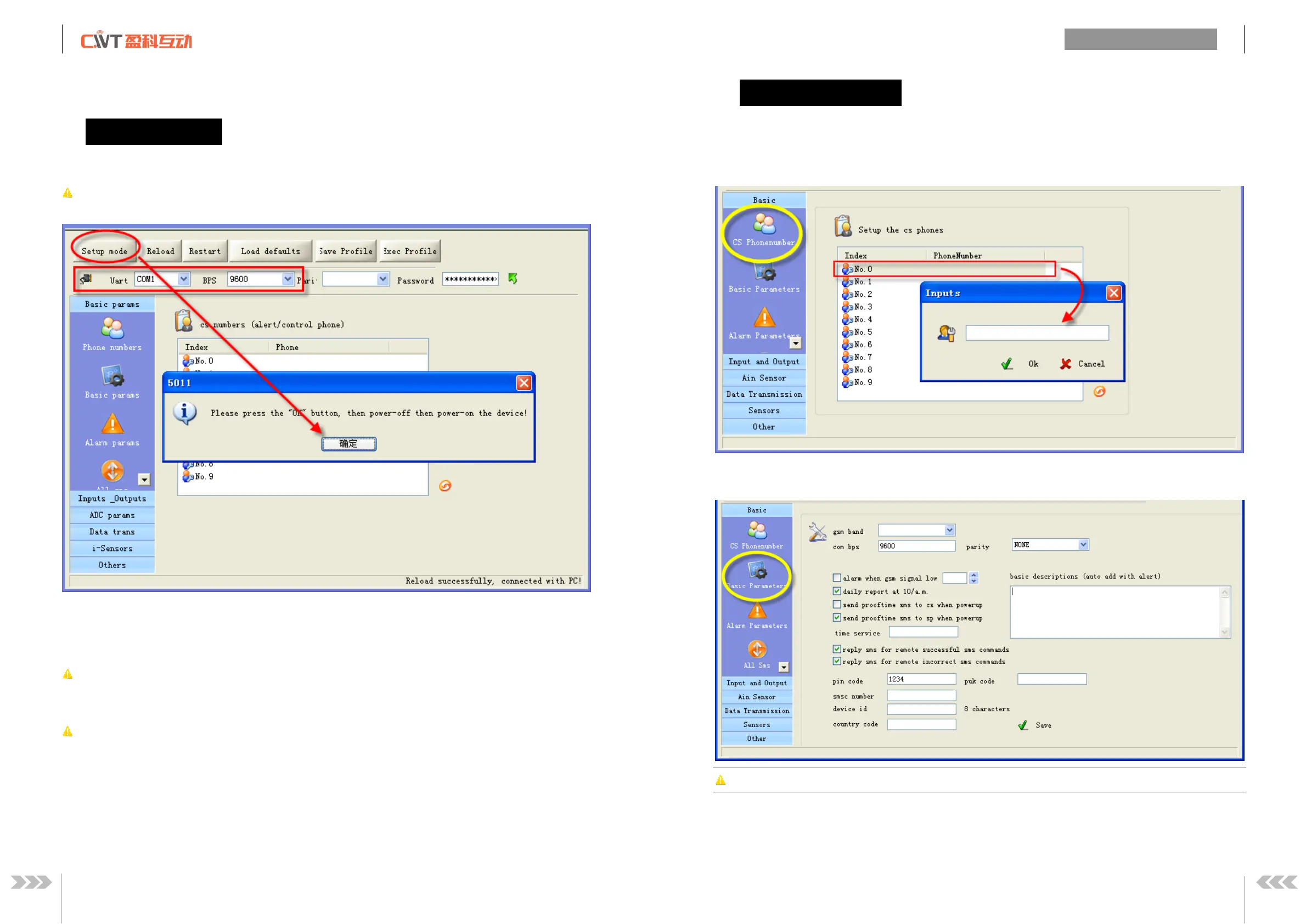
Connect RTU and computer with RS232 cable,
open the configuration software, make
setup mode according to the following figure.
ote: Please choose the serial port No.
, the default communication rate is
efinition: Working mode and setup mode
In setup mode, all functions
disabled, only to setup parameters.
RTU must be restart to enter
working mode, all functions is enabled, t
he RTU can alarm and be control.
Access setup mode, the simcard and antenna is no need, but access wording mode, the simcard and
How to know current mode:
ethod 1: Check the ACT light, if the ACT light flickers twice per se
cond, that means it is under the setup
flicker period of the ACT light can be up to 6 sec under the working mode.
ethod 2: Check the information from the serial port, if the
occurs, it means that RTU
can send sms commands to control RTU and receive sms
(include alarm sms, report sms etc).
User can set 10 CS numbers, CS0
bps, uart, pin code, country code please using the default


 To Next Page