EasyManua.ls Logo

CWT 5016 - Alarm Parameter Configuration

CWT 5016
14 pages
Print Icon
To Next Page IconTo Next Page
To Previous Page IconTo Previous Page
Loading...
9
SHEN ZHEN YIKEHUDONG
TECHNOLOGY TRADE LT
D
TEL
+86
-
755
-
below
the
preset threshold
, the default is 11.
D
aily
report
enable
the option
, RTU
will send a report sms to CS number at 10:00 every morning for reporting current
states, through which the user
can make sure the normal operation of RTU.
Proof time
Proof time
is keeping the RTU
s
os (operation system) has correct time. RTU can execute daily report,
timing arm or disarm, timing output at correct time.
S
end
proof time
sms to cs when
power up
When
R
TU
power up
, it send a sms to CS0 to request
proof time
, CS0 can reply
sms”
999
to
RTU to
complete
proof time
.
S
end
proof time
sms to sp when
power up
SP phone number is
a phone that cans
automatic reply a SMS to any incoming SMS, RTU use it to
update inte
rior Clocker by the timestamp in SMS, the SMS contents is not important
.
D
evice description
You
can add description with RTU (such as install
position,
user information)
, the
description
is
show in
RTU alarm
sms
.
Device ID
T
he device ID is
an
8
-
byte
ASCII
characters which
is
show in
RTU state
sms
.
4.2.3
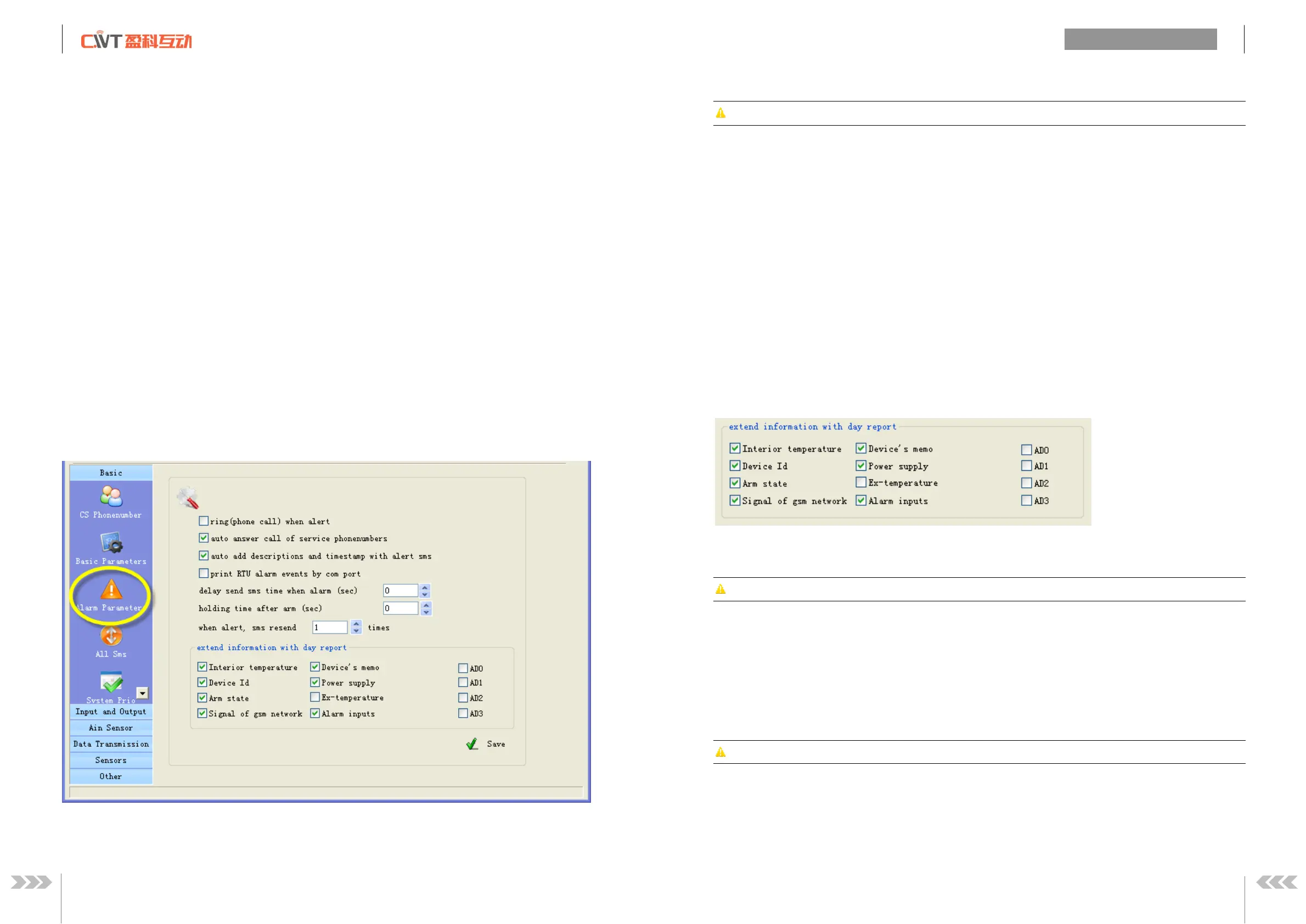
Alarm parameters
ring when alert
Enable
this option, RTU will give CS number a phone call then send sms when alarm
CWT501
6
Use
r
s manual
10
www.mobq2000.com
auto answer call
of
service phone
number
s
Attention
:
This
option is
valid
for the RTU
models t
hat have
audio
interface
.
If
MIC and speaker are
connected;
RTU auto answer when CS
numbers call
it, so user can
remote
monitor
voice and speaking.
A
uto add basic description with alert sms
Enable
this option,
the description (such as install
position,
use
r information) that have been defined by
user will show in alarm sms
and
daily report sms.
print RTU alarm events by com port
Enable
this option, when RTU alarm, it sends the alarm data to com port with CWT_IO data format.
delay send sms time when
alarm
(di
sarm delay)
Define the
time;
you have
an
enough
time to disarm RTU when you go into the monitor area.
time after arm
(
arm delay time)
Define the
time;
you have
an
enough
time to arm RTU when you leave the monitor area.
Extend information with report
RTU
can send report sms to cs phones by timer or user
s
inquiry
by sms command, this function is
designed to let user know the
RTU
is s
tilling working and its status, enable or disable follow
information
to show in report.
Interior temperature:
T
he
inte
rnal temperature sensor
is optional, if RTU
has added
it,
the
temperature value
will
show in the daily report.
Attention
A standard
RTU
have not internal temperature sensor
Device Id:
enable this option, ID will show in the daily report.
Arm status:
enab
le this option, arm or disarm status will show in the daily report.
Signal of gsm network:
enable this option, GSM signal value will show in the daily report.
Device’s memo
:
enable this option, Device description will show in the daily report.
Power supply
status:
enable this option, the daily report will show power supply status
Ex
-
temperature
:
Attention
:
This
option is
valid
for the RTU
models that have
temperature inputs (DS18B20 inputs).
Enable th
is
option, all the value of
extend
temperature sensor
will show in the daily report.
Alarm inputs:
enable this option,
the
input
s
that are in alarm
status will show in the daily report.
AD0~AD3:
enable those options, all the value of AD input will show in the daily report.