EasyManua.ls Logo

CyberPower CPS600E - User Manual

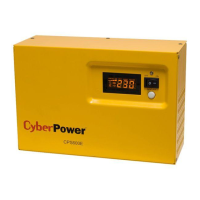
CyberPower CPS600E
16 pages
Print Icon
To Next Page IconTo Next Page
Loading...
User’s Manual
CPS600E
CyberPower Europe
CyberPower Systems B.V.
Flight Forum 3545, 5657DW Eindhoven, The Netherlands
Tel: +31 (0)40 2348170
Fax: +31 (0)40 2340314
Website: http://eu.cyberpowersystems.com/
E-mail: sales@cyberpower-eu.com
K01-0000186-00

Questions and Answers

  • S
    simsstevenJul 26, 2025
    Why CyberPower UPS will not turn on?
    • P
      Paula SextonJul 26, 2025
      If your CyberPower UPS won't turn on, there are a few potential causes. The on/off switch might be preventing damage from rapid cycling. To resolve this, turn the UPS off, wait 10 seconds, and then turn it back on. Also, make sure the unit is properly connected to a 220/230V outlet.
  • S
    Stephanie AdamsAug 11, 2025
    What to do if CyberPower UPS outlet does not provide power?
    • J
      Jennifer ReedAug 11, 2025
      If the CyberPower UPS outlet isn't providing power, there could be several reasons. First, the input fuse might be blown due to an overload. To fix this, turn off the EPS, unplug any connected equipment, and disconnect the EPS power cord. Then, remove the fuse compartment beneath the AC inlet, replace the blown fuse with a spare that meets the specifications, and lock the compartment. Reconnect the power cord and turn the EPS back on, ensuring the equipment plugged in doesn't exceed the UPS's capacity. Another reason might be that the batteries are discharged, in which case you should recharge the unit for at least four hours.

Summary

Safety and EMC Instructions

Do Not Use for Medical or Life Support Equipment

Prohibits use with life support, medical applications, or patient care equipment.

Do Not Use With or Near Aquariums

Warns against use near aquariums due to condensation causing short circuits.

Do Not Install Near Heat or Sunlight

Advises against installing the unit in direct sunlight or near heat sources.

Do Not Block Ventilation Openings

Emphasizes the importance of keeping ventilation openings clear for proper airflow.

Installing Your EPS

Unpacking

Instructions for inspecting the contents of the EPS package upon receipt.

Automatic Voltage Regulator

Explains the function of the EPS in regulating inconsistent utility power.

Hardware Installation Guide

Provides step-by-step instructions for physically installing the EPS unit.

Basic Operation

Description

Details the components and features of the EPS unit for basic understanding.

Replacing the Battery

Definitions for Illuminated LCD

EPS Status Inquiry and Functions Setup

General Mode

Describes how to check EPS status and perform basic inquiries.

Set-Up Mode

Details how to enter and configure various user-adjustable settings.

Fault Warning Display and Alarm

Fault Conditions and Solutions

Summarizes common fault warnings, their causes, and recommended solutions.

Troubleshooting

Technical Specifications

CyberPower CPS600E Specifications

General IconGeneral
Battery TypeSealed Lead-Acid
Runtime (Full Load)3 minutes
Surge ProtectionYes
Communication PortUSB
TypeLine Interactive
Output Power Capacity360W / 600VA
Output Voltage230V
Output Frequency60Hz
Transfer Time6ms
Battery Recharge Time8 Hours
Input Voltage230VAC

Related product manuals