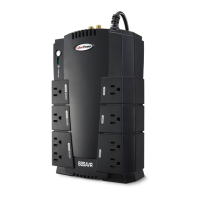
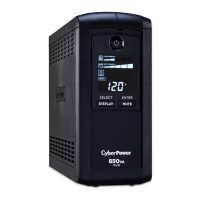
This document is the user manual for the CyberPower CPS825AVR Uninterruptible Power System (UPS) with USB Interface and PowerPanel Plus™ Software.
The CyberPower CPS825AVR is designed to provide complete power protection for connected electronic equipment, ensuring consistent power from the utility supply. It features Automatic Voltage Regulation (AVR) to manage inconsistent utility power voltage levels, increasing low voltage or decreasing high voltage to a consistent, computer-safe 110V/120V. The UPS also offers a high level of surge suppression (1260 Joules) for power line surges and provides long-lasting battery backup with dual 7.2AH batteries for loss of utility power and voltage sags. The accompanying PowerPanel Plus™ software enhances its functionality by saving data, closing open applications, and automatically shutting down the computer system in an intelligent and orderly manner during a power loss.
Function Description:
The CPS825AVR acts as a buffer between your electronic equipment and the utility power, protecting against surges, spikes, sags, and complete power outages. It ensures that your computer system receives a consistent voltage level, even when the incoming utility power is unstable. The battery backup activates when the incoming voltage drops below 85V or increases above 150V, providing continuous power to connected devices.
Important Technical Specifications:
- Model: CPS825AVR
- Capacity: 825VA (410W)
- Input Frequency: 57Hz to 63Hz
- Input Voltage Range: 92V – 145V
- AVR Line Conditioning Regulation:
- Max. boost 13% of input voltage for output regulation when input voltage is from 8% to 30% under nominal.
- Buck 13% of input voltage for output regulation when input voltage is from 8% to 26% over nominal.
- On Battery Output Voltage Regulation: 120 Vac ±5% (user adjustable)
- Transfer Time: 4ms typical, including detection time
- On Battery Output Wave Form: Simulated Sine Wave Form
- Max. Load (Battery-supplied outlets): 825VA (410W)
- Max. Load (Full-time surge protection outlets): 12 Amps
- Battery Type: Sealed, Maintenance-free lead acid battery
- Number of Batteries: 12V / 9AH x 1
- Recharge Time: 4 to 8 hours from total discharge
- Communication Interface: RS-232 with Plug and Play interface / USB Adapter (compatible with Win 98, Win NT, Win 2000, Win ME, Win XP)
- LED Indicators: Power On, Electrical Wiring Fault
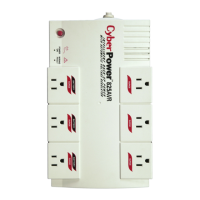
- Output Receptacles: 3 Battery-powered and full-time surge protection, 6 full-time surge protection
Usage Features:
- Battery Backup and Surge Protection Outlets: Three outlets provide battery-supplied power with Automatic Voltage Regulation, and three outlets offer surge protection only.
- "Always-On" Surge Protection Outlets: Three dedicated surge-protected outlets safeguard equipment against surges and spikes without battery backup.
- AC Adapter Friendly Design: All six outlets are designed to accommodate AC power adapter blocks without blocking adjacent outlets.
- Resettable Circuit Breaker: Located on the side of the UPS, this breaker provides protection against circuit overload and faults. It is normally depressed.
- Power Switch: Acts as the master on/off switch for computer equipment connected to the battery power-supplied outlets.
- Power On Indicator: An LED that illuminates when utility power is normal and the UPS is providing clean power, free of surges and spikes.
- Electrical Wiring Fault Indicator: An LED that illuminates to warn the user of a wiring problem with the AC outlet (e.g., bad ground, missed ground, or reversed wiring). Users are advised to unplug equipment and have an electrician check the outlet.
- Communication Protection Ports: Protects standard modem, fax, or telephone lines.
- Serial Port to PC: Allows connection and communication from the computer's DB-9 serial or USB port to the UPS unit, enabling the PowerPanel Plus™ software to monitor UPS status.
- Auto-Charge Feature: The battery automatically recharges when the UPS is plugged into an AC outlet, even if the unit is off.
- Software Integration (PowerPanel Plus™):
- Automatic Shutdown: Saves and closes open files, then shuts down the computer and UPS during a power failure.
- Scheduled Shutdown/Startup: Allows users to schedule automatic computer and UPS shutdowns and startups at specified dates and times.
- Monitoring: Displays real-time information such as input voltage, battery level, frequency, temperature, load level, and output voltage.
- Adjustable Settings: Users can adjust settings like time between power failure and shutdown, low/high voltage failure thresholds, battery-mode output voltage, and audible alarm (buzzer) on/off.
- UPS Self-Test: Allows testing of the UPS without unplugging it from the wall.
- Event Logging: Records events such as power failures, program starts, and program ends.
- Closed Application Information: Displays names and locations of auto-saved files.
Maintenance Features:
- Battery Replacement: The manual provides instructions for replacing the battery, including safety precautions. The replacement battery order number is BA-825AVR.
- Battery Recharge: It is recommended to recharge the battery for at least four hours upon receipt and after any self-test or power outage to ensure maximum charge capacity. For extended storage, recharge every three months.
- Troubleshooting Guide: The manual includes a section to help users diagnose and resolve common issues such as surge protection outlets not providing power, unexpected runtime, or the UPS not turning on.
- Safety Instructions: Emphasizes important safety precautions for installation, operation, and battery servicing, including warnings against removing the cover, using in medical/life support applications, or near aquariums.

 Need help?
 General







 To Next Page