EasyManua.ls Logo

CyberPower OL6000RT3U - User Manual

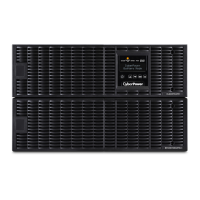
CyberPower OL6000RT3U
27 pages
Print Icon
To Next Page IconTo Next Page
Loading...
Users Manual
OL6000RT3U
OL8000RT3U
OL10000RT3U
OL6KRT3UPM
OL8KRT3UPM
OL10RT3UPM
Cyber Power Systems Inc.
www.cyberpower.com
K01-0000286-01

Questions and Answers

  • L
    Laura PatelAug 20, 2025
    When should I replace the battery on my CyberPower OL6000RT3U?
    • K
      kperryAug 20, 2025
      If the CyberPower UPS displays 'Replace Battery', the battery will soon need to be replaced due to insufficient runtime. Contact technical support to replace the battery.
  • J
    Jesse PierceAug 22, 2025
    How to fix O/P Overload on CyberPower OL6000RT3U UPS?
    • X
      xwilliamsAug 22, 2025
      If the CyberPower UPS displays an O/P Overload error, it means your equipment requires more power than the UPS can provide. Turn off non-essential equipment. If this resolves the issue, the UPS will return to normal operation.
  • S
    Sherry ClarkAug 25, 2025
    What to do if CyberPower OL6000RT3U shows 'Load Over XXX%'?
    • R
      robert61Aug 25, 2025
      If your CyberPower UPS displays 'Load Over XXX%', it means your equipment requires more power than the setting in the Power Management Software allows. You can either shut off non-essential equipment or increase the level in the Power Management Software.
  • T
    trantoddAug 26, 2025
    How to resolve a wiring fault on a CyberPower UPS?
    • B
      Bridget LopezAug 26, 2025
      If the CyberPower UPS displays a Wiring Fault, it could be due to reversed line and neutral wires, a missing ground wire, or no ground wire. Exchange the line and neutral wires, connect the ground wire, or disable the Wiring Fault alarm on the LCD panel.
  • E
    Ethan MooreAug 28, 2025
    What does 'Battery Failure' mean on my CyberPower OL6000RT3U UPS?
    • K
      Keith GriffithAug 28, 2025
      If the CyberPower UPS displays 'Battery Failure', this means the UPS has failed the Battery Test. Check the battery connector and battery breaker. If the problem persists, contact technical support to replace the battery.
  • B
    Brian KimAug 30, 2025
    Why is my CyberPower UPS showing 'Over Temperature'?
    • K
      Kelly MuellerAug 30, 2025
      If your CyberPower UPS displays 'Over Temperature', it indicates a high ambient temperature. Check the fan to ensure it's working and that the ventilation hole is not covered.
  • S
    stephen47Sep 1, 2025
    What to do if CyberPower OL6000RT3U UPS shows 'Output Short'?
    • G
      Garrett MurphySep 1, 2025
      If the CyberPower UPS displays 'Output Short', it indicates an output short circuit. The equipment attached to the UPS may have problems, so remove them and check again.
  • D
    donald40Sep 3, 2025
    What does 'BAT Disconnected' mean on CyberPower OL6000RT3U UPS?
    • L
      Laura LawsonSep 3, 2025
      If your CyberPower UPS displays 'BAT Disconnected', it means there is missing battery power. Check the battery connector and battery breaker.
  • R
    Richard CarrilloSep 5, 2025
    Why does my CyberPower OL6000RT3U UPS show 'Line Abnormal'?
    • B
      burchreginaSep 5, 2025
      If the CyberPower UPS displays 'Line Abnormal', it means the utility power backed up during UPS auto-restart is wrong. Check whether the voltage or frequency of the utility power is out of range.
  • V
    Vanessa RhodesSep 7, 2025
    What does 'EPO OFF' mean on my CyberPower UPS?
    • K
      Kelly DavisSep 7, 2025
      If your CyberPower UPS displays 'EPO OFF', it means the EPO connection is missing. Check the EPO connection.

Summary

Specifications

Smart App Online UPS Models

Details about the Smart App Online UPS models and their specifications.

Battery Safety Precautions

Precautions and guidelines for safe handling and maintenance of batteries.

Important Safety Instructions

General Safety Precautions

Crucial safety warnings and cautions for installation, operation, and maintenance.

Hardware Installation

Rackmount Installation Procedures

Step-by-step instructions for mounting the UPS in a standard equipment rack.

Vertical and Tower Installation

Electrical Installation Guidelines

Hardwiring Input and Output Terminals

Backfeed Protection Configuration

Extended Battery Module Operations

LCD Setup Functions

Maintenance

Battery Replacement Procedure

Step-by-step guide and safety precautions for replacing the UPS batteries.

Troubleshooting

Common UPS Problems and Solutions

A guide to diagnosing and resolving common UPS operational issues and warnings.

Product Registration and Warranty

CyberPower OL6000RT3U Specifications

General IconGeneral
TypeLine-Interactive
TopologyDouble-Conversion
Watts6000 W
Output Frequency50/60 Hz
WaveformSine Wave
Transfer Time0 ms
Form FactorRack/Tower
Rack Size3U
Operating Temperature32 °F to 104 °F (0 °C to 40 °C)
Warranty3 Years
Capacity6000 VA
Battery TypeSealed Lead-Acid
Typical Recharge Time8 hours
Dimensions5.2 inches
Data Line ProtectionRJ45
Communication PortsUSB, Serial
Operating Humidity0% to 95% (non-condensing)
CertificationsFCC, RoHS
Battery RuntimeVaries based on load

Related product manuals