Getting Started — 4 of 15
GETTING STARTED
1.4
Charging the battery
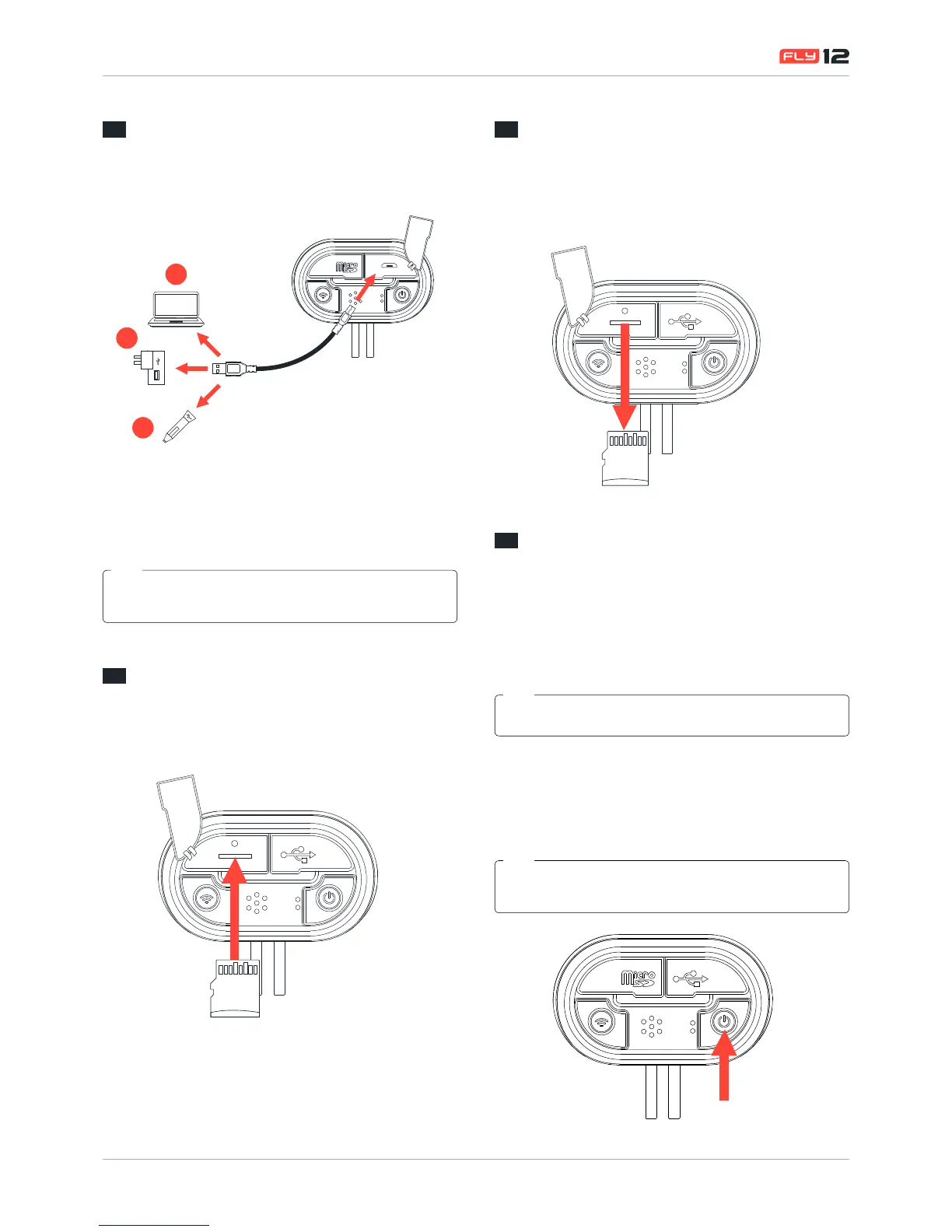
Fly12 can be charged in any of the following ways:
A
B
C
A. Via your Computer’s USB port
B. Universal USB AC Adapter (not included)
C. Universal USB auto charger (not included)
Cycliq recommends charging via a universal AC adapter for faster
charge rate.
TIP
1.5
Inserting the MicroSD card
To insert the MicroSD card, open the MicroSD slot and gently
insert the MicroSD card as shown below
1.6
Removing the MicroSD card
To remove the MicroSD card, open the MiscroSD slot and
gentle depress the MicroSD card. This will free the card
allowing for the card to be removed.
1.7
Power on/off
To power on:
Press the power button for 1 second and release. The unit
will make a startup chime followed by a series of beeps which
indicate charge level.
When the device is powered on Fly12will always begin recording.
TIP
To power off:
Press the power button for 1 second and release. The
unit will make a series of beeps which indicate charge level
followed by a shutdown chime.
Visual/audible alerts are an indicative guide to Fly12 charge levels.
See "Visual and audible alerts" on page 6 for more details.
TIP


 To Next Page