Adjust settings manually — 8 of 15
ADJUST SETTINGS MANUALLY
1.17
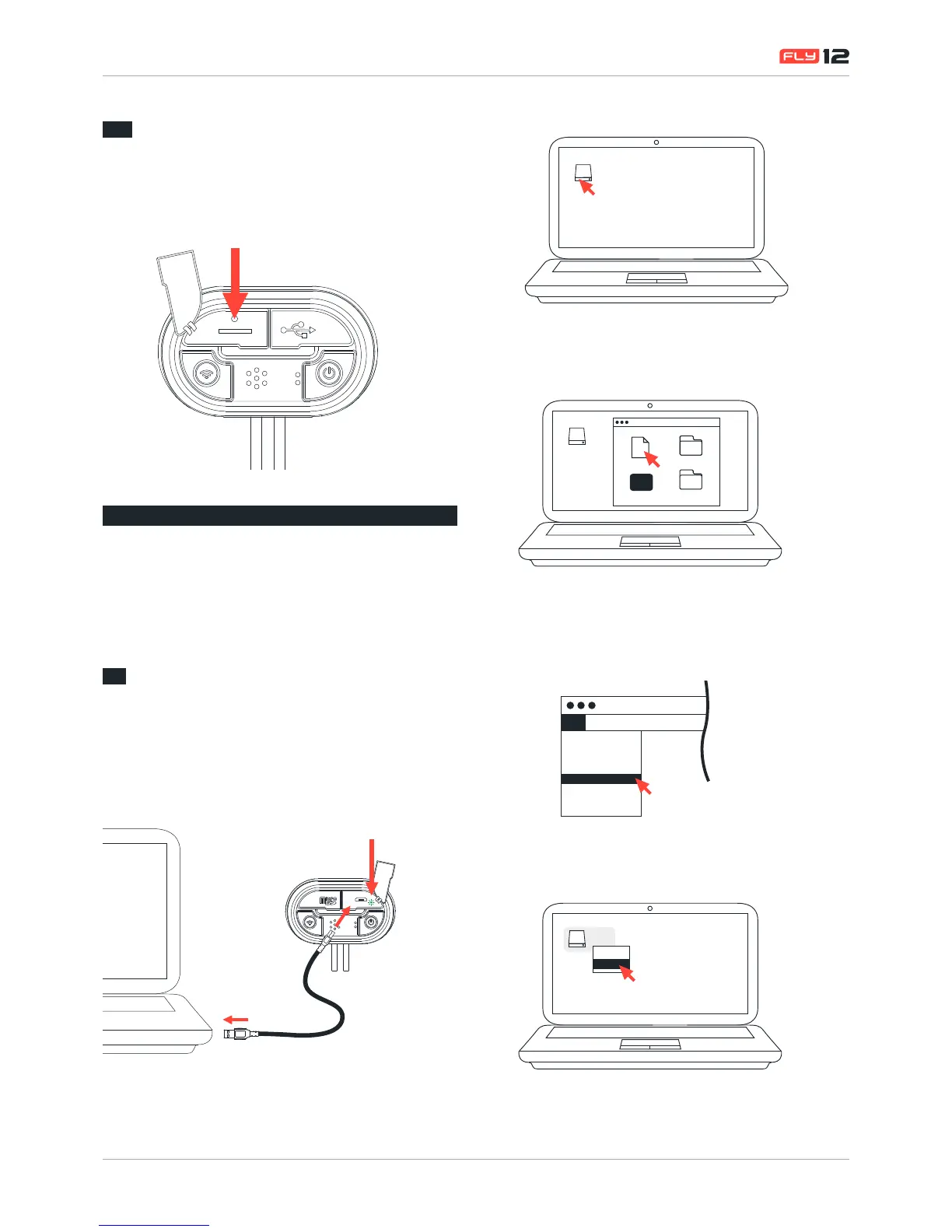
Master reset
In the event that a master reset is required, the reset button is
located within the small cut out as illustrated. Carefully, using a
ne object, press the reset button to perform the reset.
2
ADJUST SETTINGS
MANUALLY
Your Fly12 allows you to change settings manually via the
Cong.text le.
2.1
Edit settings on your Fly12 manually
(via cong.txt le)
To make any changes to your Fly12:
1. Connect Fly12 to a PC or mac and locate the Fly12
device drive
2. Click on the Fly12 device drive and open the cong.txt le
Fly12
3. Open the cong.txt le (using Notepad for Windows,
TextEdit for Mac) found in your Fly12 main folder
Fly12
Config.txt
FLY12.ver
Fl y12
DCIM
Help
Exec
4. Simply follow the desired manual settings instructions
within the cong.txt to activate your manual settings.
5. Save the cong.txt le
Fly12
New
Open
Open Recent
Close
Save
Duplicate
Rename
Print
File Edit Format View
6. Safely eject your memory card/Fly12
Fly12
Open
Eject


 To Next Page