EasyManua.ls Logo

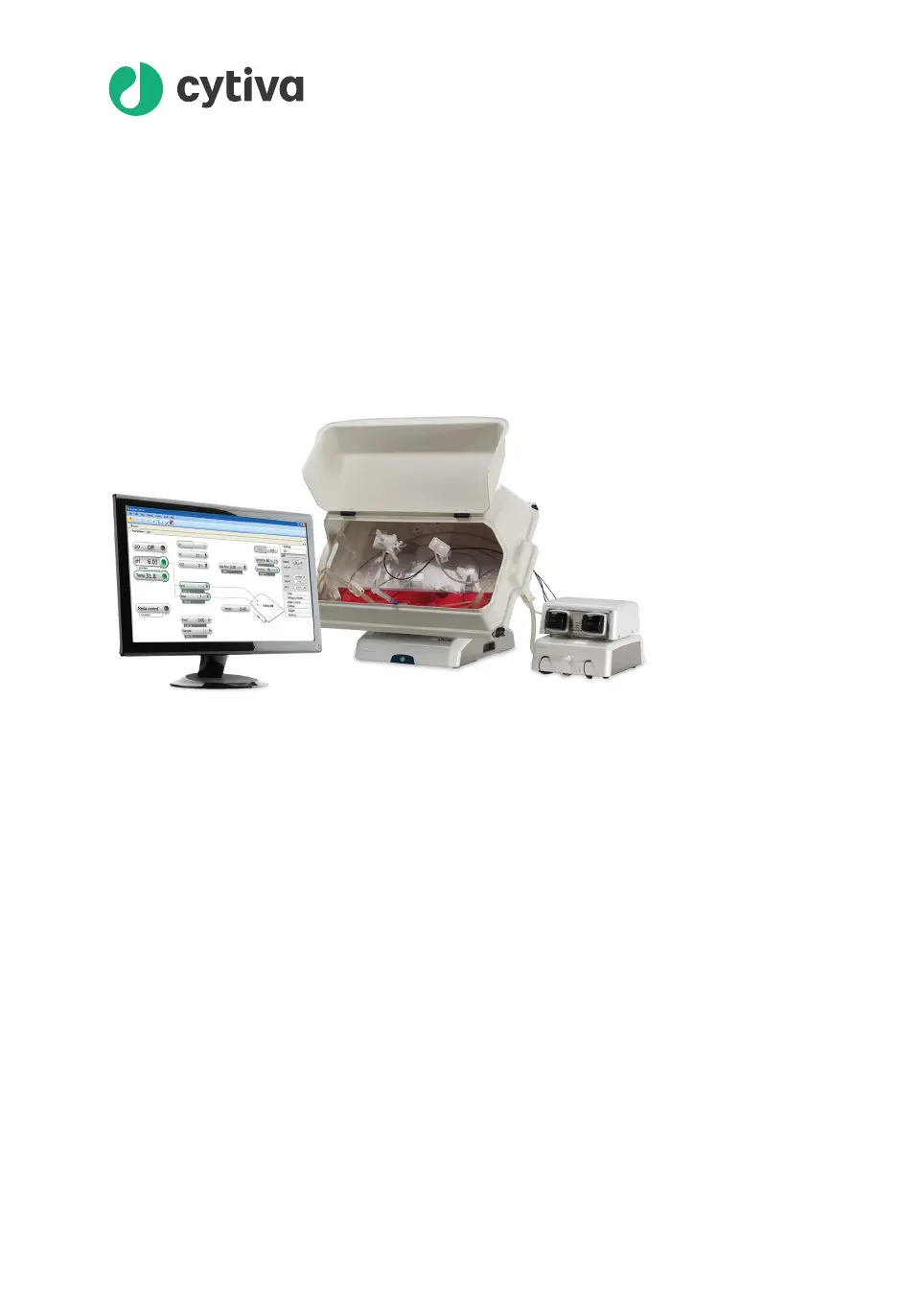
cytiva ReadyToProcess WAVE 25 - User Manual

cytiva ReadyToProcess WAVE 25
290 pages
Print Icon
To Next Page IconTo Next Page
Loading...
ReadyToProcess
WAVE 25
User Manual
cytiva.com

Table of Contents

Questions and Answers

  • B
    Brian WhiteAug 19, 2025
    Why is there no gas flow in my cytiva ReadyToProcess WAVE 25 Laboratory Equipment?
    • M
      Michael ThomasAug 20, 2025
      If there's no gas flow, fluctuating gas flow, and a high pressure alarm, it could be due to the gas flow shutting down or being restricted by a blockage in the gas tubing or vent filters, or a clogged Cellbag bioreactor outlet vent filter. Ensure all inlet and outlet lines are open. Disconnect the N /Air and Gas mix out 2 tubing and locate any blockage. Also, check that the Filter heater functions properly. If the outlet gas flow is blocked by foam, reduce the rocking angle or decrease the rocking speed. If the problem persists, transfer the contents to another Cellbag bioreactor.
  • T
    tiffany85Aug 22, 2025
    Why does the power button flash red on my cytiva ReadyToProcess WAVE 25 Laboratory Equipment?
    • R
      Rachel EdwardsAug 22, 2025
      The power button might flash red on your Cytiva Laboratory Equipment because the rocker isn't connected to the UNICORN database, or system units defined in UNICORN aren't connected to the rocker. To solve this, verify the connection between the rocker and the client computer or network. Alternatively, disable the missing components in UNICORN or connect the missing components to the rocker.
  • J
    James PerryAug 25, 2025
    What to do if CBCU and/or pump not recognized by UNICORN in cytiva ReadyToProcess WAVE 25?
    • D
      Darlene AllenAug 25, 2025
      If the CBCU and/or pump are not recognized by UNICORN, it might be due to a gap between occupied UniNet-9 ports on the rocker rear panel, or because one or more connected pumps is not defined in UNICORN. Reposition the connectors or insert jumpers in the unused positions between the occupied ports. Also, read the displayed message when you connect to the system in System Control and make sure all available components are selected for the system.
  • L
    Lindsey RobbinsAug 26, 2025
    Why is my cytiva ReadyToProcess WAVE 25 showing an incorrect weight?
    • H
      hammondtoddAug 26, 2025
      An incorrect weight display on your Cytiva Laboratory Equipment can be caused by several factors: uneven weight distribution on the rocker feet, the rocker not being on a horizontal surface, a missed tare before adding the load, or mechanical obstructions. To fix this, use the tare functionality and even the weight distribution. Ensure the rocker is on a horizontal surface. Enter the correct net weight and press tare, or remove all load and tare the scale. Check that the tray is firmly locked, no tubing is pulling on the Cellbag bioreactor, and the rocker's movement isn't obstructed.
  • R
    Rhonda SmithAug 27, 2025
    What to do if pump not recognized by UNICORN in cytiva ReadyToProcess WAVE 25?
    • M
      Maria RamosAug 27, 2025
      If the pump is not recognized by UNICORN, it could be due to an incorrect pump CAN ID or the pump not being selected as a component. Check and change the CAN ID using the switch on the pump rear panel, ensuring it's set to position 1 or 2 with unique values. Remember to switch off the system before changing the CAN ID, and then restart it. Also, add the pump as a component in System Properties within the Administration module.
  • M
    Mary GarciaAug 30, 2025
    What to do if CBCU not recognized by UNICORN in Cytiva Laboratory Equipment?
    • S
      Samuel BensonAug 30, 2025
      If the CBCU is not recognized by UNICORN, it might be due to an incorrect CBCU CAN ID or the CBCU not being selected as a component. Check and, if necessary, change the CAN ID using the switch on the CBCU rear panel, ensuring it is set to position 1. Remember to switch off the system before changing the CAN ID, and then restart it. Also, add the CBCU as a component in System Properties within the Administration module.
  • C
    Charles SmithSep 1, 2025
    Why is my Cytiva Laboratory Equipment rocker not rocking?
    • K
      Kristen FischerSep 1, 2025
      If the rocker is not rocking, it may be in an error state or the tray might be in a tilt position. Check the current alarms and reset power to the unit. Ensure that the tray is in the normal position.
  • C
    caroline85Sep 2, 2025
    Why does my cytiva ReadyToProcess WAVE 25 Laboratory Equipment rocker stop rocking?
    • C
      Catherine MitchellSep 3, 2025
      If the rocker stops rocking, it's possible that it is mechanically restricted from moving. Locate and remove any object that is restricting its movement.
  • C
    Cynthia LiuSep 5, 2025
    Why temperature control is not functioning in Cytiva Laboratory Equipment?
    • K
      Kendra HaleSep 5, 2025
      If the temperature control isn't functioning or the displayed temperature is incorrect, it might be because the temperature sensor isn't in contact with the culture medium or the sensor needs calibration. Ensure there's enough culture medium in the Cellbag bioreactor to cover the temperature sensor, even when the rocker is rocking. Check that no crease with a resulting air pocket has formed on the Cellbag bioreactor film covering the sensor, and that the pH or DO cables aren't in contact with the temperature sensor.
  • D
    Daniel AustinSep 7, 2025
    Why is my Cytiva Laboratory Equipment showing incorrect readings in dual mode?
    • T
      Tony PerkinsSep 7, 2025
      Incorrect readings in dual mode can occur if Cellbag bioreactors aren't centered on the respective halves of the tray, or if the tare was omitted or incorrectly performed. Check bioreactor placement. Tare the scale before or after filling the Cellbag bioreactors.

Summary

1 Introduction

1.1 Important user information

Crucial safety and operational guidance for users.

1.2 About this manual

Purpose, scope, and conventions of the user manual.

1.3 Associated documentation

Lists related documentation for the system.

1.4 Abbreviations

Explains common abbreviations used in the manual.

2 System description

2.1 System overview

General description of the ReadyToProcess WAVE 25 system.

2.2 ReadyToProcess WAVE 25 rocker

Details on the rocker unit, its components, and functions.

2.3 ReadyToProcess CBCU

Description of the control unit for gas, pH, and DO.

2.4 ReadyToProcess Pump 25

Details on the peristaltic pump unit.

2.5 Cellbag bioreactor

Information on the bioreactor bag, options, and components.

2.6 UNICORN software overview

Introduction to the UNICORN software and its modules.

3 The UNICORN software

3.1 Administration

Managing UNICORN software functions and user access.

3.2 System control

Starting, viewing, and controlling runs in the system.

3.3 Methods in UNICORN

Creating, editing, and managing methods for runs.

3.4 Evaluation in UNICORN

Evaluating run results and generating reports.

4 System control description

4.1 Single and dual operation modes

Explains single and dual mode operation of the system.

4.2 Temperature measurement and control

Details on how temperature is measured and controlled.

4.3 pH and DO measurement and control

Principles of pH and DO measurement and control.

4.4 pH control

Automated pH control modes and settings.

4.5 DO control

Automated DO control modes and settings.

4.6 Media control

Modes and settings for media addition and perfusion.

4.7 Recommended operating conditions

Guidance on optimal settings for gas flow, rocking, etc.

4.8 System verification

Procedures to verify system functionality.

5 Operation

5.1 Set up the system

Preparing the bioreactor system for cell cultivation.

5.2 Start and configure the system

Starting, logging on, connecting, and configuring UNICORN.

5.3 Prepare for cultivation

Steps to prepare the system before starting cultivation.

5.4 Perform cultivation

Basic steps for performing a cultivation run.

6 Maintenance

6.1 Calibration

Procedures and schedule for system calibrations.

6.2 Pump calibration

Detailed instructions for calibrating pumps.

6.3 Cleaning

Procedures for cleaning the system units.

7 Troubleshooting

7.1 ReadyToProcess WAVE 25 system

Troubleshooting common system-level issues and alarms.

7.2 ReadyToProcess WAVE 25 rocker

Troubleshooting specific problems related to the rocker.

7.3 ReadyToProcess CBCU

Troubleshooting issues with the CBCU unit.

7.4 ReadyToProcess Pump 25

Troubleshooting issues with the pump unit.

7.5 Cellbag bioreactor

Troubleshooting overinflation and underinflation of the bioreactor.

7.6 Software problems

Troubleshooting issues with UNICORN software.

8 Reference information

8.1 System specifications

Technical specifications for the overall system.

8.2 Component specifications

Detailed specifications for system components.

8.3 Client computer specifications

Requirements for client computers running UNICORN.

8.4 Chemical resistance

Approved chemicals for cleaning and disinfection.

8.5 Control settings

Detailed list of configurable control settings in UNICORN.

8.6 Digital and analog I;O connections

Pinout and signal specifications for I/O connections.

8.7 Ordering information

Product codes for systems, accessories, and spare parts.

cytiva ReadyToProcess WAVE 25 Specifications

General IconGeneral
CategoryBioreactor
TypeSingle-use bioreactor
Gas ControlYes
Temperature Control RangeAmbient +5°C to 40°C
DO ControlYes
AgitationRocking motion
Power Requirements100-240 V AC, 50/60 Hz

Related product manuals