1.3 When Scanning:
1.3.1 Four Processing Methods
1.
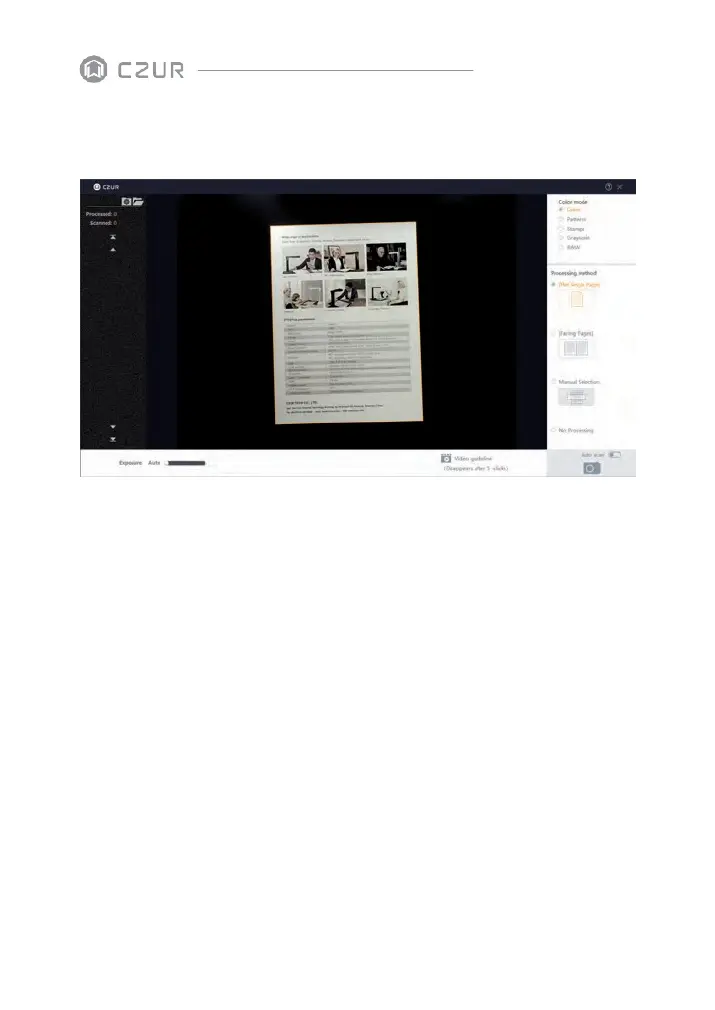
Flat Single Page: to scan unbounded non-curvature documents
·
The area within the yellowish line is what the after-scan JPG looks like. The lines can
automatically adapt to the shape of the document.
·
The software can auto crop the unnecessary outside of the yellowish line.
·
The software can auto correct the book center even if the book is not placed
horizontally.
Note: the following incorrect operation might result in a less satisfying.
scanning result:
·
When the black document pad doesn’ t properly cover the full screen.


 To Next Page