17D-Link DCS-8000LH User Manual
Section 3 - Using the Mobile App
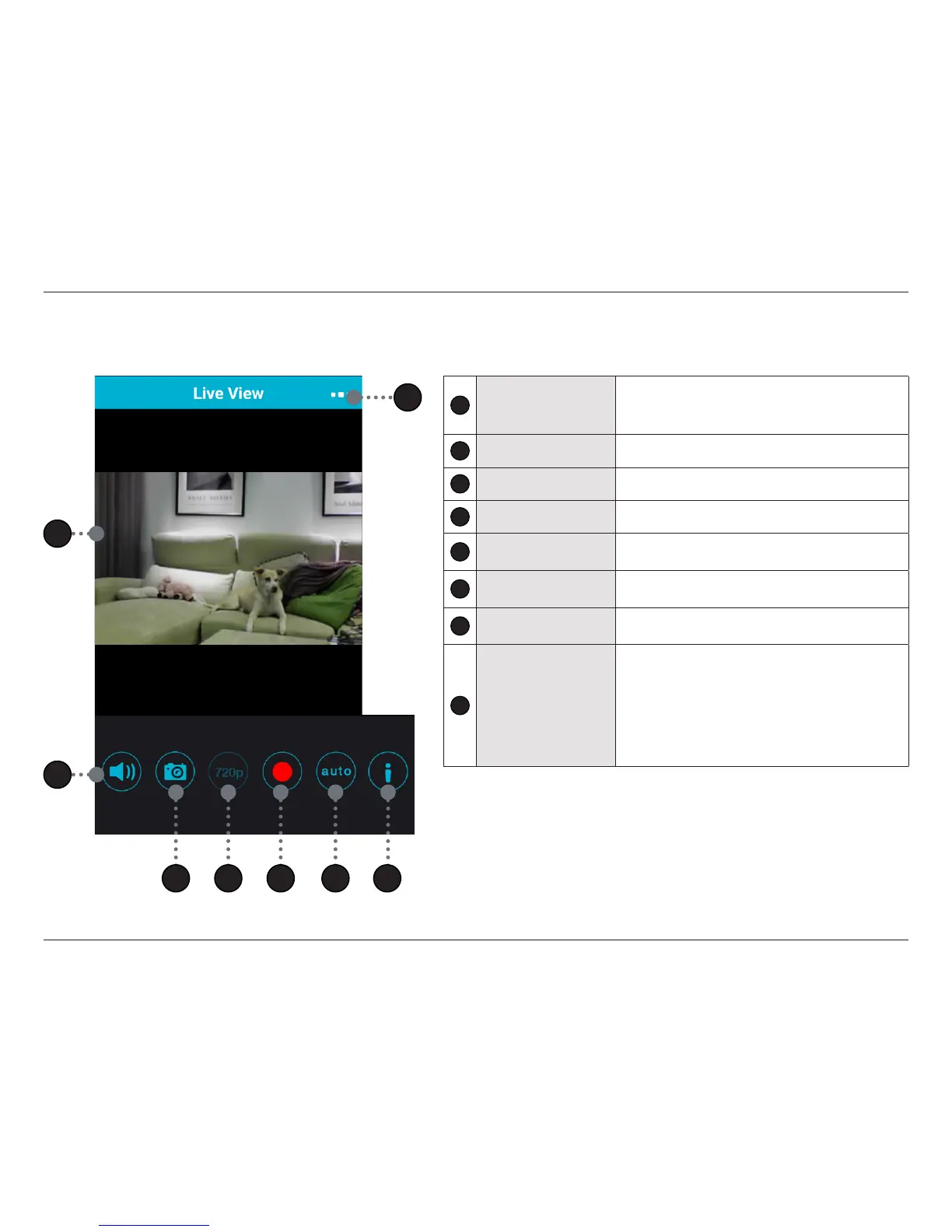
Live View
1
Live View
• Rotate your device to landscape orientation for full
screen viewing.
• Pinch to zoom.
2
Sound On/O Button Tap this button to enable or disable live audio.
3
Snapshot Tap this button to take a snapshot.
4
Viewing Resolution Displays the current resolution.
5
Manual Record Button
Tap this button to manually start recording video. The clip
will be saved to your mobile device.
6
View Mode Button
Tap this button to toggle between Day, Night (IR LED on),
or Auto modes.
7
Information Button
Tap this button to enable or disable the on-screen display
information.
8
Camera Options
Tap this button to open a menu for access to:
• Live View
• Settings
• Push Notication
• Firmware Version
• Remove Device
1
2
3 4 5 7
8
6








 To Next Page