MultiplexArgument={if2;},{if3;}
The destination interface is core since 239.192.100.50 is a multicast group. No address translation
of 239.192.100.50 was added but if it is required for, say, if2 then the final argument would be:
MultiplexArgument={if2;<new_ip_address>},{if3;}
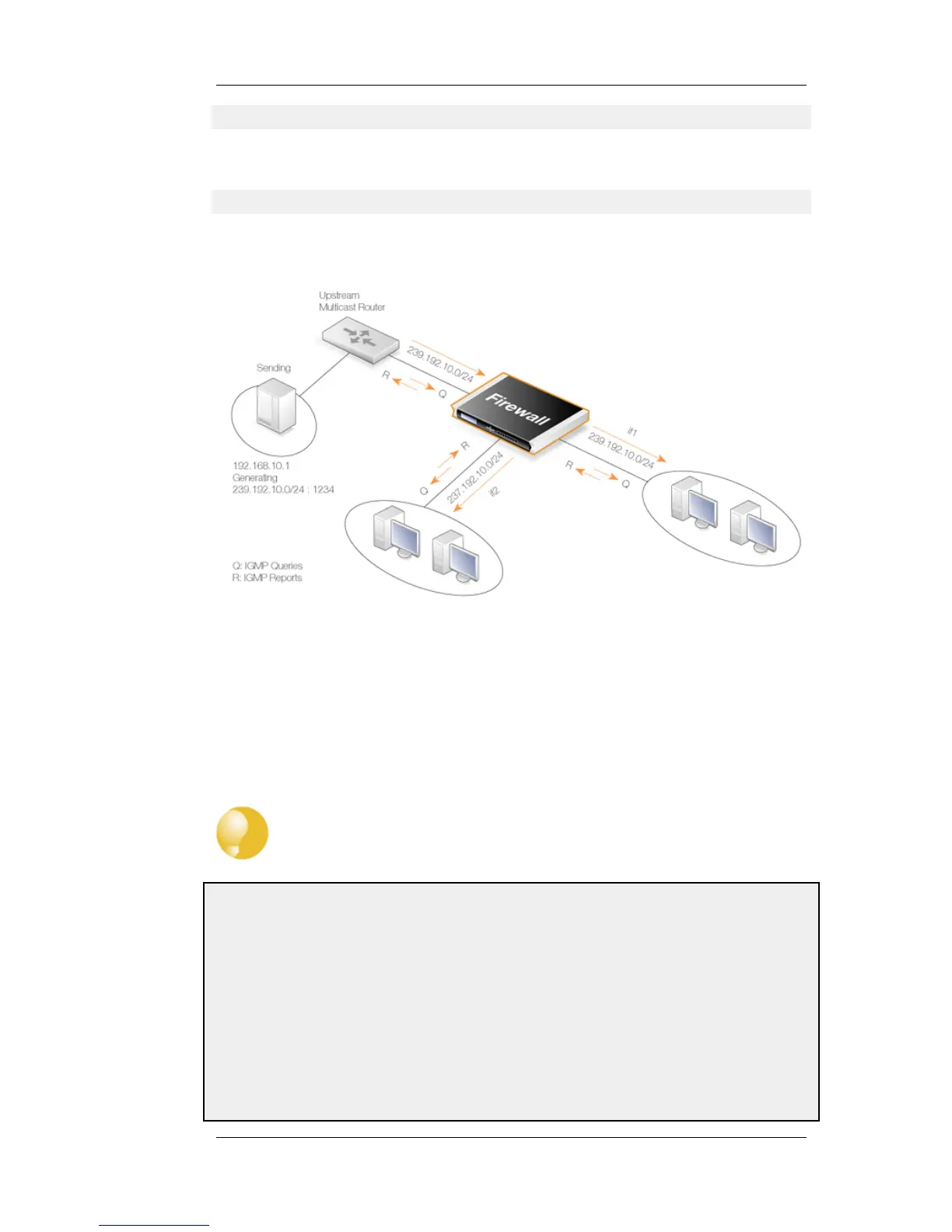
4.6.2.2. Multicast Forwarding - Address Translation Scenario
Figure 4.15. Multicast Forwarding - Address Translation
This scenario is based on the previous scenario but this time the multicast group is translated. When
the multicast streams 239.192.10.0/24 are forwarded through the if2 interface, the multicast groups
should be translated into 237.192.10.0/24.
No address translation should be made when forwarding through interface if1. The configuration of
the corresponding IGMP rules can be found below in Section 4.6.3.2, “IGMP Rules Configuration -
Address Translation”.
Tip
As previously noted, remember to add an Allow rule matching the SAT Multiplex rule.
Example 4.15. Multicast Forwarding - Address Translation
The following SAT Multiplex rule needs to be configured to match the scenario described above:
Web Interface
A. Create a custom service for multicast called multicast_service:
1. Go to: Objects > Services > Add > TCP/UDP
2. Now enter:
• Name: multicast_service
4.6.2. Multicast Forwarding with SAT
Multiplex Rules
Chapter 4. Routing
224




 To Next Page