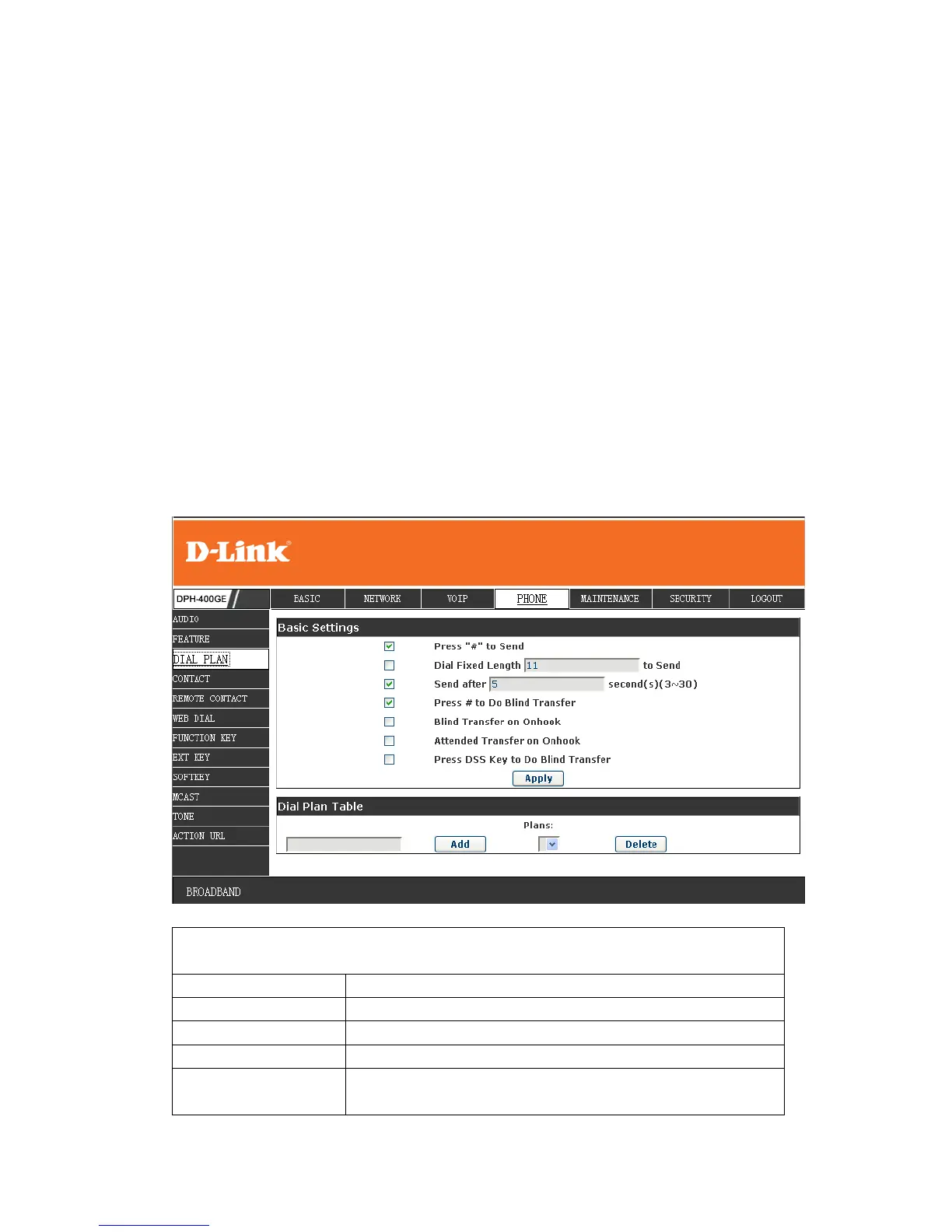
hang up handle or press speaker, you can transfer the current call to the number.
6) Attend Transfer on OnHook: hang up handle or press speaker you can realize
the blind transfer function.
7) Press DSS Key to Do Blind Transfer: press dss-key, the phone will transfer
the current call to the third party
8) User defined: you can customize digital map rules to make dialing more
flexible. It is realized by defining the prefix of phone number and number length
of dialing.
In order to keep some users' secondary dialing manner when dialing the external
line with PBX, phone can be added a special rule to realize it. so user can dial a
number as external line prefix and get the secondary dial tone to keep dial the
external number. After finishing dialing, phone will send the prefix and external
number totally to the server.
For example, there is a rule 9, xxxxxxxx in the digital map table. After dialing 9,
phone will send the secondary dial tone, user may keep going dialing. After
finished, phone will call the number which starts with 9; actually the number
sent out is 9-digit with 9.


 To Next Page