EasyManua.ls Logo

D-Link DPH-400G - Remote Contact

D-Link DPH-400G
96 pages
Print Icon
To Next Page IconTo Next Page
To Previous Page IconTo Previous Page
Loading...
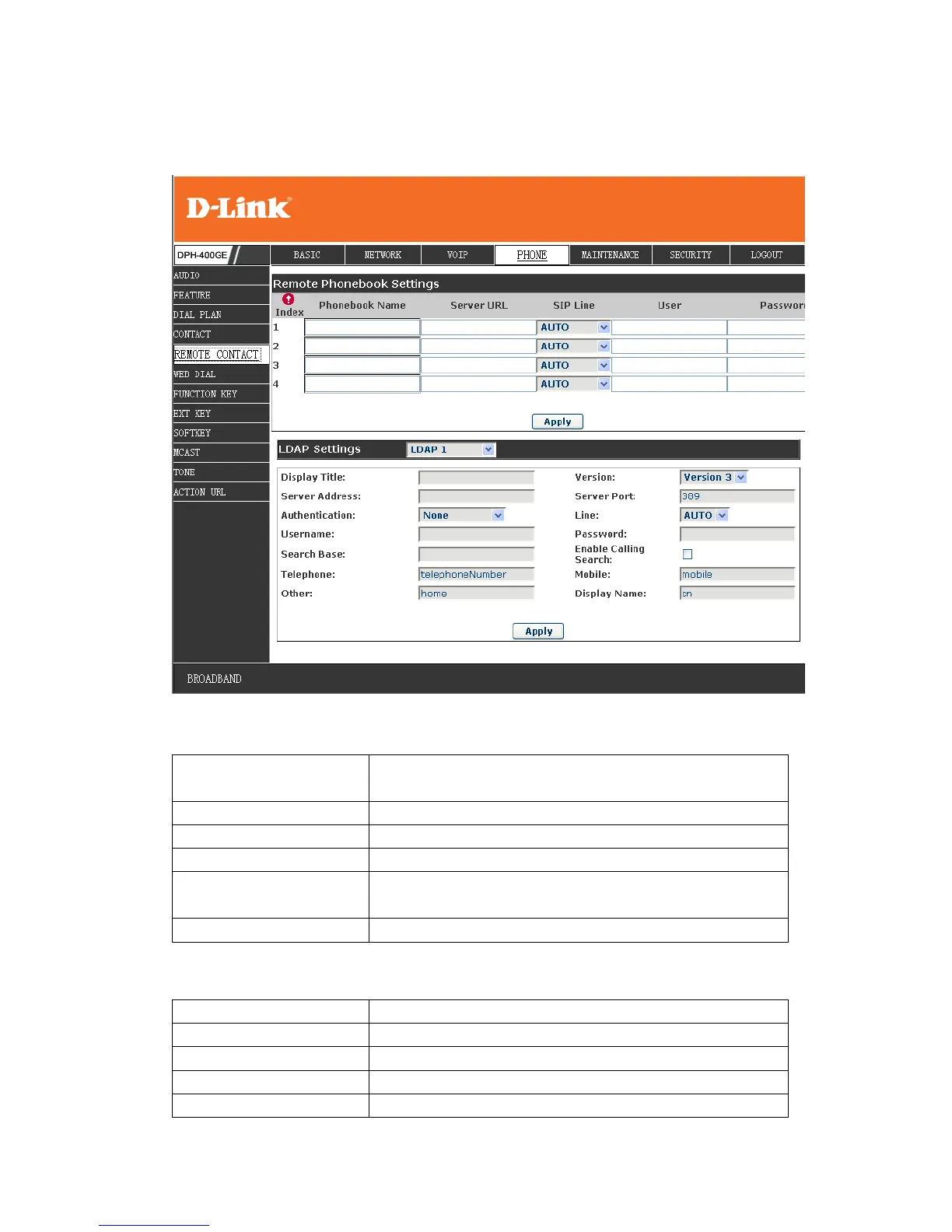
8.3.4.5 REMOTE CONTACT
You need to match a XML Phonebook address and you can directly access to the
corresponding remote phonebook on the phone.
Remote Phonebook
Setting
Phonebook Name
Custom the phonebook name displayed on the phone
Server URL
Specify the server url of the remote phonebook
Sip Line
Specify the sip line for the remote phonebook
Authentication
Specify the authentication mode for remote
phonebook
Username/password
Input the authentication username and password
Note: remote book support the modes as HTTP ,FTP ,TFTP
LDAP Settings
Display Title
LDAP phonebook name
Version
LDAP version
Server Address
LDAP server address
Server port
LDAP server port

Table of Contents

Related product manuals