ENGLISH
55
When the system leaves the factory, the timers are disabled and not programmed.
6.2.5.1 Timer Settings
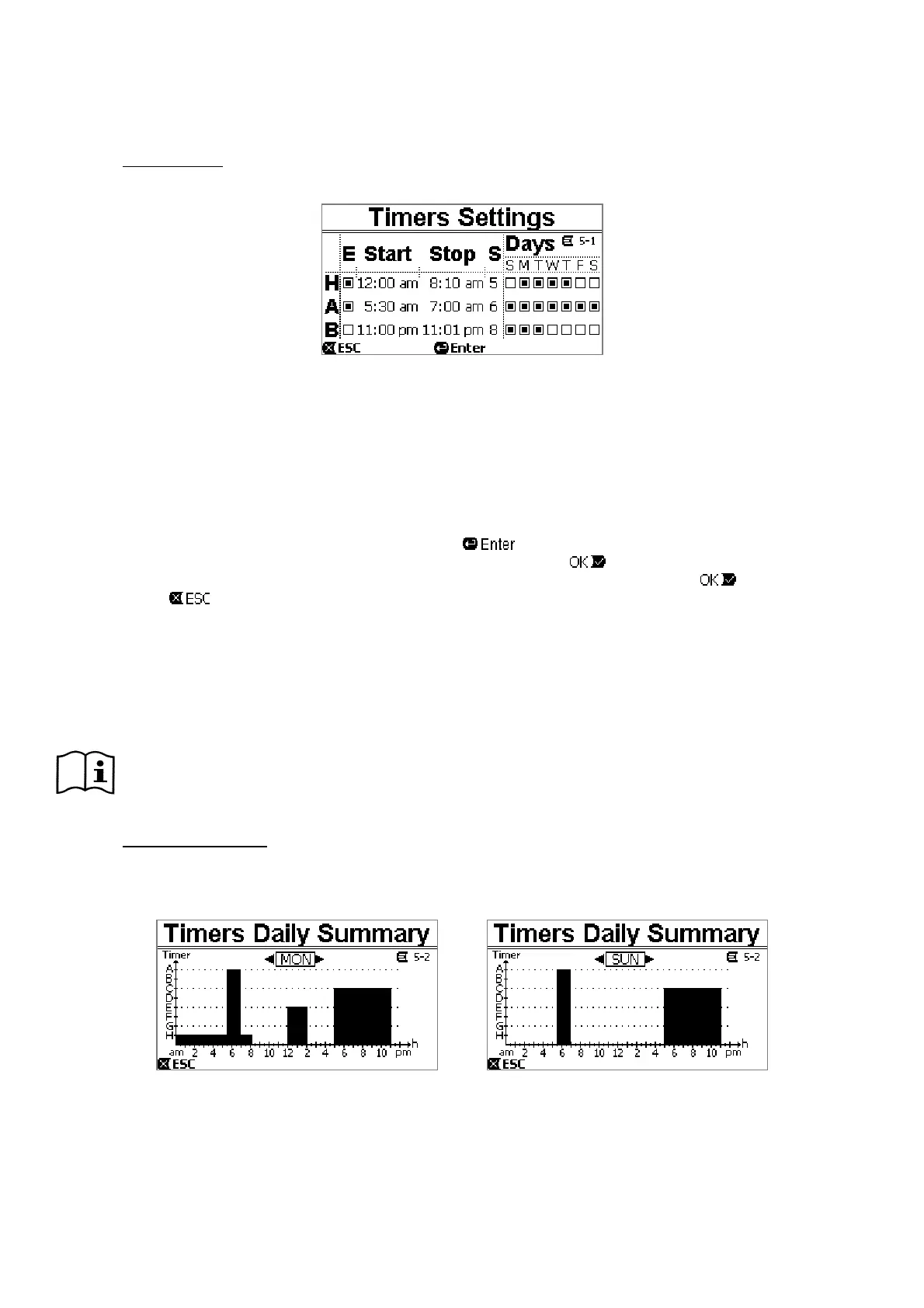
Programming of the timers is carried out in “table” form: a table appears on the display, showing the activation data of
each of the eight Timers A – H.
Figure 31
The following are set for each timer:
‐ the START time,
‐ the STOP time,
‐ the desired SET POINT (under the symbol “S”), chosen among the 4 speeds/flows of the Set Points 5-8,
‐ the days of the week on which the timers are to be activated (the boxes for the days are marked),
and lastly it is possible to enable or disable the timer, by marking or not marking the box under the symbol “E”.
The data are accessed and modified with the “Enter” and arrow keys, etc. following the normal rules applied to all the
menus (see an example in par. 6.1.3).
Another special function is available: holding down “Enter” [
] for three seconds makes a copy of the timer on
which you are positioned; moving to another timer and holding down “OK” [
] for three seconds pastes the whole
configuration of the first timer onto this one; the operation is then confirmed by pressing “OK” [
] or cancelled by
pressing “ESC” [
].
This special function makes it particularly easy to repeat the data of a timer if you want to change, for example, only
one parameter, such as the day or the setpoint.
If you want a timer to be activated every day, clearly it is sufficient to mark the boxes of all seven days of the week for
that timer.
The possibility of enabling or disabling a timer may be useful, for example, at the change of season, allowing you too
exclude a timer but leaving all its data set to be used again later.
If two or more timers have been programmed as “active” at the same time, the one that comes first in
alphabetical order will have precedence, that is Timer A will have precedence over Timer B and so on.
6.2.5.2 Timer daily summary
The set timers are displayed like a chrono-thermostat: the profile of the set points used as a function of the time is
shown for each day of the week. This offers an immediate check of the operation of each whole day.
Figure 32


 To Next Page