12
PR/PAGE
SELECT
OK
PR/PAGE
SUBCODE
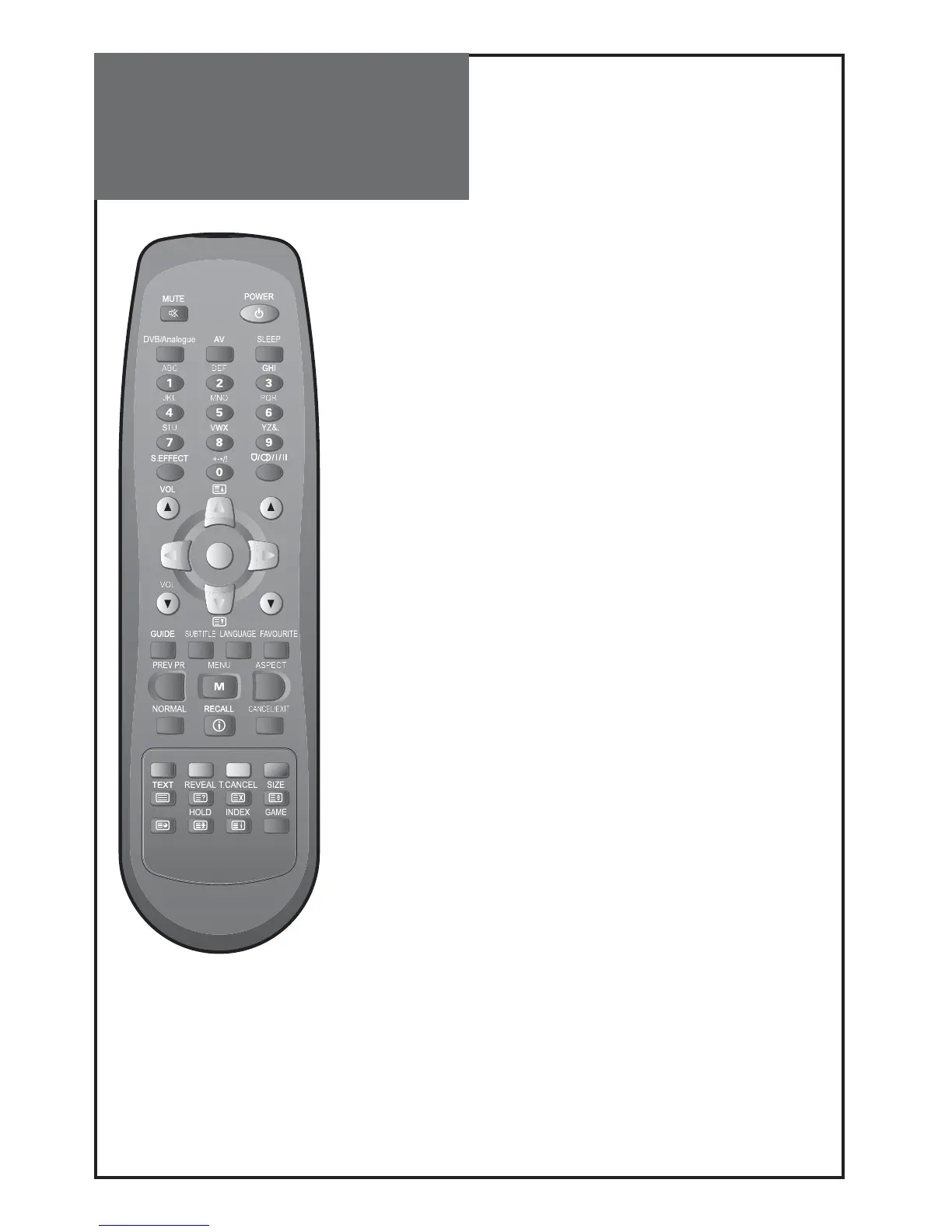
Parts of the Remote
Control
16.
LANGUAGE
(digital mode only): Moves to multi audio language
selection. See page 32.
17.
FAVOURITE
(digital mode only): Moves to Favourites channel.
See page 30.
18.
PREV PR
: Previous PROGRAMME button in TV mode.
19.
MENU
: Menu display button.
20.
ASPECT
: Selects the screen aspect ratio. See page 38.
21.
NORMAL
: The NORMAL button changes picture mode as follows:
Normal Movie Favourite Dynamic Normal
22.
RECALL
: You can recall the present modes (TV, Video, Compo-
nent, HDMI, PC) and Signal information. In TV mode, the Programme
number and Sound.
23.
CANCEL/EXIT
(digital mode only): Using this button to move to
upper menu or exit the menu.
24. Colour Keys (
RED, GREEN, YELLOW, BLUE
) : Use on analogue
text or DVB-T mode.
25.
TEXT (TEXT, REVEAL, T.CANCEL, SIZE, SUBCODE, HOLD, MIX, INDEX
):
see page 46.
26.
GAME
(option) : You can play the Sudoku game.



 To Next Page