13
INTRODUCTION
13
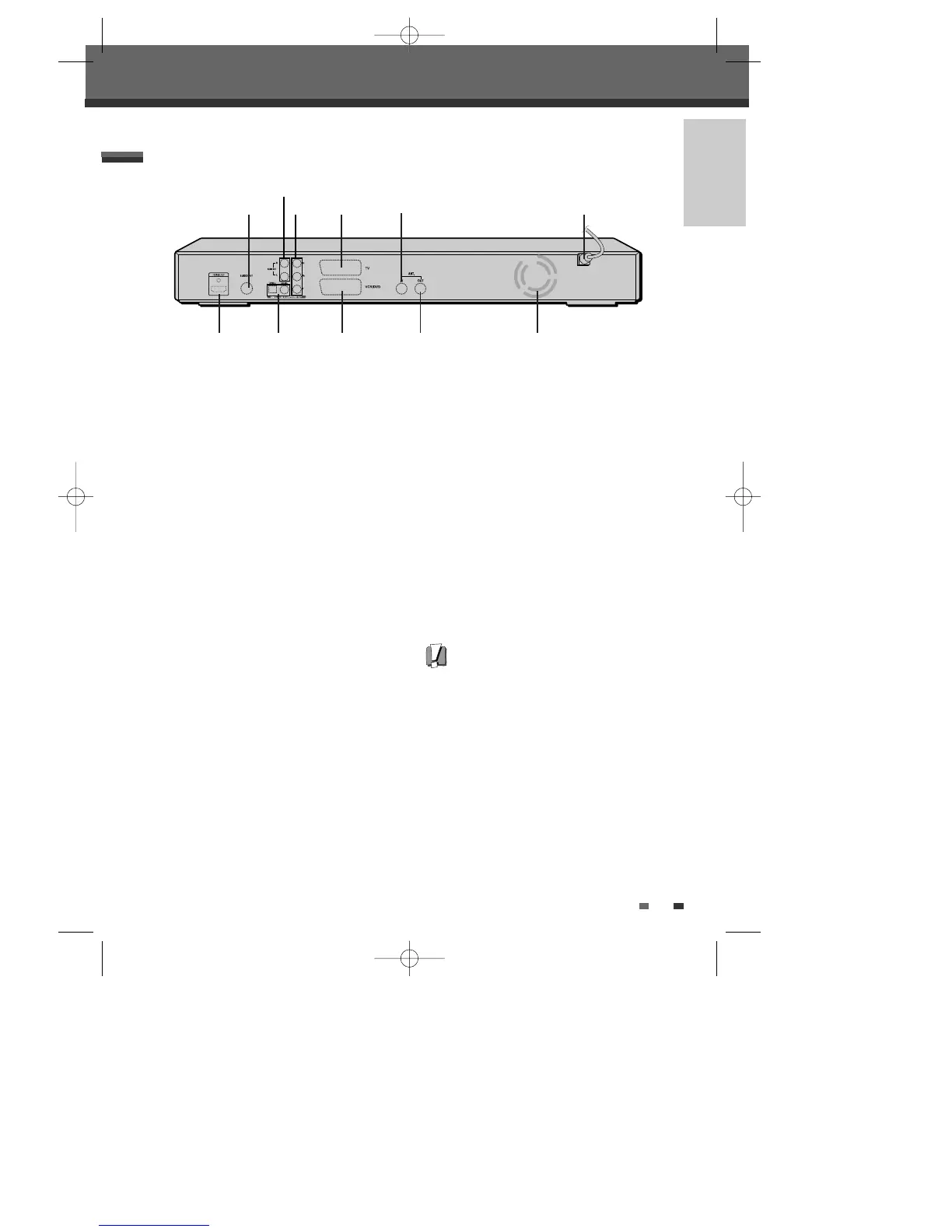
Identification of Controls
!
S-VIDEO OUT
Connect to a TV with an S-Video Input.
@
AUDIO OUT (L, R)
Connect to a TV or other equipment with audio
inputs.
#
COMPONENT VIDEO OUT (Y Pb Pr)
Connect to a TV with Component Video (Y Pb
Pr) inputs.
$
Scart socket 1
For connection of a TV set. Composite-output or
RGB-output
%
ANT IN
Connect to your antenna or cable TV outlet.
^
AC Power Cord
Plug into a power outlet.
&
HDMI out
HDMI output providing a high quality interface
for digital audio and video.
*
COAXIAL/OPTICAL (Digital Audio Out)
Connect to an amplifier with a coaxial (or
optical) digital audio input.
(
Scart socket 2
Connection of an additional device (satellite
receiver, set-top box, video recorder,
camcorder, etc.)
)
ANT OUT
Connect to a TV with an RF input.
1
Cooling Fan
Rear panel
Caution
• Do not touch the inner pins of the jacks on the
rear panel. Electrostatic discharge may cause
permanent damage to the DVB-T HDD/DVD
Recorder.
! $
%
^
*& ( ) 1
#
@
0202DRHT-630 2007.2.2 9:19 AM ˘ `13



 To Next Page