35
Setup menu
SETUP
35
DivX VOD
1
Follow steps 1-2 as shown under ‘Firmware
Info.
2
Use […/†] to select ‘DivX VOD’.
3
Press [OK] to select the DivX VOD.
4
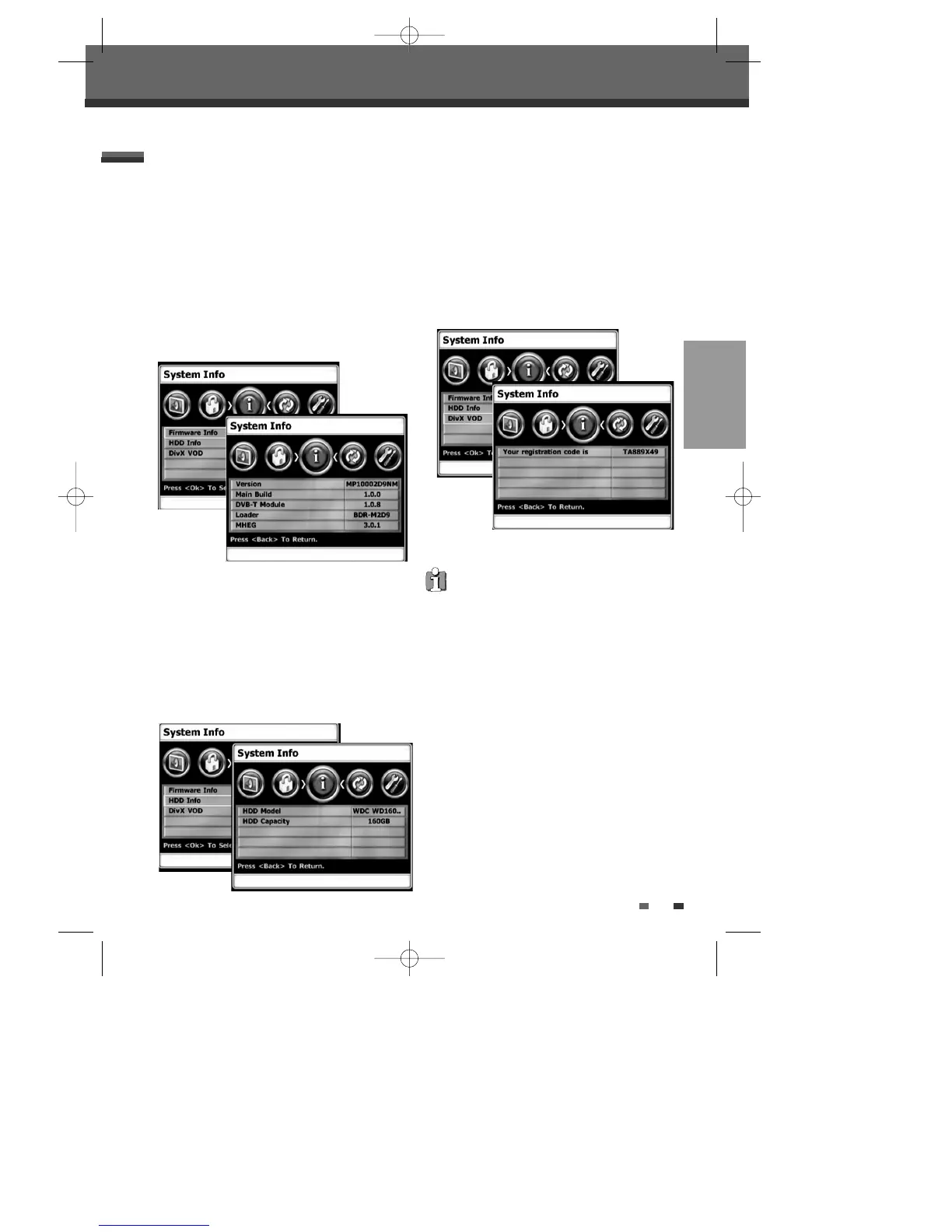
DivX VOD screen appears as below.
SYSTEM Info
Firmware Info
System Information helps service personnel identify
firmware information about your DVB-T HDD/DVD
Recorder in case service is required.
1
Press [SETUP]. The Setup menu appears.
2
Use [œ] and [√] to select ‘System Info‘.
3
Use […/†] to select ‘Firmware Info’.
4
Press [OK] to select the Firmware Info.
5
Firmware Info screen appears as below.
HDD Info
You can see HDD information you’re using such as
HDD model and total HDD capacity.
1
Follow steps 1-2 as shown under ‘Firmware
Info.
2
Use […/†] to select ‘HDD Info’.
3
Press [OK] to select the HDD Info.
4
HDD Info screen appears as below.
We provide you the DivX® VOD (Video On
Demand) registration code that allows you to rent
and purchase videos using the DivX® VOD service.
For more information, visit www.divx.com/vod.
0202DRHT-630 2007.2.2 9:19 AM ˘ `35



 To Next Page